How to Rename a Drive?

I'd like to rename an attached drive in my capture one library.
Renaming it via the finder breaks all the links to the images, but the rename option in capture one seems to always be greyed out. Why is that?
I was able to do it once, but no idea why not any more.
Cheers,
Jim
-

If you change the name on the new drive, Capture One will not be able to locate the files. Capture One has no working feature to allow you to tell it the new drive's name. If you want to change a drive's name, you will need to use the Locate tool to let Capture One relocate them. It does a good job of relocating folders, even with a large number of images and folders, but it occasionally fails to connect with the files in those folders. It works better if you locate the top level folders one at a time.
Alternatively, you change the drives name back to the original name that Capture One recognized, that should restore the connection with the referenced files. Then, you can move the referenced files from within Capture One to a new drive with a new name. This is admittedly tedious and a big limitation of Capture One.
0 -
I get this… that's why I was seeking to rename the drive from within capture one, so it understands the change and I don't have to go an locate 40,000 images which would be a nightmare.
That's why there is a rename feature surely?
I just can't understand why it is almost always greyed out.0 -
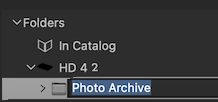
No, it is not possible to edit the name of the drive. You can rename any folder on the drive (e.g., Photo Archive, below) by clicking on it or right clicking on it and selecting 'Rename' and renaming it. if you click on the name of the drive, nothing happens. Perhaps Capture One thinks it is OK to change the name of something you created or added to Capture One, but not something created outside of it.
 0
0 -
Interestingly, if the drive is offline, I can rename it…
I wonder if I rename it in CO offline, and also then rename it in Finder, then it would locate all the files after I bring it back online?
Dare I give it a go!?!
My fear is the need to go and loacte 40,000 images indvidually! Perhaps I need to test with a small drive with a few hundred.0 -
You really don't need to go through all 40,000 images individually.
Imagine your old drive name is OLD and your new drive name is NEW. If you had a folder structure like this
OLD
>Weddings
>Family
>Wildlifeetc
The new structure would be
NEW
>Weddings
>Family
>WildlifeNow Capture One doesn't know where the Weddings folder is, but you can relocate the whole folder, you don't have to do it one image at a time. So you find the Weddings folder in the Library tool, and on the File menu choose Locate folder. That will sort out the Weddings folder (and all its subfolders and the images in them) in one go. Repeat for the other folders.
Ian
0 -
I tried renaming the drive when offline, but I got this message when I typed in a new name, which is odd because I did it with read and write privileges for Capture One. What access privileges might it be referring to?
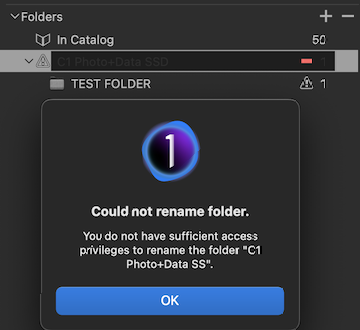
Jim, were you able to rename the drive? If not, I wonder if the error message hints at Capture One expecting it to be a folder that is being named, not a drive.
0

Post ist für Kommentare geschlossen.
Kommentare
6 Kommentare