Some Newly Imported Images Are Marked Not Editable

I imported about 600 images from a CFExpress card today, a mix of jpeg and RAW, and for some strange reason, about the last third of the images in the Capture One catalog are marked with the not-editable symbol (pencil with a slash through it).
This screenshot shows how the image on the left is editable, while the one on the right is the first of the images with the not-editable symbol.

I can't rate them or keyword them or anything else.
I can't figure out how to turn them back into editable files. (Or why they imported that way in the first place!)
-

I'm sure a more informed member can clarify but I suspect it has to do with the color space (such as Adobe RGB) that the problem images have been coded with.
For instance when I import black and white film scan jpegs into Capture One they too appear with the non-editable symbol. However, if select the problem image in Capture One using the "edit with" function and select one of my secondary apps (such as Topaz or one of the NIK Suite), make minor adjustments then save back into Capture One, the edited version is fully accessible to Capture One.
0 -
Interesting! Why in the world would Capture One do that?
Anyway, another workaround to try: copy the images from my card to my desktop then drag them into C1. Let's see if that works.
Nope.
I'm starting to suspect it's got to do with my Nikon Z8's jpeg file format. I'll start with the camera settings and see where that gets me.
0 -
Yes Robert, greyscale images are not supported, that's a pity.
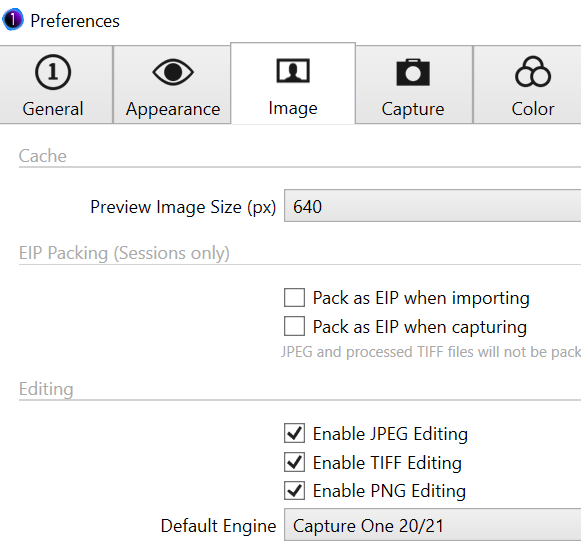
But the case for Joseph is probably a preference setting, if all jpgs are concerned:
 0
0 -
Wow, that was it.
I've never shot jpegs until now -- always Nikon raw files.
It's a shame that setting isn't on by default.
But thanks! Mission accomplished.
0

Post ist für Kommentare geschlossen.
Kommentare
4 Kommentare