Cannot select multiple keyword filters in filter tool sidebar

I can select multiple star ratings or color ratings in the Filters tool sidebar, by clicking on one and then command+click on another. I can also add one Keyword to the selections and it will show the thumbnails of image with the selected stars, color tags and key word. However, if I select more than one Keyword to filter (with or without selecting a star rating or color tag), Capture One displays the message "No results for the current filter(s)."
It would be nice to be able to select multiple keywords to filter using the Filter sidebar. What am I missing to enable this?
-
Works for me. Windows version 22 (15.2). Do you have the option "Result Matches All Criteria" checked?
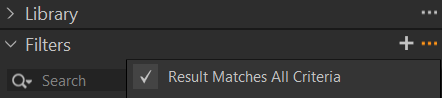
It checked then the filter is (color1 OR color2) AND (Rating1 OR Rating2) AND (Keyword1 OR Keyword2).
If unchecked, it uses OR instead of AND. But then, you should have more images filtered instead of less, but actually you have none. If you didn't make a mistake then maybe it is a new bug in v23.
They changed the code in v23 to allow individual variants to be assigned to an album, maybe that affects not only the (broken) Drag/Drop action but also the Filter. Do you have the issue in the All Images collection and/or in an album?
0 -
That's It. Many thanks. I had the problem in searching All Images, also. I had to uncheck Results Matches All Criteria to select a search on multiple ORs. I had no idea that checkoff was there.
0 -
Good to hear it still works in v23 :-)
0

Post ist für Kommentare geschlossen.
Kommentare
3 Kommentare