Viewer not showing full image

While having the same raw file opened in Capture One and ACDSee, I noticed the image in ACDSee was displaying a little more image, along the borders, than was displayed in Capture One. The Viewer is zoomed out as far as possible too, so I don't understand why Capture One isn't showing me the entire file as it was imported. Has anyone else noticed this happening? I'm new to Capture One and thanks for any replies.
-
Are you sure you don't have any distortion or crop enabled?
1 -
Wow, thanks Marcin, didn't know about that! Looked in the Shape tab and saw that "Hide Distorted Areas" was checked. Unchecked it, but no change. Then noticed the Distortion slider was set to 100; brought it down to 0 and found the missing pieces of the image. I would have thought unchecking the "Hide" would have revealed the missing parts.
1 -
Unchecking Hide is slightly different. Here's an example. This image was taken in an art gallery with a compact camera which uncorrected has HUGE distortion at its widest angle setting.
First, with the correction applied in Capture One.

Here's what it looks like in Capture One with the crop tool enabled, plus full distortion correction and distorted areas hidden.
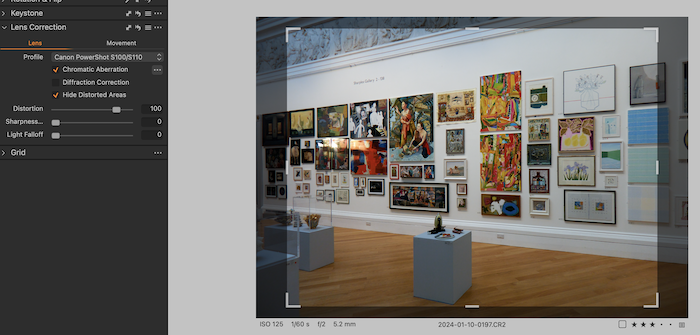
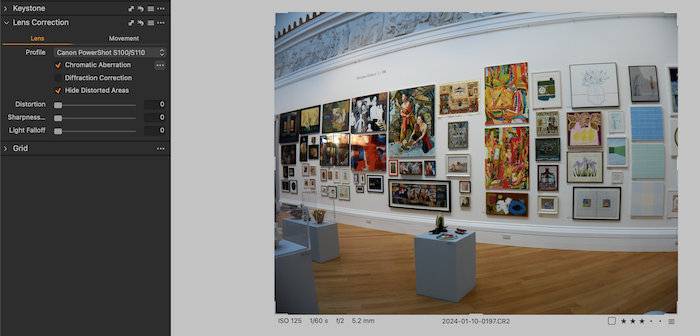
Then with Distortion correction turned down to Zero (but distorted areas still hidden). Note the severe barrel distortion.
Then with the distortion correction turned back on but distorted areas not hidden. You really don't want some of that back!
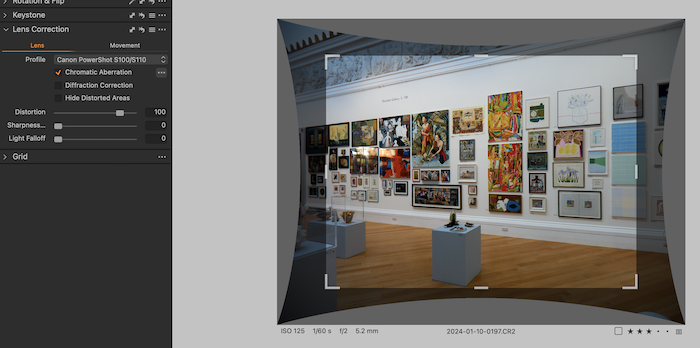
Obviously this is an extreme example (the widest setting on the zoom on this compact camera is a focal length of only 5.2mm) but it illustrates a bit what is going on. In a less extreme example, you might get away with including some of the distorted areas, depending on the subject matter. In a scene like this any barrel or pincushion distortion is very obvious, but in say a landscape without obvious straight lines you might be able to recover some extra pixels at the edges if you need to without it looking bad.
Ian
0


Post ist für Kommentare geschlossen.
Kommentare
3 Kommentare