Export: Better "Collection Name" token

Like many others, I have my edited photos in Collections.
Usually there's a group, for example "Portraits" and in this group there are collections such as "Anna", "John" etc.
The export recipe has Folder = Catalog default, which is a folder named "Exported".
Now when exporting let's say Anna's photographs, in the recipe, in the "Subfolder" field have "Collection Name".
Desired outcome: The photos are exported to "Exported \ Portraits \ Anna"
Actual outcome: The photos are exported to "Exported \ Anna"
If anyone already knows of a way to do this in C1, please let me know, it would be very helpful.
Otherwise, please upvote the feature request/idea that I have added: https://captureone.ideas.aha.io/ideas/FR-I-1489
---
Notes:
This was easily achievable in Lightroom Classic using Jeffrey Friedl's Collection Publisher plugin, which is a popular LR plugin.
Didn't find anything about export tokens in Capture One's Plugin SDK yet. If anyone knows of a way to do this via plugins, please let me know and I'd be happy to start a project for this.
-
I send you expect the full collection hierarchy when using the Collection Name token. As you now know that is not what you get. You get the parent collect name of the image itself, in this case Anna. There is no token for the Parent Collection Name or Collection Hierarchy. Those would be useful tokens to have.
0 -
Sure, I'm attaching here a screenshot of the export settings.
I'm currently working on some astrophotos so I'll share my exact setup here:
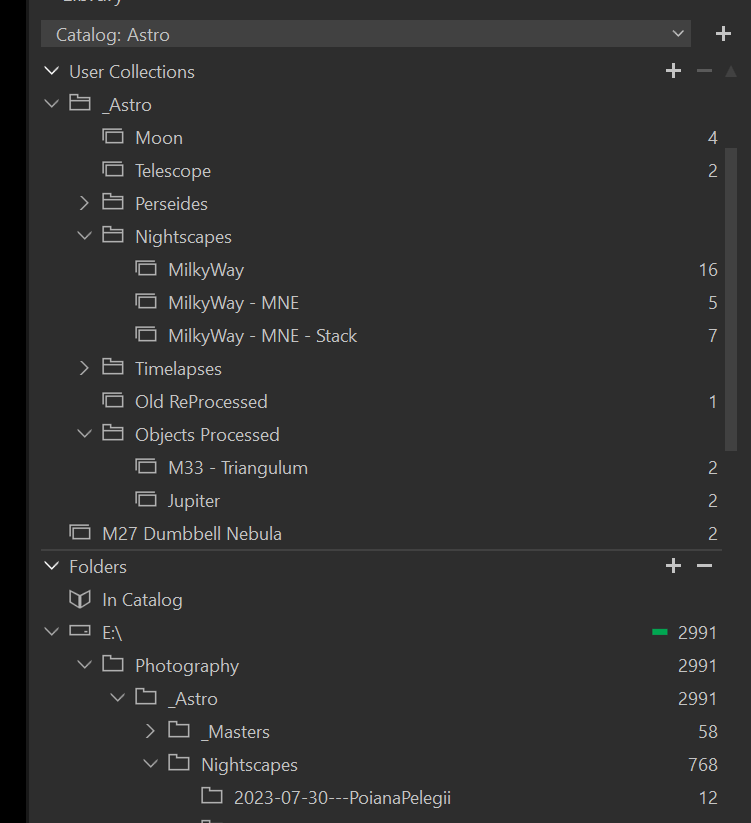
Raw files are in this folder: \ Photography \ Astro \ Nightscapes \ Milky Way \ 2024-xx-xx---MontenegroMy Album is in CaptureOne "MilkyWay-MNE" and is in the group "Nightscapes"
What I would like is to be able to export directly to "Nightscapes \ MilkyWay-MNE"
Screenshot of export settings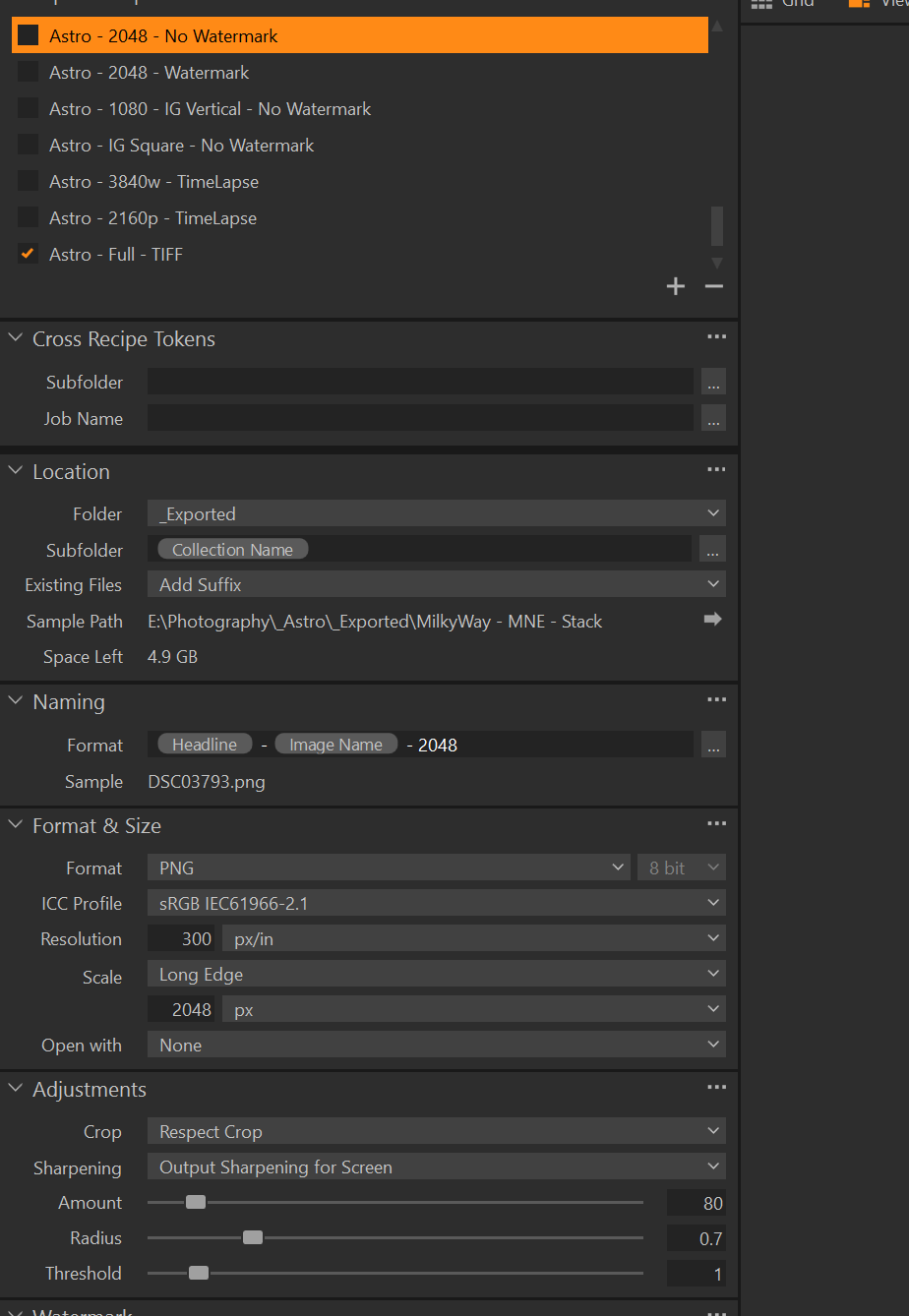
Screenshot of my Collections and Folders tree:
 0
0 -
So your hope was to get "_Astro/Nightscapes/MilkyWay - MNE - Stack" but as you now see you only get "MilkyWay - MNE - Stack"
0 -
Walter Rowe Thanks for looking into this.
The "Exported" folder in the Export screenshot is located at "_Astro \ Exported"
My hope was to get
"_Astro \ Exported \ Nightscapes \ Milky Way - MNE - Stack"
but I only got
"_Astro \ Exported \ Milky Way - MNE Stack"
So a missing "Nightscapes" right in the middle, which is the name of the group in Capture One.0 -
In AppleScript it could be determined (on macOS only of course) and set manually based on what it finds, but there is not direct token to identify the parent collection name dynamically in the recipes as you would like.
0 -
In AppleScript using Capture One's Plugin SDK or how?
0 -
You can use AppleScript directly with Capture One. Open ScriptEditor, then open the Capture One dictionary. It takes a bit of time to understand their object model and how to interact with the GUI. I don't know if the effort required would pay off for you. I don't know how often you need this.
0 -
I would basically need this on almost all exports. I didn't know about their Script Editor. I will look into it.
Thank you very much for the info.
0 -
ScriptEditor is part of macOS.
0

Post ist für Kommentare geschlossen.
Kommentare
9 Kommentare