Capture one 20 NOT launching win10 pro x64

-

Not had the same problem. But I am still using Win 7 so maybe not so helpful.
However if it was a general problem I think the forum would be well populated with posts about it.
I would suggest that you firstly uninstall and then re-install and see what happens. It may be worth rebooting you PC as well before re-installing. Just to clean things up as much as possible.
There should be some log files that will tell us how far the process got. If re-installing does not get you to a proper start up it would be worth looking at the log files to see what they can tell us.
Grant0 -

NNN637111819456175394 wrote:
After installing a trial, the software doesn't launch at all. Not even showing in Task Manager, it tends to load, makes my ventilators work faster but only for 1 sec. Then it's just nowhere. Anyone had the same problem?
Please check your build or release of Windows 10. The latest (1903 and 1909) are still not supported. This seems to be related to .NET 4.8 in these builds over .NET 4.7.x in earlier builds. Capture One runs with .NET 4.7.x and not on 4.8 from what I read left and right.0 -

Actually C1-12 and C1-20 run just fine in Windows 10 Pro X64 with .NET 4.8 installed, at least on my system.
Regards, Mark0 -

1903 x64 here, no issues. Typically, .NET is backward compatible. YMMV. 0 -

Also working on older version here - Win 10 Pro (1803) 0 -
Good to hear, but still curious which build the OP runs its Windows 10 machine. 0 -

I can't launch Capture One 20 either. It installs but opening up the .exe, clicking the shortcut, or selecting launch program after installation does not open up the application. I'm using Windows 10 Pro Build 18363, fresh OS install. Antivirus is disabled. I have the latest updates for windows 10 and have .NET framework 4.8.03752. 0 -
Do the log files show anything? 0 -

Paul_Steunebrink wrote:
NNN637111819456175394 wrote:
After installing a trial, the software doesn't launch at all. Not even showing in Task Manager, it tends to load, makes my ventilators work faster but only for 1 sec. Then it's just nowhere. Anyone had the same problem?
Please check your build or release of Windows 10. The latest (1903 and 1909) are still not supported. This seems to be related to .NET 4.8 in these builds over .NET 4.7.x in earlier builds. Capture One runs with .NET 4.7.x and not on 4.8 from what I read left and right.
Sorry you are quite wrong. I am running CO20 on a fully up to date version of Windows 10 with no trouble at all. The CO20 installer checks if the right version of .NET framework is installed, if not the first thing it does is install the version it requires. My installation of Win 10 has numerous versions taking up space on my c:/ drive ☹️ .0 -
David532 wrote:
Paul_Steunebrink wrote:
NNN637111819456175394 wrote:
After installing a trial, the software doesn't launch at all. Not even showing in Task Manager, it tends to load, makes my ventilators work faster but only for 1 sec. Then it's just nowhere. Anyone had the same problem?
Please check your build or release of Windows 10. The latest (1903 and 1909) are still not supported. This seems to be related to .NET 4.8 in these builds over .NET 4.7.x in earlier builds. Capture One runs with .NET 4.7.x and not on 4.8 from what I read left and right.
Sorry you are quite wrong. I am running CO20 on a fully up to date version of Windows 10 with no trouble at all. The CO20 installer checks if the right version of .NET framework is installed, if not the first thing it does is install the version it requires. My installation of Win 10 has numerous versions taking up space on my c:/ drive ☹️ .
Apparently it works on some, and does not work on others. Anyway, builds 1903 and 1909 are not supported. Not my text, it is in the release notes. Not supported does not mean it does not/never work. It may work, but it is not guaranteed and you can not get support on it.0 -

David532 wrote:
Paul_Steunebrink wrote:
NNN637111819456175394 wrote:
After installing a trial, the software doesn't launch at all. Not even showing in Task Manager, it tends to load, makes my ventilators work faster but only for 1 sec. Then it's just nowhere. Anyone had the same problem?
Please check your build or release of Windows 10. The latest (1903 and 1909) are still not supported. This seems to be related to .NET 4.8 in these builds over .NET 4.7.x in earlier builds. Capture One runs with .NET 4.7.x and not on 4.8 from what I read left and right.
Sorry you are quite wrong. I am running CO20 on a fully up to date version of Windows 10 with no trouble at all. The CO20 installer checks if the right version of .NET framework is installed, if not the first thing it does is install the version it requires. My installation of Win 10 has numerous versions taking up space on my c:/ drive ☹️ .
Working for me as well on Win 10 Pro Build 18363.476
Ian0 -

Windows 10 Pro version 1903 for x64 and .NET Framework 3.5 and 4.8 works fine in combination with CO 20.
Willy0 -
I found out my problem and it's working fine now. I needed to install the Microsoft Visual C++ Redistributable for Visual Studio 2015, 2017 and 2019. Downloaded it at https://support.microsoft.com/en-us/help/2977003/the-latest-supported-visual-c-downloads 2 -
rpc wrote:
I found out my problem and it's working fine now. I needed to install the Microsoft Visual C++ Redistributable for Visual Studio 2015, 2017 and 2019. Downloaded it at https://support.microsoft.com/en-us/help/2977003/the-latest-supported-visual-c-downloads
That is a great tip. That explains that .NET 4.8 will not give a problem anymore. Thanks for the feedback.0 -

I am running CO20 on two different Windows 10 1909 PCs - no problems so far.
Both PCs have been upgraded thru several versions of Win10 so .net 4.7 was previously installed. Maybe that is a clue?
...Anyway, builds 1903 and 1909 are not supported. Not my text, it is in the release notes. Not supported does not mean it does not/never work. It may work, but it is not guaranteed and you can not get support on it.
That is worrying in my opinion. The only Win10 version (on which Phase One supports CO20) still supported by Microsoft is 1809 (for which support ends May 12, 2020).
So I cannot update Win10 because a software vendor is not able to stay up-to-date with software development?
I am paying monthly for using this piece of software, so I expect them to stay current.
Phase One should really get their stuff toghether and update the Windows version of CO20 ASAP to the latest .net version.
https://support.microsoft.com/en-us/help/13853/windows-lifecycle-fact-sheet0 -

rpc wrote:
I found out my problem and it's working fine now. I needed to install the Microsoft Visual C++ Redistributable for Visual Studio 2015, 2017 and 2019. Downloaded it at https://support.microsoft.com/en-us/help/2977003/the-latest-supported-visual-c-downloads
Thanks for your comment! The information should perhaps be highlighted more... It is quite frustrating when you have just switched to the program or version (like me) and the program does not run on a normally configured PC.1 -

rpc wrote:
I found out my problem and it's working fine now. I needed to install the Microsoft Visual C++ Redistributable for Visual Studio 2015, 2017 and 2019. Downloaded it at https://support.microsoft.com/en-us/help/2977003/the-latest-supported-visual-c-downloads
had the same trouble, not launching even C1 11 after upgrade to 20 and this helped. Thanks a lot!0 -

I am also facing same issues. I installed Visual C++ package as mentioned above. running on OS version 1904. i am seeing a screen like this when i open it shows up a white screen as in below screenshot. if i select it turns gray. not allowing me to add my key and proceed . Installed latest C1-20 13.1 installable CaptureOne20.Win.13.1.0.exe

on selection it becomes grey but i dont see any inputs.
 0
0 -
Anyone facing similar issue?
2 -

Hi, we’re you able to resolve the white box issue? I can’t seem solve this. Thanks
0 -

Before and after June update for Windows 10, software won't load at all. Doesn't appear in task manager. Reinstalled Windows and still doesn't work.
0 -

Same issue there...Latest version...
0 -

Same problem, I have tried all the solutions for Win10 Pro 64 and tried a new reinstall of Pro 20 as last resort and I am now getting the "Report Error" message, I press skip and the .exe file executes but the software does not load. I usually operate from behind a VPN but have turned this off whilst trying to open C1 - still doesn't load.
0 -
Very recently installed V20 on a new Win 10 machine.
Win 10 was updated (after the machine arrived) to 10.0.19041.
No problems found so far. Everything seems to work.
Other than my printer for which there seems to be a lack of Win 10 drivers even though it is recognised and Windows says the device has been setup.
I would suggest checking the log files. Also Task Manager to see what is an is not running. If C1 seems to be running then maybe check for windows that are not displaying as expected. Two monitors, extended desktop, window compressed to 1 pixel wide ... that sort of thing.
0 -
SFA - Thank you I will take a longer view tomorrow.
0 -
Paul,
Are you starting C1 from a desktop icon?
If so it might be worth double checking that the link for the icon does indeed point to a correct location for V20.
0 -
SFA - I deleted all the desktop links etc and then renewed one of them. I have been starting it from the Win Start menu. I have been looking at "Task Manage" - "Details"- "Capture One"- right-click "Analyse Wait Settings" and I have found the following:
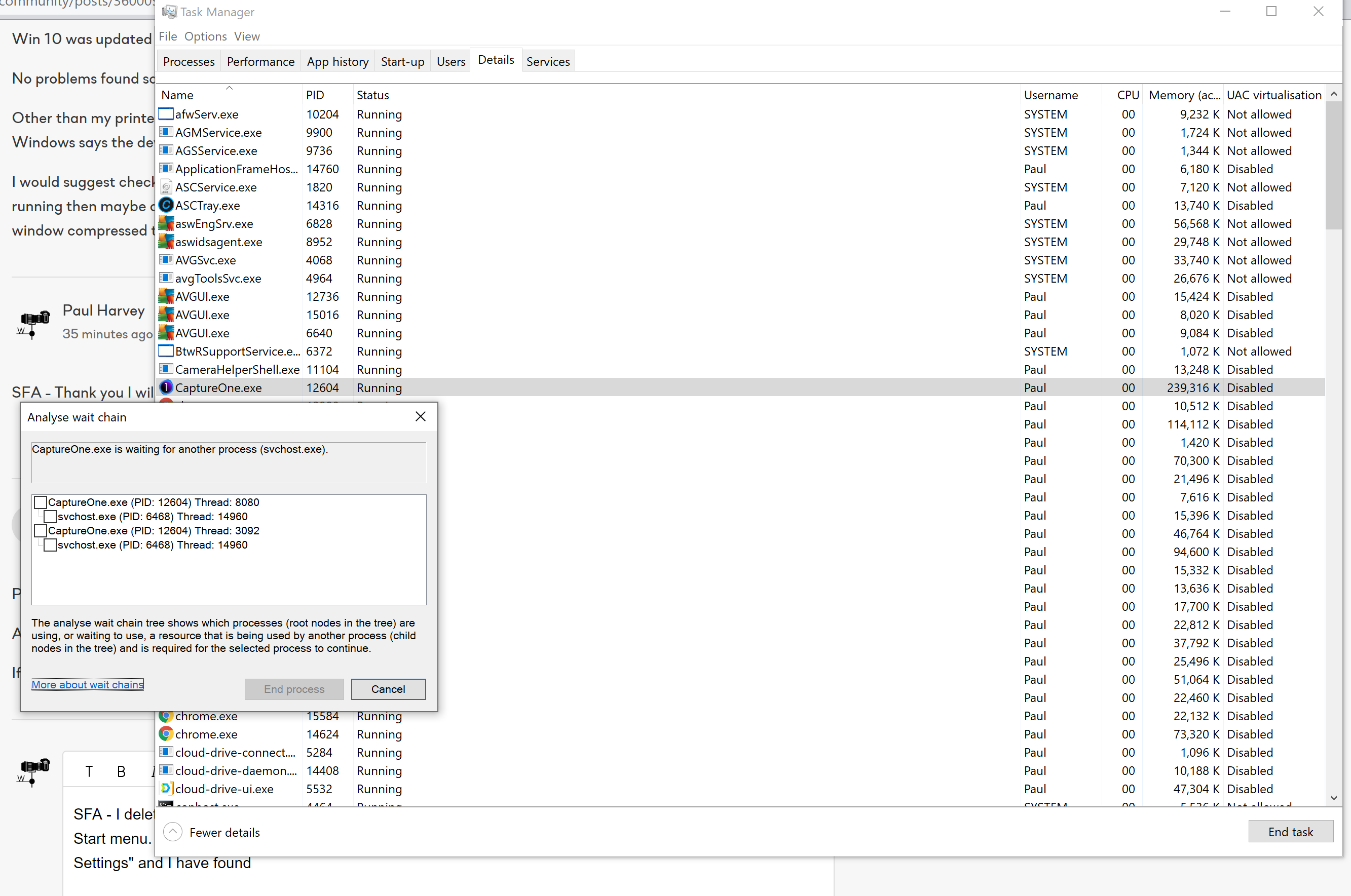
Disabling the Svchost.exe allows C1 to launch, what then follows is a prompt to enter my license details, which seems correct as this is a new install. I enter the licence details and the prompt screen then freezes!
0 -
Presumably waiting for svchost again?
Svchost seems to be associated with thread 14960 (in the wait chains window for this particular run).
Is there anything else that references that thread number?
I would be tempted to try a series of 2 or 3 system reboots as a starting point to see if there might be some sort of Windows issue that goes away.
I cannot recall hearing about anything like this before. For any application.
Basically the processes are in a mutually exclusive (or recursive) loop. The question is, what got them to that point. And whether, after a shut down, they return to the same state.
I feel a Google coming on.
0
Post ist für Kommentare geschlossen.
Kommentare
28 Kommentare