Save a version of an image without creating a new variant
Implemented
Is there any way to save a version of an image – like with Lightroom's snapshot function – without having to create a variant, which, if you create many versions, becomes pretty messy?
. . . . .
I'll turn this into a feature request.
Let me just add that as you can't add one variant to an album without at the same time adding all other variants, creating unnecessary variants isn't a very attractive alternative.
-

BeO,
you make very valid points as you did in your first post that I quoted in parts. As I wrote in my previous post, I would be happy, if CaptureOne would implemented the changes that you have suggested. I suppose, one could easily get to a different conclusion if you read through my longish post that follows :-P You are also absolutely right, that I don't use layers to their full potential at all and possibly comparing their benefit to snapshots doesn't withstand a closer look.
I had the feeling, that others than you didn't grasp the concept of snapshots, so I tried to illustrate this more specifically. You might be also right that snapshots lead to more desires and complexity than I had in mind.
For me personally, the single most important feature would be the ability to protect variants against modifications. After that, if there was some additional textfield for describing the purpose of the variant, that is visible in addition to the variant number, i would be 95% pleased. Wether it is implemented by Snapshots or other tools doesn't matter too much. Finally, being able to put individual variants into an album would solve another annoyance.
We already have the request for snapshots. I think, these are 3 individual features that can be requested and voted independently. If you don't mind, I will post according feature requests.
0 -
Alexander,
I think it is a good idea to post your mostly desired requirements as single requests, it might possibly have a bigger chance to be selected for implementation. I think it is also generally a good idea to clearly separate the requirement, read: what you want to achieve, from a suggested solution for this requirement, read: how to implement a feature to achieve the goal.
Firstly, this gives the product people more freedom for creativity. Second, sometimes several different requirements even from different persons which do not even know from each other can be implemented by a common solution approach, leveraging the benefits of this solution approach. As opposed to one solution for each requirement separately, no leverage, cluttering a software with unconnected features.
Tbc in in few minutes...
0 -
...continued...
Third, a suggested solution can help understand the requirement.
On the flip side, a suggested solution can create a bias, a thinking corridor in the brain of the product people.
Customers often describe thier requirement in terms of a solution, sometimes even worse, they tell younonly the solution without mention of the actual requirement. Because in their mind that's the same thing. Requirements enginnering tries to separate this out, build decision processes, matrixes etc. based on the requirements, not the suggested solution, I like this example so let's use it, a customer might say I want snapshots, but his actual requirement/need is save a state of his edits, and lock it down against accidential edits. Another person who says the same thing does not care about accidential misedits, but wants to have a two dimensional way to structure his edited versions because he find it supereasy to work with, or just because he is used to it, and wants to go back in history edits because thats is of utmost importance for him.
Different requirements which can both be solved with LR like snapshots, it looks like a good candidate then, but if you add another requirement into tha matrix, e.g. One customer wants to have heavy duty funcionality for rating, culling, comparing, exporting/processing fir all his edit versions then snaphots might be out of the race if this requirements needs to be implemented too, because then, all of a suddon, enhancements to the variant approach is a solution which fulfills all example requirements.
You can, and should, freely submit any request you like, I try to encourage people to do so as this is a valuable source of information for any company, even if I do not like a particular request.
Btw. I am only a regular customer/user of C1.
regards
0 -
I am late to the game, but I wanted to add that I found this post because I too was looking to see if Capture One had some hidden snapshot ability that I couldn't find.
I would add that I think a snapshot should save the state of the photograph as a separate instance/object that holds the base image and all the all the adjustments that quantify the difference between the base photo and the final state that one is trying to preserve. It should have no direc linkage to previous versions/variants of the photos that are part of the existing session. That is, the snapshot should exist separately. Possibly as a child of the session so that one can look at and manage all the various snapshots in a separate namespace, but still preserve the relationship to the original photo/session. Conceptually I think you could view a snapshot like a 'tag' in a revision control system (e.g. git or svn). It is a version that is tagged as a release and stored separate to the trunk. If something needs to be done to adjust it, it can be 'checked out' and adjusted and either resaved as the same snapshot, or copied to a different branch withing the 'snapshot tree'/namespace within the session.
How is that for being specific to what (I think) would work.
Regards,
BillR
0 -
Seems like LR is having a multilevel tree, but how does it show this intuitively to the user?
Can you paste a screenshot from LR which shows (a) virtual copies and (b) snapshots (versions) of each virtual copy? Having a hard time to believe it wouldn't overwhelm my ability to grasp complex things in LR or C1. My thinking is one dimensional, want a snapshot? I press F8, want another snapshot, I press F8, variant after variant, one dimension, easy to grasp and guide the user.
At least I can say that I haven't missed a versioning of variants yet.
Nobody showed any illustration so far...
regards
0 -

@BeO
Snapshots in Lightroom are tied to the (linear) per-image history.One can look at the history of all editing steps and nominate any point in this one-dimensional list as a snapshot.
Snapshots in Lightroom are easy to use and would be super easy to support in conjunction with a per-image history (which makes a ton of sense on its own).
Unlike image variants, snapshots
- do not clutter up the catalog/session, and hence
- do not require previews, and
- are protected against accidental deletion.
I don't know where the idea comes from that image variants in C1 do not require space on the storage medium (as previews are allegedly created "only if needed in memory at run time"), but it is certainly wrong. Image variants are immediately displayed in a browser because pre-computed previews are pulled from storage.
Image variants in C1 are currently an unfortunate mix between the "virtual copies" and "snapshots" in Lightroom. Like the former they appear in the browser but like the latter they have to stay together all the time.
It would make a ton of sense to give users the chance to place only one image variant in a collection (say a "B&W" collection of a parallel "Colour" collection) and conversely to avoid the overhead of storing previews for variants which are just "snapshots" of points in the editing history.
In short, both "virtual copies" and "snapshots" in Lightroom make sense. They serve different needs and neither of those needs are currently served well by "variants" in C1.0 -
Class A,
snapshots are not points in time of the history of a virtual copy, but of the image? Now I am even more confused. How does it actually look like in the user interface?
Of course variants use some space, small in database, a bit more in Cache folder, and some space in the comask file if using rasterized or brushed masks, but this shouldn't be an argument to introduce a new feature like snapshots, I hope you agree that this would be a somewhat silly argument.
Place variants in a regular album, yes this would be great. Give it a name, also great.
regards
0 -
"Image variants in C1 are currently an unfortunate mix between the "virtual copies" and "snapshots" in Lightroom. Like the former they appear in the browser but like the latter they have to stay together all the time."
Agreed.
0 -
"snapshots are not points in time of the history of a virtual copy, but of the image? Now I am even more confused. How does it actually look like in the user interface?"
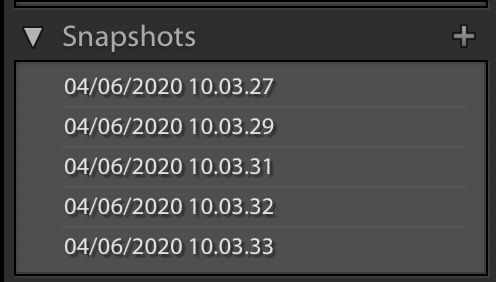
When you save a snapshot, you save the adjustments/settings of an image at a particular point in the editing proces. Snapshots appear in a list. By default, snapshots are labelled with time and date, but you can call them whatever you want. It's very simple and works perfectly. Here's a screenshot of a list of snapshots just created:
 0
0 -
Thanks for providing that.
And these snapshots are not related to virtual copies (variants)?
regards
0 -
"And these snapshots are not related to virtual copies (variants)?"
There's a clear distinction between virtual copies and snapshots. Like variants, virtual copies appear as individual instances of images in the library (but unlike variants they can be organized individually, etc.). Snapshots don't appear in the library, they are only saved settings, making it easy to revert to a previous state in the editing process. They are tied to each instance (variant) of an image.
0 -
Thanks Thomas, this makes it clearer for me.
I would like to adjust ClassA's sentence from
"Snapshots in Lightroom are tied to the (linear) per-image history." to
"Snapshots in Lightroom are tied to the (linear) per-virtual copy (variant) history."
suggesting a variant of an image in C1 is the closest thing to a virtual copy of an image in LR.
Assuming C1 would implement snapshots as named development stages of variants, this would not solve the problem that variants can't be named, neither the problem that a single variant can't be put into a regular /static album.And vice versa, C1 would need to (and could) implement that variants can have their own or an additional name, and that they can be put into an album without putting all the other variants into that album, even without implementing snapshots per variant.
That's actually two different things, variant-independency (but still support the grouping if more than one variant is in the same collection), and history-snapshots per variant.
If they would implement variant-independency I would be totally fine, that would suffice me, I do not need snapshots-per variant.
Actually I do use variants if I want to make a snapshot and I actually like that each has its own preview and thumbnail.
But I better undertand now where you are coming from, and optional snapshots per variant wouldn't disturb me, but take care that they implement the variant-independency, as this is part of what at least some of you are missing and are using for argumentation pro snapshots.
regards
BeO
edited for typos
0 -
"Assuming C1 would implement snapshots as named development stages of variants, this would not solve the problem that variants can't be named, neither the problem that a single variant can't be put into a regular /static album.
And vice versa, C1 would need to (and could) implement that variants can have their own or an additional name, and that they can be put into an album without putting all the other variants into that album, even without implementing snapshots per variant."
Agreed.
Variant-independency would be a big improvement. As it is, variants clutter up your library unnecessarily, and relying on variants where you could have used snapshots only makes this worse, particularly when there's no way of naming them, etc.
0 -

Just a point of terminology In C1 to point out that ALL images, including those with no additional edit "variants" identified, are referred to generically as "Variants".
For some people new to C1 (and maybe a few oldtimers too) this may not be entirely clear. In which case it could be somewhat confusing.
It difficult to see how the exiting system producing additional versions of an edit can be thought of as "cluttering up the system" since all of the edit variations are retained in the same edit instructions file.
The "snapshot" concept would either need to be added to that (thus forcing a significant change in the data structure of those parts of the database and and so whatever consequences that would lead to for conversion and backwards compatibility) or would been to be an additional file or files. Which would in effect be doing much the same thing as the "edit Variants" do now.
Unless, that is, the "Snapshot" also retains some sort of thumbnail or preview to make it useful. In which case we would, presumably, be looking at additional and separate files. Storage capacity and performance consequence are likely.
At present C1 creates a base preview file and expects to work with that and the adjustments for normal editing if performance is important. Thus is one is working with multiple variants of an image they are rendered into memory from the same Preview file.
To make Snapshots a "thing" would either require the same thing to be repeated with the Snapshot process OR the save the Snapshot and Edits as an individual file and thus a pre-prepared preview of its own complete with its own name but links back to the original Source file (at least - would it need to be connected to the variant of that source file edit as well? If so, how?) and so one is onto duplicating editing system data sources. For what benefit?
I have a system that allows for the saving of individual versions of images at a specific edit state that sounds just like a Snapshot as described. I suspect it pre-dated the facility in LR by some years. At the time I found it very useful. It was one of the influences that led me to abandon LR after buying it at Version 1.
That one could save a reasonably usable jpg complete with embedded edits was handy but did add to the file storage requirements. And, of course, multiple files in the folder that needed to be be managed independently if one was driven by a need to keep things tidy.
But then we are talking about a system that required changes to be saved and so the idea of saving a new edit version became a habit anyway if one wanted to keep intermediate edit steps that one could go back to if desired. (Yes, if had complete edit history but that was not always helpful.
C1, once I had adapted my approach (starting with remembering that all edits were recorded in real time with no "save" action required), opened up the much more useful and far faster "Variants" approach and the joy of simply hitting F8 (Windows) to create another editable variant of wherever I was at and continue working knowing that my previous edit state was retained in the edit file with no further actions.
Bear in mind that whether providing a field for an alternative name for a variant edit (or more then one name ?) OR going for a parallel system with it's own files, the creation of the name field or the separate files is only a small part of the total DAM function that users would expect to have available.
Personally I would prefer a simpler DAM with my RAW editor. Something minimalist - like I get with sessions.
If I want a complex DAM I can always research and find one. Perhaps something that works with processed files and so separates the identities of images produces for different purposes it that is what people wish to do.
Just my opinion of course, should the developers take the time to plough through the comments.
0 -
"It difficult to see how the exiting system producing additional versions of an edit can be thought of as "cluttering up the system" since all of the edit variations are retained in the same edit instructions file."
It should be clear from the descriptions above in what way the library is cluttered up: you get unnecessary instances (variants), which you can't name individually and which you also can't organize individually, except with bothersome workarounds that only partly solve the problem. For those who have no issues with the way it currently works, that's fine, but it should also be clear that quite a few users do have issues with it.
1 -
Well said, Thomas.
0 -
SFA,
you wrote "Storage capacity and performance consequence are likely."
The same efficient storage that is currently used for variants can be maintained for snapshots and "virtual copies" (first-class citizen variants). No different treatment is necessary.
Thumbnails would have to be created for virtual copies only (snapshots are "invisible" unless called upon (in LR, different schemes are possible, of course)). However, the same thumbnails would have to be created for C1-style variants as well.
The requests for "virtual copies" (first-class citizen image variants) and "snapshots" (variants that are always tied to an image (virtual or not) and typically remain invisible) are really about surface level organisation principles that are aimed at reducing surface level clutter and increasing surface level flexibility.
No need to bring in implementation details into the discussion (which need not deviate from the approach that is currently used).0 -
ClassA, Thomas,
How many versions of an image or virtual copy do you create usually?
I am having a hard time even thinking about your request for thumbnail-less versions if you work similar like me, which is about 1 to 5 (max) variants which I keep, and a couple intermediate ones during my edit session as a temporary snapshot in order to not loose a certain state. Sometimes I have one or the other alternative extra layer.
I can understand your request for versions if you have 20+ snapshots (variants) or so; but then I don't understand why you would need these, and I dare to question if you really do or if it is just habit.
I do a lot more work on important images as David Groover does in his web sessions, but still don't need more variants than I just outlined, so what are you doing actually to need much more?
Again, I am totally with you regarding independency for album assignment and an alternative/additional name of a variant to be used in browser and viewer.
regards
0 -
In Lightroom, I don't have that many virtual copies; I imagine 5 at the most. Because of the inability to organize variants in C1 I've so far avoided creating more than a few.
The main point of snapshots, in my view, is saving specific states in the editing process, so that 1) you can go back to a previous state and 2) you can compare such states. You can do the same with variants, sort of, but if, for instance, you're working on two different versions of the same image, the variants you create for these two versions (as an alternative to snapshots) will be listed next to each other in your library, on the same level in the hierarchy, so to speak, whereas snapshots will be located inside each variant/instance of an image, they're not listed among snapshots of other variants of the same image. This is a clear advantage.
I agree that variant-independency would make the need for snapshots less acute. Though snapshots still have advantages such as not requiring any extra organization.
0 -
BeO,
personally I don't have a need for snapshots (a full per-image history would be very useful, though).
I'm wishing for first-class citizen variants. I often don't need any variants (virtual copies) but if I do, the maximum is around five; just for experimenting with different processing options (and being able to come back to them), and keeping the most successful ones (usually not more than three per image).
Some of these go into client collections (including "public", "private", "selects"), others into a personal "favourites" collection, other into a "portfolio" collection, etc. My clients' favourite variants are not necessarily my favourites, it's nice to maintain a "B&W work" portfolio, etc. That's why they need to be separable "variants".
0 -
Let me suggest that someone creates a separate feature request for variant-independency, as this seems to be more pressing, I have seen similar discussions years back, hence I believe it has a higher chance to be implemented in C1 than LR like snapshots. Plus, snapshots does not mean they'd implement variant-independency.
regards
0 -
"Let me suggest that someone creates a separate feature request for variant-independency …"
"Allow to give variants a description"
"Add one variant to an album without automatically adding all other variants"
0 -
Weak shortterm memory :-) Thank you.
0

Post ist für Kommentare geschlossen.
Kommentare
53 Kommentare