Strange colour shifts during editing

Hi,
I recently had to re-install Capture One 20 (Sony) after a system rebuild (Windows 10) and since then, I've noticed a strange issue while editing. While making adjustments to RAW files in the Exposure area, the main preview image appears to temporarily shift colour spaces, render the change before reverting back to the preview. Prior to the re-install, any change I made would be rendered seamlessly in real time. I've played around with various proofing options etc, but I haven't found any setting that makes any kind of difference.
My Capture One version is fully patched, as is Windows 10 with the latest GPU drivers (AMD 5700 XT). My display is also calibrated (ColorMunki Display).
Any ideas?
-
Two ideas:
1- Check in preferences if hardware accelaration is on.
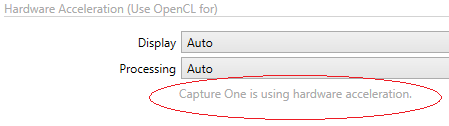
Switch from Auto to Never to test if this changes the behavior.
2. Try to re-generate previews (select variants in browser, then main menu "Image")
regards
0 -
Thank you. Changing the hardware acceleration "Display" option from Auto to Never did the trick!
0 -
Did you see this sentence in the red circle in preferences when the setting was on Auto and C1 restarted?
If yes, that indicates a problem with the graphic card compatibilty, driver or else. Check in the future if there is a new driver and try again to activate OpenCL. You might find C1 is faster then, on display or processing.
If no, than either Capture One failed to initialze the GPU, or it initialized it but found that your CPU would be faster. We could try something...
regards
0 -
The settings below resolve the rendering issue. Setting "Display" to Auto will cause the issue to return.
I've verified that I have the latest AMD Radeon 20.2.2 drivers installed. I've also run some benchmarks that confirm OpenCL is installed, and appears to be running correctly as they complete successfully. If there are ideas on how to enable Display hardware acceleration, I'd be willing to try them. 0
0 -
I've just tried running an export now, and similar issues appear in the exported file if "Processing" is also set to Auto. Exporting files with it set to Never resolves that issue as well.
0 -
Then I suspect a driver or card compatibility issue. Leave it Never. If you like the speed improvement, if you noticed any, check if there are new drivers some time in the future which might solve the issue.
regards
0 -

Hi Erin,
If you look for Radeon and GPU support and C1, you will find some bugs about using Radeon 5700 Series and GPU-Support. My Radeon 5700 has problems if I enable GPU support and then use the HDR slider.
Without using the slider my pictures are looking good, when using it I have the problem you described. Without GPU support I can also use the HDR slider and everything looks fine.
According to AMD, C1 is probably not yet familiar with the new RDNA architecture of the RAdeon 5700. Unfortunately the support is overloaded at the moment and I only got a feedback that the error was recorded. In the meantime I work without GPU support. Which is annoying, because the acceleration is already very high due to the graphics card.
Translated with www.DeepL.com/Translator (free version)
Robert
0 -
That's interesting, Robert.
I don't know much about developing software which uses graphic cards, so my opinion here is really not more than a non-educated opinion and assumption. This assumption is: OpenCL is a standardized interface to allow programmers to use OpenCL functions irrelevant to the underlying architecture, be it CPU or GPU/graphic card, If that is true then it is the responsibilty of the gfx card vendor to supply a driver which implemetns the OpenCL standard on the specific hardware/gfx card, no matter what the underlying hardware specific architecture is. But maybe this is either wrong, or a too simplistic view.
During my research I also stumbled over an opinion of a (seemingly) developer:
NVIDIA development documentation is often published well in advance (months or even years) of the moment when a new card can actually be purchased. For example developers have known about the fact that NVIDIA Volta and newer GPUs would be able to diverge within warp for about a year by the time it has actually happened! On the contrary AMD has only released a whitepaper on RDNA and announced changes in wavefront size from 64 to 32 in August 2019 -- more than a month after RX 5700 became available.
Anyway, I believe you have heard my message and hope you can pass my comments to relevant teams. I would love AMD to become more developer-friendly. In order to win the battle with other GPU manufacturers you need not only to produce high-performing GPUs (which you have already thanks to 7nm and RDNA) but also the support of developers' community.https://community.amd.com/thread/245990
... tbc...
0 -
Continued...
I share your assessment that C1 team is probably overloaded currently, but as said, I am not sure they have to or or even can change something to better support RDNA cards.
Is OpenCL going to be supported by the gfx card vendors in the future? I stumbled over the term "Metal", is this going to replace OpenCL in the future? I need to do more research...
regards
0 -
Well, in the release notes for version 12.1.4 under Bug Fixes you can find: "Fixed an issue with OpenCL using Radeon VII graphics cards". So there are probably already adjustments to certain hardware. And even if C1 can't change anything here, they may can communicate this better to AMD than if we as users do this. Since I don't have any comments from C1 so far, except that the bug has gone into the database after I sent logs and support files to the support, I don't know who can or must help here. My hope is still with C1, since AMD has already written me.
Translated with www.DeepL.com/Translator (free version)
Robert
0 -
Thank you @BeO & @Robert for your followups.
I have also followed up with AMD support but haven't heard anything from them yet.
I appreciate the challenges involved with adopting new architectures and as someone who works in IT, I understand the issues (at a high level) behind them. From this perspective, the support teams have my support (and perhaps sympathy) for trying to resolve these issues - particularly so if there are communication issues between vendors. However, as a customer, my experience with Capture One is less favourable. I bought into Capture One mid 2019 after years with Adobe and I was initially very pleased with the software and the published online tutorials were and are first rate. But to face the prospect of having to disable a core feature (GPU acceleration support) after only just upgrading to v20 in late 2019 (I effectively bought in twice within 12 months) does leave a poor impression.
0 -
Fully agree. I hope they take some of the money from new users (I have the impression C1 becomes more and more popular) and beef up their dev and support departments...
0

Post ist für Kommentare geschlossen.
Kommentare
12 Kommentare