Color Editor
Implemented
Could you move the "View selected color range" check box to be above Basic, Advanced tabs? I would prefer quicker access to this checkbox which usually requires me to scroll down to see it. Also, no reason it needs to move downward as I add new color ranges.
-

Hi Michael,
You can drag and drop all the tools, and then save is a default workspace - so you can move the tool up, and also attach it to the pin-able area or keep in the scrollable area (in Capture One 20).
Best regards,
Jakob, Capture One0 -
Hi Jacob,
My request was not about moving the tool, I was suggesting that the "View selected color range" checkbox be moved to just above the first range selection to lessen the gap between that checkbox and the activate/deactivate checkbox.
Thanks,
Michael
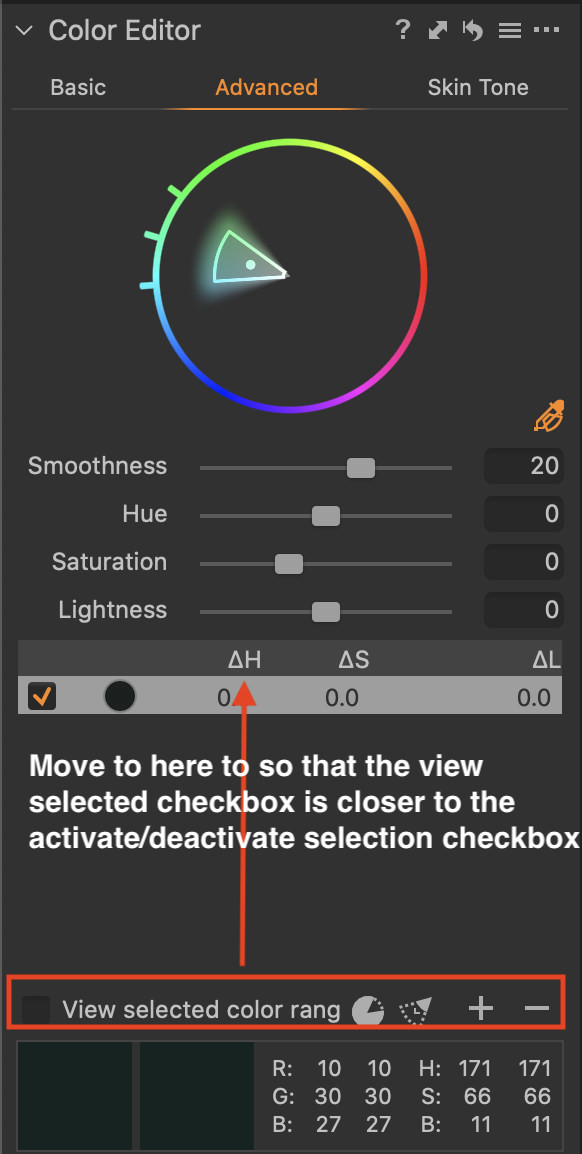 0
0 -
Sorry, I misunderstood. Thank you for your elaboration on the subject and for the screenshot. I will forward your request internally.
Best regards,
Jakob, Capture One0 -

There is a "View selected colour range" toggle option in the View Menu.
Keyboard Shortcut Alt + C on a PC.
KB Shortcut is the fastest way I can think of to turn it on and off compared to a tick box in a window.
0 -
That's very helpful, thanks. It did not occur to me that there'd be a shortcut for that.
0
Post ist für Kommentare geschlossen.
Kommentare
5 Kommentare