Exporting pictures without renaming

Hello all
I am new to Capture One and switched from Adobe Lightroom. During my workflow in Capture One 20 I rename my pictures in the begining so I don't need a second rename. When I want to export my finished pictures they will be renamed againg with different order of numbers as I skipped some pictures. How can I avaoid this and only export the pictures withouht renaming them again?
-

It will be some setting that you have in play.
When you write "Export" are you using the "Export" function or an Output Process Recipe? (I have assumed that you are not using an "Express" version of C1.)
Where are you exporting to - a new folder or the same folder as the original source files?
Are you exporting RAW to another format or perhaps jpg to jpg?
0 -
I am exporting RAW to JPG in a new folder. The RAW files already have their names which I want ot keep because of the numers. What do you mean by Express version? I am using the Pro 20 version.
0 -
For Sony and Fuji users there is an "Express" version that has some feature restrictions but is free to use.
So you are using the Export Images > Variants feature?
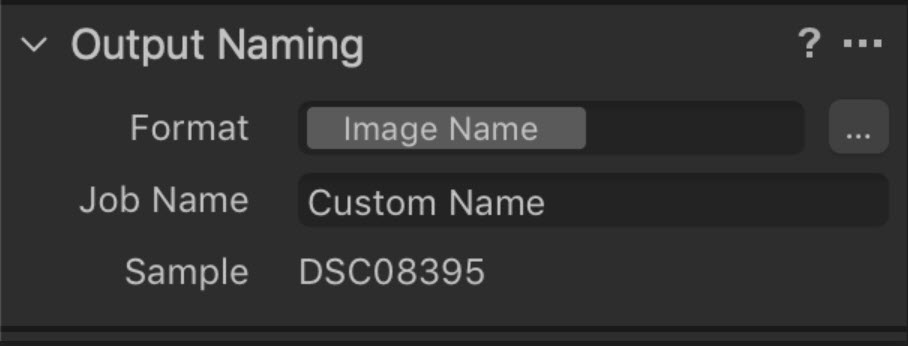
If so, what settings do you have for the "Export Naming" tool?
Specifically, how are the values for Naming Tokens set up in the "Format" field?
0 -
Problem is now solved. Someone from the Capture One support team helped me. If I choose the format "Image Name" the existing name will stay and not change.
 0
0
Post ist für Kommentare geschlossen.
Kommentare
4 Kommentare