Some visual indication whether setting or slider was changed from original position
Implemented
Not sure if this has been asked before (couldn't find anything), but I would find it really helpful if esp. those slider would have some indication whether I changed them already or if they are still in their default position.
Visual indication could slide handle greyed out a little bit or something like that.
Default I mean e.g. for white-balance original Kelvin or Tint from shot -> grey, moved by me or C1Ps automatic WB -> not grey.
-

I have the feeling both of you Grant and ClassA think by only organizing the usage of layers, naming it appropriately, don't use to many tools (and layers) or just build on top of existing makes this user interface aid request obsolete.
First,
your suggestions might be the way you are working; and you might be able to do this for each and every image consistently, and you did not change your structure and how you organize the layers, you might be perfectly organized with your adjustments. Perfect world.
I am not. Not as strict as you suggest. If I have developed and image to an intially envisioned state, it can happen that I am creatively be influenced by this (then intermediate) state and deviate from my initial idea and layer organization approach, without doing it all over again, by either adding a new layer or (preferrably) use the layers I already have, should there be a good fit.
But even with a strict organization, unless I only use 1 tool per layer, I find this aid would be very helpful. It would be a real time saver. Select a layer called "Face" and immediately see which tools were used even if they are collapsed, Grant, (btw one could even "highlight" the main tool tabs).
Second,
do you really believe we (the requesters) don't try to work in an somehow organized manner? Even if we do (and I do), this aid we request would help. But when I sometimes deviate from that structure, then the requested aid is even more helpful.
Third,
I work as much as I can in C1 trying to avoid external editors (reasons are not subject to this discussion) but I use selective adjustments, hence maybe I use more layers and/or tools for a particular image than you.
After all, it is an user interface aid, no rocket sience, not distracting if done subtle (or made optional), nothing which is against C1 concepts, which more users in this thread than not want to have or see it is helpful.
It is a tiny little thing after all, but if we cannot convince you then maybe we can agree to disagree. :-)
regards
1 -

B.O
I don't work in a totally controlled and consistent way with dedicated layers always used the same way. I often think I should and sometimes see videos where people appear to have adopted such a strongly controlled approach. But that's not what I do. If I was running a photographic production line - perhaps something as controllable as some times of studio based Product photography, then I might well adopt a highly formulaic approach and stick with it. It would likely make sense to do so. But that's not what I do.
Nor do I wish to open every layer and every tool tab for every layer to see if I have used a particular tool or maybe a number of instances of a particular tool. Just give me a "list" similar to that offered for the "Style" definition.
If people want other things as well then fine, suggest it. But don't skip that list possibility. Everything in one place and a quick view please.
And yes, if is is ultra critical to a person's regular work flow then consistent use of layers and their content (and so the tools likely deployed) may well be part of how they set things up to aid productivity. We probably all do that sometimes to some extent - especially on a large and repetitive project. It's where the concept of "styles" comes in.
A few weeks ago there was a suggestion about creating a virtual "tab" (per layer as I recall) for all of the tools currently used in a layer. For real efficacy that, with an option to display it starting in collapsed or expanded format, is probably the best interactive option for a single layer that would visualise the tools currently active in that layer.
But a pop-up list per layer using a hovered mouse (or whatever) would be fine in many use cases. Even better if the facility was available for all layers concurrently (as a text list) if hovering over a Thumbnail or via a KB Short cut if working in the viewer.
General observation.
Meanwhile, nice as it is to talk about futures, there is the present to consider. The opportunity to observe what tools have been used by visual indications of use of a tool in a layer are already available. Using an expanded tool tab so that the controls are visible, turn the layer on and off. What has been adjusted, together with how much adjustment has been applied (including the use of Opacity), is instantly visible. Hopefully that is useful, even if only as a stop-gap approach, for people's work today.
Grant
0 -
Hi Grant,
"But don't skip that list possibility"
I know that's your preferred way to show used tools. And I have nothing against it, your list and the requested feature here "at the tool" could coexits. I would use the list too, but the list would be my second priority.
"A virtual "tab" (per layer as I recall) for all of the tools currently used in a layer." is also a good idea. I mentioned a while ago (maybe in another thread) a checkbox to hide the "unused" tools. Given this kind of checkbox one could create a custom tool tab (can be do today) and add all the tools (those who want to have there). This even gives you the option to use a tool (in that tool tab) which is not yet used.
I still prefer the visual indication "at the tool" because you do not have to switch between your usual customization and list or virutal tool tab. And a hiding checkbox also changes the layout of the tool tab. Both may be just one click with my hand, but a bigger switch in my head.
regards
1 -

"I don't want to appear to be antagonistic but you still haven't explained why you want to know which tools were used on a layer.
Why worry about the past when the future should only be influenced by what adjustments are needed for the image (irrespective of any it already has received)?"
I used to think that advantage of seeing at a glance, which parameters and tabs have been adjusted, was quite obvious, but if it needs an explanation, then here are some considerations.
1. Although C1 works with high color depth images and operates float point numbers, the precision of these calculations is not indefinite. Every adjustment uses some degree of approximation, and the more adjustments are introduced, the more the calculation error grows.
2. Most of the common adjustments in photo editing are non-linear, they distort the tonal curves, which is the whole point of those adjustments actually. If you keep layering new adjustments on top instead of tuning the existing ones, at some point you're gonna start getting funky results.
Visual indication of adjusted parameters and used tools helps you keep track of what has been done and work in a more efficient and organized manner.
Additionally, it may provide a good learning tool for new users or ones who open C1 only occasionally. Seeing the result image and the tools used definitely helps to understand the software better and master the editing skills. Also, going through the edited photos and seeing quickly what is typically adjusted, may let the user improve their photography techniques.
Here is how visual indication of adjusted sliders looks in Blackmagic Fusion 9: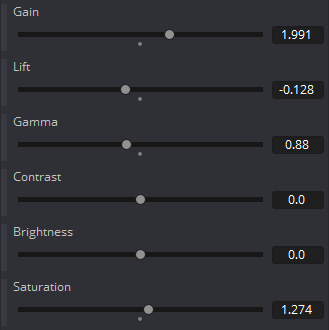
Adjusted tools in DaVinci Resolve 16:

Non-default parameter values in Lightroom:
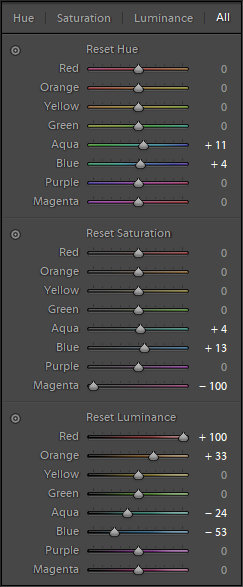 0
0 -

Hi,
Thank you for your request and suggestion provided.
There is a similar post on changing the color indicator of the tool once it was used for making some edits here.
I will also forward your comments and suggestions to the Product Management team.
Hopefully your feedback contributes towards a future version of Capture One.
1
Post ist für Kommentare geschlossen.
Kommentare
35 Kommentare