Can I make a double-click a shortcut?

If I'm in grid mode I want to double click an image and see it in a viewer. Can I make a custom shortcut for that? If not can I change the viewer shortcut to a double click?
-
Isn't that the standard already?
If the Viewer is hidden, if you double-click on an image in the Browser e.g. in Grid mode, then theViewer shows up and loads the image into it, the Browser goes to its predefined place e.g. left, right or bottom.
If the Viewer already shows an image, if you select a different image with a single mouse click in the browser, it swaps the image to the newly clicked one.
Or do you mean the separate Viewer component which opens with F10?
I don't think you can customize any mouse action in C1, only keyboard shortcuts.
I think there is 3rd software for Windows (I just forgot the name) which can be utilized to customize mouse actions, i.e. you can assign key strokes to, depending on the application running.
Have you considered using a gaming mouse for C1? I have bought one many years back, just for C1, and never looked back (I don't play games).
I customized the additional buttons mainly for editing and masking, and to slow down the speed of the mouse for precise masking or adjustments.
Here is my default profile (outside C1):

Here's my C1 profile:
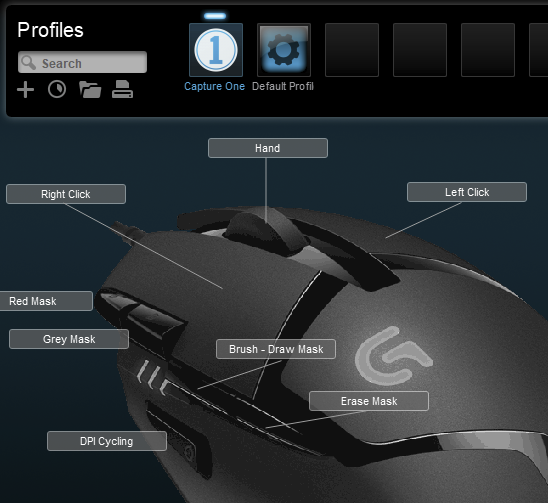
Hand is H
Red mask is M
Grey mask is ALT+M
Brush B
Eraser E
I configured the DPI cylcling button to switch between two different mouse speeds.
The buttons and the scroll wheel are silent, smooth and yet very precise (opposite from sloppy), best mouse I've ever had in decades.
regards
1 -
BeO,
Thanks for the reply. I don't want the browser to show during the double-click view. Yes I get a single image view from the grid mode but it loads the browser as well. In order for me to get rid of the browser, it takes an additional press of the V key to hide it. I'm looking for a faster solution. The closes I can get is to select the image in grid mode, then hit the V key twice or double click the image and then hit V key once. Ultimately I would like the browser available when and if I want it with hovering over the area like an auto hide. this would be the best for me but seems like the only thing that works with an auto hide is the top tool bar by hitting the F key. This brings up another question on how to get a full screen image. I mean nothing showing but the image. Thanks fo showing the mouse. Yes very helpful. I have one as well and an intuos 5 tablet. I'm anxious to try it out, and see how it performs. LR had a lag when using the spot clone or heal brush.
Thanks,
Steve
0 -
I have a tablet too, since a couple if months, and the right-hand mouse in my left hand, so the extra buttons are less useful now, I use the normal mouse buttons and the scroll wheel.
You might be able to configure a multi-keystroke for a mouse button? To show the viewer and hide the browser simultaneously...
Auto hiding the tools and full screen is possible with the Mac version only, it seems Windows is a challenge for the C1 team in this respect, so an auto hide browser is probably far away...
regards
0 -
Thumbs Up
0 -

Hey BEO, thought I would try to spend 10 minutes to work out why double click doesn't change from viewer to browser and it seems like this is an issue that's been going around for at least a couple of years...
0 -
unbelievable why this hasn't been fixed after all this time. If I close my catalog and re open the same one double clicking takes to full view. If I change catalogs nada. If I close and reopen the same bingo! go figure.
0 -
Steve, there are so many of these weird anomolies in the programme. There are so many little bits that don't make anyh sense, unless the developers are trying to piss you off.
Try the resize, then hit return and it automoves to the hand icon... An icon which appears to be of very little use at all.
0 -
Ooh, intersting. Opening and closing the session means that I can now double click to see the image in Viewer. Ok... That's interesting at least.
0 -
Double-clicking on a thumbnail in the browser always opens this image in the viewer, in all versions since v8 until 13.1.3 which I have used (so, not all versions in between). This suggests a bug in newer versions or incompatibilities with your current MS Windows operation system state. Maybe you "submit a request" (as a bug report).
"Return" key to end the crop: The hand tool is my goto tool. Just checked Affinity Photo, if you hit return key after setting your crop guess what tool is automatically selected, regardless of which tool was selected before the crop tool: Hand.
But you could submit a request or post a Feature Request in the forum for a configuration option...
0

Post ist für Kommentare geschlossen.
Kommentare
9 Kommentare