Horizontal Curves with Local Control
Implemented
I'd like to see an alternative mode of defining curves.
In addition to the usual approach in which a diagonal line (mapping input to output) represents the neutral setting, I'd like to see a relative +/- approach in which a flat horizontal line represents the neutral setting.
It should be possible to locally pull down the line to decrease the output and locally pull up the line to increase the output. It would be more intuitive to read such a line, in particular for the non-technically inclined. I personally have no problem with understanding the current approach and use it a lot but I still think looking at a modified horizontal line would be nicer.
Furthermore, control points should have local effects rather than affecting the curve globally. It would be nice to have the ability to pull out little bell-curve shaped hills and troughs from the horizontal line. For instance, pulling out such a dent in the shadow area (left hand side) should not influence the highlights (right hand side) at all.
Currently, one needs a lot of control points in order to restrict changes to one area, i.e., avoid that other areas are affected. Who really wants to change the shadows when adjusting some control point in the highlights? I think most people don't want that and yet currently they are forced to set many (neutral) control points in order to reign in the spline-based curve control.
The local hills and troughs of the horizontal curves should have control points for affecting their amplitude and their width (ideally even asymmetrically). Maximising the width (to reach the extremes of the input range, or just extend to the end of the next hill/trough) could mimic the current (smooth but poor) control.
This alternative mode of editing curves should be available for RGB, Luma, R, G, and B curves.
-
I'm not convinced! One of the benefits of the current diagonal line is that it makes logical sense: a graph showing Input values on the X axis and Output values on the Y axis. And, very importantly I think, it is the way the Curve tool appears in every photo editor I am aware of. I would be very reluctant to lose it in its present form, and it would be very confusing for Curves in Capture One to work in a different way from Curves in other software. .
Of course, there could be a case for an extra tool for adjusting tonal values in a different way, but we already have curves, levels, the HDR tool, the handles in the Colour Balance tool.
Some software (Photoshop Elements, I think, and perhaps others) has sliders for adjusting sections of the tone curve but I don't know whether that works well, not having tried it.
Ian
0 -
Ian, I didn't mean the "horizontal curve" approach to replace the classic one, that's why I wrote "alternative". I improved the subsequent wording to express that I understand that many users are used to the standard input->output mapping and do not mean to take this approach away from them.
While I agree that this traditional approach "makes logical sense", clearly my proposed alternative makes logical sense as well. Instead of showing a standard input-output graph, it shows the modifications made to a linear mapping. I maintain that is an approach that is more economic, intuitive, and natural.
I don't agree that an alternative way of showing curves adjustments would add to the tool set; I submit that it is just an alternative view on a tool that already exists. Users could indicate via the preferences which view they prefer, i.e., there would not be an additional tool.
I've used Lightroom extensively before I switched to C1 and often used the parametric controls for the tone curve. They are simple to use (just moving sliders instead of moving points on a curve), have local effects (their extent is limited to certain tonal ranges instead of affecting the whole range like moving a single point on a tone curve does), and often deliver what is needed.0 -
OK, I see. So do you like the sliders as available in Lightroom? (I could only remember that they were in Photoshop Elements. not being a LR user.) They strike me as a more attractive enhancement of the curves tool than the "horizontal" approach.
Ian
0 -
Thanks, Ian.
I'm not arguing in favour of the sliders (i.e., a parametric editing approach to the curves tool).The sliders are limited in what they can achieve and would overlap with many of the tonal adjustments that are already available (-> HDR tool & the colour balance tool).
I'd like free control over curves, just in a nicer way than currently available.
I'm surprised that you are not attracted by my vision of local adjustments to the curve. I trust that you know how to use the current curves tool well, but wouldn't you agree that it is tedious to having reign in the effects of single point adjustments so that they don't affect regions one does not want to affect?
If one wants to tweak the highlights using the curves tool, one is always forced to set a number of "identity" control points to the midtone and shadow region of the curve in order to prevent those areas to be moved as well.
My local adjustments (amplitude and width controllable separately) get rid of that. They could of course be implemented on top of the current "slanted line" approach but what would look like perfectly regular "hills and troughs" on a horizontal line, would look much less natural when being skewed by the current linear input->output mapping.
Note that the effective adjustments would be equivalent, I'm just talking about a different rendering and local controls instead of having to manage the somewhat unwieldy behaviour of the current spline-based tone curve.0 -
The idea of local adjustments to the curve I like well enough. It's the "horizontal" curve that doesn't appeal to me.
By the way, you probably know this, but just in case... There is a preset in the curves tool called "5 Point All Channels" which is just a quick way of getting it to add 5 control points to the curve for you. If you use that, you can pull around one part of the curve without the rest being affected - see the screen shot, where I have pulled it down at the shadow end and the curve in the top right has not moved at all. Also, if that is not fine-grained enough for you, you could create a similar preset of your own perhaps with 7 points or 9 points. (Apologies if you know all this. Not meaning in the least to be patronising.)
Ian
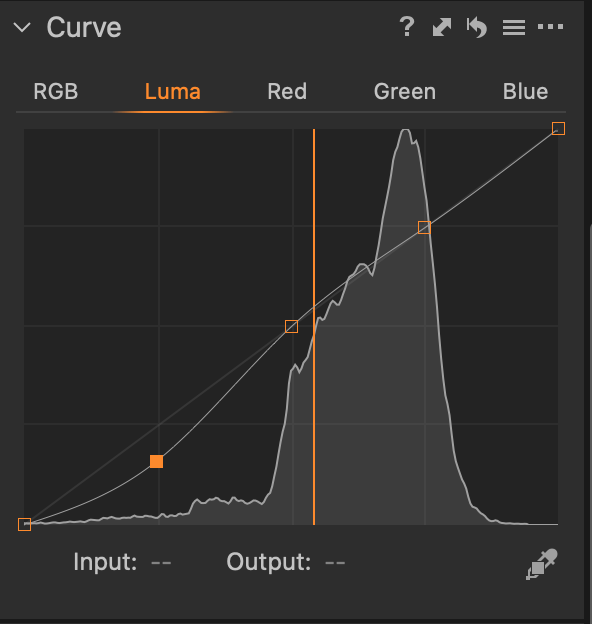 0
0 -
Ian, all good, I appreciate your input.
I knew about the presets but if I hadn't, I would have appreciated the pointer.
In my view these points don't help much. When one has to move them so that they get out of the range one is trying to affect, one has to manually place them exactly on the diagonal in order to avoid unwanted adjustments. At least creating "null effect" control points for pinning down the curve is easy by just clicking near the diagonal.
Just imagine, you could pull out the negative adjustment you made in your curve orthogonally from the curve and then would be able to adjust the width of that change to the linear mapping without ever affecting the highlights (and thus not being required to have control points in that area that attempt to pin down the curve in that region).
Right now, you have to wrestle with that one control point affecting both amplitude, width, and symmetry at the same time whenever you move it slightly
Furthermore, imagine the negative adjustment would appear as what it is: a negative (almost symmetrical) dent downwards in the shadow region, as opposed to the slanted slope it shows as right now.
The horizontal curve rendering would just show the perpendicular distances to the diagonal, taking out the necessary absolute part of the mapping. One would just see the negative and positive adjustments as what they are without that linear bias applied.0 -

Hi,
Thank you for your post and suggestions provided.
This feature request was forwarded to the Product Management team.
0 -
Thanks a lot, Lily!
0

Post ist für Kommentare geschlossen.
Kommentare
8 Kommentare