Capture One 20 for Nikon - File formats supported

Does the new "Capture One 20 for Nikon" support editing of JPG files from my Nikon S9100 and TIFF files from my Nikon CoolScan slide/negative scanner?
-

Well, it doesn't allow me to edit my tiff files from my D7100 exported from Lightroom. I downgraded to the Nikon version, but have a request to customer services to upgrade to Pro
0 -
Paul,
Thanks for the feedback.
So in Preferences, Image there is no option under Editing to enable JPEG, TIFF or PNG editing (see image attached) as in the Pro version?
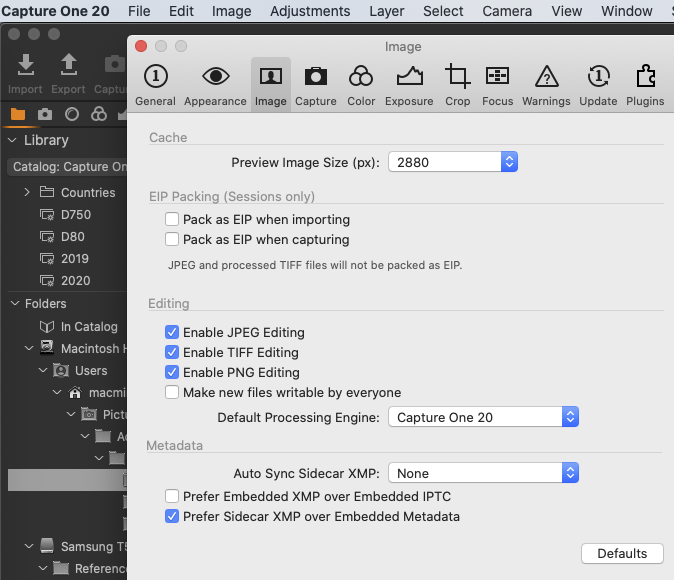
If so his is a real shame as the Nikon only version would have suited me fine!
0 -
Oh sorry, I take it back... I was conflating two issues...
The first one was that you can't edit a JPG from a non Nikon. I was under the impression this could be done, it was only off-brand RAW files that were forbidden.
I've just tried editing a tiff from my D7100 and it did work! However, the previous tiffs from my Nikon failed, not because of the file format or licensing, but because of their colour space. They were encoding as Grey Gamma rather than Adobe RGB. I've successfully edited a colour tiff from my D7100 and it works okay.
0 -
Paul,
Thanks for the clarification, from what you have found I think I should be OK.
I'll stick with my current PRO license until I need to upgrade and consider my options/cost again then.
0
Post ist für Kommentare geschlossen.
Kommentare
4 Kommentare