"Display Mask" preferences kept
Logged
can we get the "Display Mask" checkbox to stay checked or unchecked for every use of the refine or feather tool in Layers?
It is a pain to check it every time I use it in a layer.
The same could be said for the Luma Range tool
If your workflow requires you to see the mask, you will want to see ALL THE TIME. Checking the box every use is redundant
How anyone would use those tools without seeing the mask is beyond me.
-

I honestly didn't pay much attention to it until now since my default setting is "show mask only when dragging", but I just checked it and for me these settings keep persistent not only during the actual session with C1, but also after a new start
0 -

Ian,
Many people find that they just want to "paint" the effects and do not need to see the masks all of the time.
Now I'm not totally sure from your phrasing whether this annoyance in you view is specific to the functionality you mention and could go some other way in other situations.
So are you suggesting that, no matter what the general setting might be, when using the refine or feather functionality the mask should always display. Just wanted to confirm precisely were you are coming from.
I just ran a quick test and making sure i left the Mask displayed for an Adjustment layer I closed the session and then opened it again. (I had more than one session open)
I then selected a different image, created an Adjustment layer and observed that the mask was displaying just as it had been before I closed the session.
As far as I recall this is something that is stored in the UserConfig file (using Windows) for a session that is 'known' to C1 when it is opened. i.e. the session have been open and used before and the Userconfig file have not been replaced for any admin reason since then and so the settings persist.
In general, to the best of my recollection, this is true for all settings that can be established by use of a Keyboard shortcut - the last known state of that shortcut will be persistent so long as nothing happens that overwrites the value or replaces the file.
I assume the same is true for Macs as well - but it may not be.
0 -

Hi Ian,
Thank you for your post.
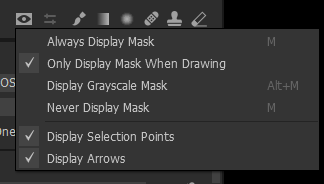
The checkmark in the Display Mask box correlates with the global settings. If you have chosen Always Display Mask or Only Display Mask When Drawing, the mask will be shown when using the Luma Range tool as well as when using the Refine Mask... or Feature Mask feature.
 0
0 -
I guess I’m asking for the checkbox to be Independant of the global settings.
I don’t want to see the mask unless I’m painting or refining it.
When presented with a check box within the dialogue box, why would the user make the Assumption that it’s tied to a different behaviour?
0
Post ist für Kommentare geschlossen.
Kommentare
4 Kommentare