Some ideas quoted to a response to a Support Request
Implemented
These a just a few of things that might inspire me to spend money on an upgrade:
1) Fix the basic catalog functionality. The catalog system should be able to easily and quickly handle as many as 200,000 images. I've got 60,000 images in my current catalog and it feels like I'm looking over a cliff waiting for it to explode. Having to wait the incredible amount of time it takes to load all the images when the "All Images" collection is selected is amazing. Why must the images be loaded to apply filters/search/ whatever?
2) Fix the exclude duplicates function on import. You actually admitted that was broken in a previous support request. More than fix it, make it useful as find duplicates means more than find files with the same name. Adobe has figured out how to identify duplicate images with different names, are you not smart enough to figure that out?
3) Fix this display of filters when the "All Images" category is chosen.
Here is a list of things that I'd like to see changed:
1) Eliminate the "Edit the primary and edit all selected variants" toggle. It's confusing and inconsistent in where and how it is applied. Any changes, metadata, image modifications, etc, should be applied to whatever "variants" are selected. This might reduce the unholy reliance that C1 has on "Presets". It's funny, it's evidently known to be an issue, as there are warnings at various places indicating the user is doing something which normally requires more than one image, but the toggle is set to off. H'mmm.
2) Have a user setting to allow for the automatic reset of the various image counters, either individually or all of them. This is a major pain to have to reset the image counter every.time.I.export.photos. Seriously
3) Allow C1 to be able to use neither sessions or catalogs. Acknowledge the fact that people use other products for their Digital Asset Management. Allow them to be able to easily utilize C1 as a well integrated part of their workflow. In my mind, what this means is if C1 is opened with a file name, C1 opens with that file being presented to the user with no further machinations.
4) Put the total number of images contained in folders in the folder view (or let it be toggled on and off)
5) Include output naming and output location in Process recipes. Don't make the user change the naming convention for every recipe
6) Give Windows users a scripting ability. This could help users deal with some of the "eccentricities" of C1.
7) Allow the user to select what metadata appears in the viewer.
Those are just a few of the things I've stumbled across in my usage of C1 over the past couple of months.
Have a wonderful day.
-

Totally agree especially your comment on absolutely useless exclude duplicates function.
Dave
0 -
Big veto on removing the toggle switch to edit only the primary variant!
Just leave it alone in your preferred state and remove it from the customizable tool bar.
A bit unclear: What exactly is your point with the output location for processing and the display of filters when All Images is selected?
The other points seem to be useful desires...
regards
1 -

"Big veto on removing the toggle switch to edit only the primary variant!"
Yes, same here.0 -
@Christopher
I was surprised to see that your list didn't include the desire to have the ability to overwrite existing output files.
C1 currently renames files to avoid overwriting but personally I never want to keep the old ones and if I did, I'd copy them somewhere else first.
Given your wishlist (e.g., regarding counters), it would have been plausible for me to see a point about allowing the replacement of output files with new versions rather than adding to what is already in the output directory.0 -
Yes, Class A,
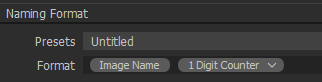
C1 currently behaves almost as the 1 Digit Counter token (difference is that even the first image gets a number).
If the default behavior would be to overwrite existing files then one could use this token to (almost) mimic the current behavior.
 0
0 -
BeO,
one couldn't really mimic the current behaviour with an image counter because whenever the image counter is reset, overwriting would occur. Currently, overwriting is never possible and another design should still allow this option.
However, there could be a "Copy + 1" Token that looks at the "overwriting generation" of an existing file (by inspecting the output location), increases it by one, and then writes a file with an updated generation number.This automatic generation increment and addition is the current behaviour and it could be made available via a token, instead of being the default behaviour.
Personally, I don't mind how the current behaviour is preserved in an improved design -- through a preference setting or through the above special token -- I'm just very keen on having the option of letting C1 overwrite disposable output files.0 -
Hi Christopher,
Thank you for feedback on Capture One - this is always welcomed and encouraged among our users and we appreciate the time you've taken to contribute towards the development of the software.
I have forwarded your comments and suggestions to our Product Management team as something to consider in a future release.
Whilst we cannot comment on future releases, we take all suggestions on board and hopefully your feedback contributes towards a future version of Capture One.
0

Post ist für Kommentare geschlossen.
Kommentare
7 Kommentare