Holding ALT for source spot does nothing

I've been following some tutorial vids and I've had this issue come up for the second time. The vid tells me to create a new clone/heal layer, choose the brush, and hold ALT to select a source, I do that but don't get the special brush marker. When I left-click it creates a new layer with some kind of adjustment. I guess my ALT button doesn't seem to be working? Rather frustrating.
Also, while we're at it, I hate the layer system of adding clone/heal fixes! I've read many other comments and found out I'm not the only one feeling this way. Adobe Bridge does it so well and easily. CO should really take a note of it.I don't need everything in a layer.
-

OK, to create the new Clone or Heal layer just choose a brush. If you choose to create a Heal layer just choose the Heal brush (or press Q) and start brushing or, in the case of Clone layer, choose the Clone brush (or press S), press alt and click on the source point and start brushing.
0 -
Exactly what I did, the special brush marker with target lines doesn't appear that's supposed to let you choose your source point. When I do left-click while holding the ALT button, it creates a new layer like a regular brush.
I don't think my ALT button is being registered.
0 -
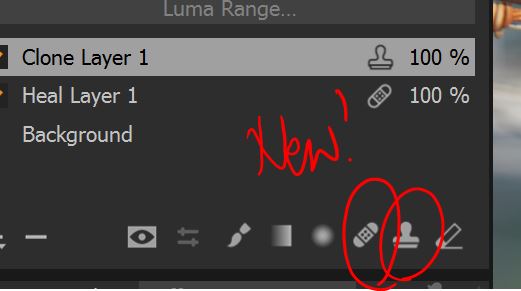 Well, I solved the mystery. Turns out the videos were (are) out of date since these two new brushes (in version 20) are what the old regular brush was. I thought it was a bug that nothing was happening when I was holding ALT, because they're actually two new brushes now. I just started using C1 so I was a bit confused by some of the layout elements.
Whew, I feel better now : )
0
Post ist für Kommentare geschlossen.
Kommentare
3 Kommentare