Import jpeg+raw pairs into a session capture folder renames the jpeg file.

I couldn't find a discussion on that topic and wonder if its the expected behavior. I'm shooting raw+jpeg and I'm new to CaptureOne. I'm importing from a local folder into the session capture folder via the import dialog. In the Naming section 'Pair RAWs and JPGs' is enabled. When importing all files the jpeg are renamed as if it were handled as duplicates and also there is an xmp file for both the RAW file and the renamed JPG file after the import.
What I would have expected by pairing jpeg+raw is to have the names being kept the same and also have only one xmp file for the jpeg-raw-pair.
Am I missing some settings?
Thanks and best, Manuel
-
For completeness, this is what I end up with after the import in the capture folder...
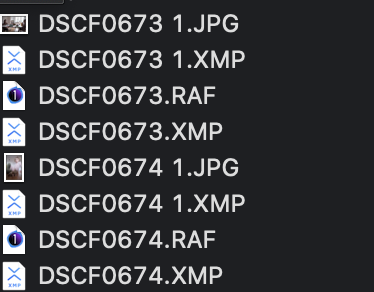 0
0 -

About the XMP files: if they are created by Capture One, you have set the metadata sync settings to Sync. Set it to Load or None and Capture One will stop creating these XMP files. Note that the Sync option is not the default. It is set by the user.
Second, regarding naming. There is a confusion to clear up. The naming paring of raw+jpeg only applies when you rename during import (or capture tethered). Looking at your file names, you do not rename. I suspect you have the [Image Name] token in the Naming field. But... maybe there is a bug.
It seems the JPEGs are imported twice by Capture One (not you, I suspect). I suggest you switch Pair RAWs and JPGs off.
Finally, the best advice I can give is not to shoot RAW + JPG but only RAW. If you really need the JPGs, do not import them. This is an easy task for Capture One through global filtering: View > Global Filters > Always hide JPEG.
0 -
Thanks Paul, I'll play with the import settings to see when it happens and when not. I'll also check with catalog imports because I think it only happens now that I use sessions before moving the final results into the catalog. But too little testing to say for sure and will report here when I have more insights on this. The sidecar is set to None. The first xmp might not be created by CO but from another app I use for sorting and tagging before I go into CO. I'll do some more testing on this as well....
btw. for raw/jpeg/raw+jpeg: I have a workflow I'm happy with to handle jpeg and raws but just don't want them to be renamed and keep the same name (with a single xmp file). Let's not start a discussion if jpeg or raw or both and everyone should decide which one to go for. Its not something I want to change :).
0 -
Interesting additional note: When I copy all images manually to the capture folder (which would be ok for me) its all good. But as soon as I select images and let CO copy them to a selects folder the same renaming mess happens again.
0 -
Also, another thing to highlight, I use the same settings with a catalog where the import dialog does not rename the files and keep the same name for jpg and raf files. In the import dialog I have it set the naming format to 'IMAGE NAME' in both cases. The session import renames it as mentioned above while the catalog import doesn't. Also, in both cases the 'Pair jpg+raw' is enabled.
0 -
Thank you for your additional information. I shot a few images with the camera set to RAW+JPEG and imported the images from either the card or from a folder on my internal disk into Capture One, session, the Capture Folder.
I could not reproduce the issue. Note that I am on the latest version, CO20, built 13.1.0.172.
Apart from contacting support, my (probably last) suggestion, in this case, is to delete the preference file. Note that since the 13.1 build, the preferences file is now called com.captureone.captureone13.plist.
For the 13.0.x build, the preferences file is com.phaseone.captureone13.plist.
1 -
Ok I think I finally figured out the issue. Indeed when importing from an SD card or from a folder without xmp files everything is fine for imports into Sessions and Catalogs just as Paul mentioned. However, I'm using PhotoMechanics for culling and have it setup that it creates a single xmp file per jpg/raw pair and this messes it up (doesn't matter who creates the xmp btw. and also if I setup the usage of a sidecar file in CO you end up in the same trouble). As soon as an xmp file is present (which has the same filename as the raw and the jpg and just a different extension), CO imports rename either the raw or the jpg file. This also happens if I turn of metadata sync for CO completely and just the presence of the file leads to the files being renamed.
In my opinion that is a bug and I'll try to submit a bug report. Is the best place to submit bug reports the `submit a request` form or is there a dedicated place for it?
0 -
Interesting. I was playing with Capture One and Photo Mechanic as well, yesterday evening, and XMP on JPG+RAW images. Now I did the metadata sync from Capture One and something went wrong. This is another scenario, but, the bottom line is that if you have a JPG+RAW image pair plus an XMP file of the same name, it is impossible to decipher to which image file the XMP file belongs.
What I try to say is that the combination of JPG+RAW and XMP is prone to error. Photo Mechanic has a setting for this, where you can tell the program the XMP is for either the JPG or the RAW.
Capture One does not have this, so it has to come up with a solution during import into a session: duplicate. This duplication is typically a scenario where you could ask yourself, it this a bug or a feature?
0 -
I understand and see your point but disagree about bug vs. feature. If there is no action and no dedicated setting for it its a missing feature or unhandled situation. Having inconsistent behavior is a bug. Having a jpg or raw file randomly renamed (sometimes the raw file and sometimes the jpeg gets renamed) is certainly a bug. If it would be a feature, the xmp file would also be attached to either of them and the other one gets renamed with the xmp information duplicated from the original one. If an application simply would ignore it I would expect to ... well ignore it and just take the information it has at hand. Also, when the setting 'prefer sidecar over embedded' is disabled it certainly shouldn't duplicate and rename the files...
I also re-tested the catalog situation. There, if I import files after culling and labeling with PM the files get renamed. On the other hand, when I import the files in CO before that (no xmp files present therefore), everything is fine. One thing that just comes to my mind is to check if PM can work with purely embedded metadata for RAF and JPEGs. If that is possible... problem solved (I hope). Otherwise, I might need to avoid Sessions although I really liked it as a feature for current projects and then move it to a catalog when all is done...
So.... some more testing on how to best work around this situation and I'll come back with what I ended up doing so folks that have similar issues get a better picture of what is possible and what is not.
And I'll still send out a bug report (or feature request? ;) )... but being a software engineer myself I totally understand that this is not highest priority and some of those need to be ignored :D.
0 -
Yet another update here. I tried to convince PM to embed all metadata into the files but unfortunately it seems not supported for RAF files and it always creates an XMP. Interestingly this works well with CO and for JPEG it takes the embedded information and for the RAF files it takes the sidecar files. I might consider simply changing my workflow to either only use catalogs or to simply rename the files during import so CO doesn't end up doing it when a file gets moved and you have no control if the jpg or the RAF file is renamed. For other camera brands it might not be a problem though and simply enable that PM embed metadata into raw files and all should be good.
0
Post ist für Kommentare geschlossen.
Kommentare
10 Kommentare