Using Tokens for exporting images

My process for developing HDR, Panos, or Stacks is to export variants to a folder, process them in Affinity Photo, export the result back to the same folder, and then import back to COP. It would help me a lot if I could create a subfolder for the export into which all files to be processed as well as the resulting image would go so that each one of these is separate from the others. Having to sift through one folder of files that have been output for multiple panos is confusing. So my question is this: what tokens can I use that will output multiple images to the same folder but be different for each set of such images? I suppose I could add keywords to each image before processing, but that seems like a lot of extra work. I've tried adding current time but if the minute changes while exporting, I get two folders. Conversely, if anyone has a better workflow for such processing, I'm all ears.
-

You can define multiple recipes and then process any number of images through multiple recipes at the same time.
I have two recipes that I use most frequently, I assign the folder name to 'Output Location' so I only have to specify it once. One recipe has no changes to the name but the second recipe uses a smaller output file size and appends '_thumb' to the image name. Tokens can be used in place of plain text for the image append
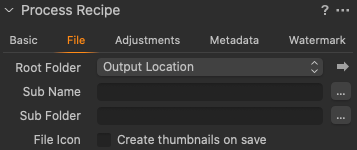
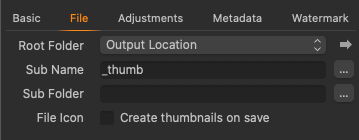
Then I select both recipes and hit Process to export them
0 -
I appreciate the prompt and helpful replies to my query, but it seems I did not explain myself very well. Let me try again. I have a folder for containing the multiple variants needed for construction of things like HDR, panoramas, and focus stacks in Affinity photo. When I export the files for the first one, all is good, but on second and subsequent ones, the number of files in the folder can get large and this forces me to remember what files I need for the latest one. You could argue that I should empty the folder between each use and I suppose that is right, but it doesn't happen (as I know from experience). It seems to me that a simple solution would be to have COP create a sub-folder for each instance that is uniquely named so that I can just go the folder (one of maybe five or six folders, not one of 20 or more files) and continue the processing. I could make different output processes but that would require that I remember to change processes for each subsequent set of images. I may as well simply remember to empty the folder each time. Ideally, I'd like a token that would let me name the folder after the primary image in each selection set (is there one and I've missed it?). This would be unique and easily identifiable. But putting an image name in as a token means it changes for each image and then I get one image per folder. I'm not trying to get the files in two places at once and having a folder named for the recipe simply means that each time I use it I'll get more and more files in that one folder and I haven't gained anything (unless I'm dense and missing the point). Does this clarify my conundrum?
0 -
I don't see an option to use the first image name
Instead of putting anything in the Sub Name field. Use the Sub Folder instead
So set Output Location to your Root Folder where you want all the Sub Folders to be;
Set Sub Folder to this:
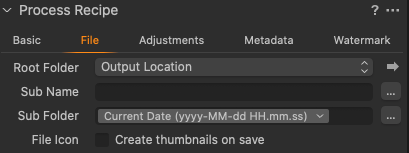
This will create a new sub folder each time it is run.
The time stamp is based on when the Process is run , so if you select multiple images and it takes 20 seconds to export then there will be one folder with the time stamp from when you hit Process
Next time it will create a new Sub Folder called , ie 2020-06-11 HH:MM:SS etc.
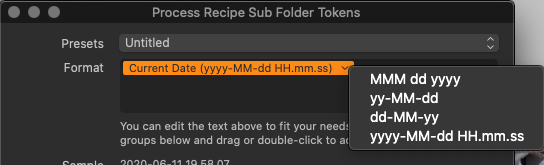
If you want to run several Processes during a prolonged session but you want them in one folder then just use the DATE options from the drop down menu in the selection pane
 0
0 -
I initially tried something very like your suggestion. I used the current time as HH-MM. However, I was confused when I exported to it once for several selected files and got two folders labeled a minute apart with only one file in the latest folder. This is what prompted my question. Perhaps this is a bug in the export dialog. I, in fact, do exactly this when I output final images with a process recipe and it works just fine. I find using the export option rather than running an output process to be easier for this purpose. I right click on one of the images and the dialog pops up and it remembers what I did last time (which is alway the same since this is all I ever use this for). I could use an output process for this but I'd then be having to switch recipes every time.
0 -
I have found a work around until a better idea comes along: I use the token that inserts what's in the clipboard. I can now select the name for the primary image, go the export dialog and go. This creates a folder with the desired name in the desired place. I'll also experiment with the time token again to be sure.
0 -

Maybe use the Sub Name token instead, you would have change it every time you process a new batch of files but you would be able to name it what ever you want and is relevant to the set of images.
0
Post ist für Kommentare geschlossen.
Kommentare
6 Kommentare