Can't import from card reader or camera

Hi Capture one 10.1 i can't import directly from the camera or a card reader i have to move the image 1st on a local or Usb disk to be able to import.
any idea how to solve this?
Thanks
any idea how to solve this?
Thanks
0
-

As far as I know direct import from the camera is not supported. This question has come up quite a lot so a search in the forum posts may provide more information.
There sold be no problems using a card reader (assuming windows is OK with it) if you can import the files from a disk or a USB stick.
Have you correctly identified the folder on the card in the reader?
If so and still nothing happens I would try another reader and the also the same reader with a different application.
Also start a Session and navigate to the folder on the card in the card reader and see what happens. ( I assume you have a PRO version active. If not the session concept may not be available to you.
HTH.
Grant0 -

Yes, importing directly from the camera is not supported in most cases (and in any event it's a better idea to use a proper card reader). That being said, please create a support case via the link in my signature and we'll see why the card reader images are not being imported. 0 -

Not supported? When I attach my Olympus to my PC C1's import dialogue appears and shows the correct drive letter. So far so good. But the images I see is a mix of new photos and some from the last import (which no longer exist on the sd card). I can solve this issue...just reselect the drive letter for import.
The import is buggy but it's basically working.
This feature is a absolutely fundamental feature and should definitely be supported...and bugfree.0 -
I suspect your computer is seeing the card in the camera as a disk and is then simply offering you any options that are registered with Windows to deal with the file types (by file extension identity) that it has found.
That in no way guarantees that the applications offered will be able to undertake the related action.
In fact the file extension does not necessarily mean that the file is readable by an application.
The fact that you see previously downloaded files that should no longer be indentifiable on the card rather suggests that what Windows is presenting to you is not what one might expect based on how it is presented on screen.
Grant0 -
I'm really sure that C1's import module is buggy. That's not a Windows-thing because other software (Lightroom etc) has no problems with that workflow.
Btw...I've NEVER seen such problems on Windows Computers before.
I'm new to C1 and I hope this software is not full of bugs (I've found two in the first 2-3 days).0 -
When you say you cannot import from a card reader can you explain a little more?
C1 expects you to identify a Folder (not a file) and will then show you the files in that folder and any sub folders that may also be populated if you have ticked the "Include Subfolders" box.
Are you using a catalogue or sessions as the the basis for your digital asset management?
Grant0 -
@SFA and @NN635817582423602042UL
thanks for the answers, i will test with another card reader, (was using the one integrated to mu computer) if same issue still there i will open a support ticket as per your recommendation.
Thanks0 -

I'm having the same issue. Windows 10.Capture One 20 Pro. Build 13.1.3.13.
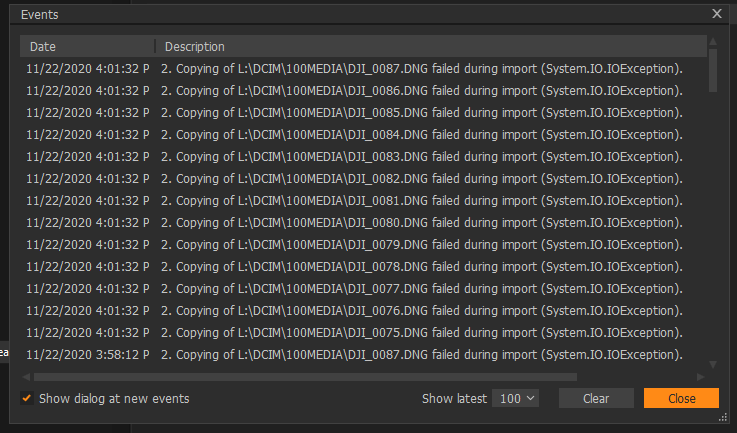 0
0 -
Actually, I just figured out that Capture One WILL LET ME as long as my capture folder in NOT part of my Google Drive. Maybe some sort of permissions issue? Anyone else noticing this?
0
Post ist für Kommentare geschlossen.
Kommentare
9 Kommentare