Noise Reduction sharpens image?

Hi all,
So for the longest time I've been noticing that skin on female subjects (at default C1 settings, no adjustments) tends to look somewhat "grungy" and rough when compared to what I see in Lightroom with the same images. Today, after a bit of experimentation, I discovered that the default Luminance setting of 50 in the NOISE REDUCTION panel seems to be the culprit - it actually has a SHARPENING effect in the image!
Once I set Luminance to 0, skin looks much better, doesn't have that "crunchy" look to it and has an overall smoother tone.
I'm a bit puzzled. In all other image editing software I've used, increasing Noise Reduction Luminance setting will generally BLUR detail, not enhance it.
Is this the intended behavior in Capture One? Most of my images are taken at ISO 50 or 100 and there isn't much noise, so all Luminance does is add unwanted artifacts and deteriorates image quality.
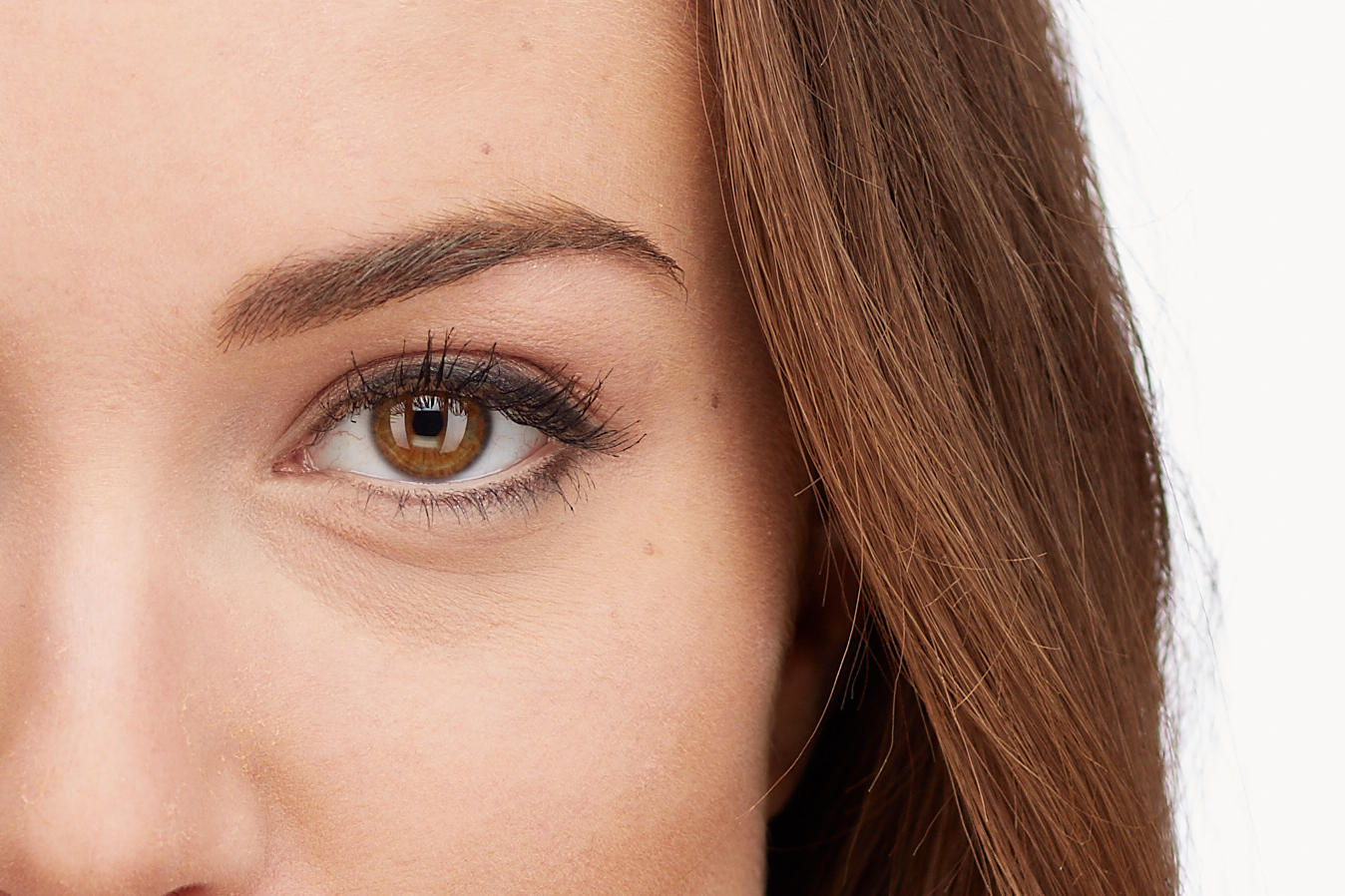
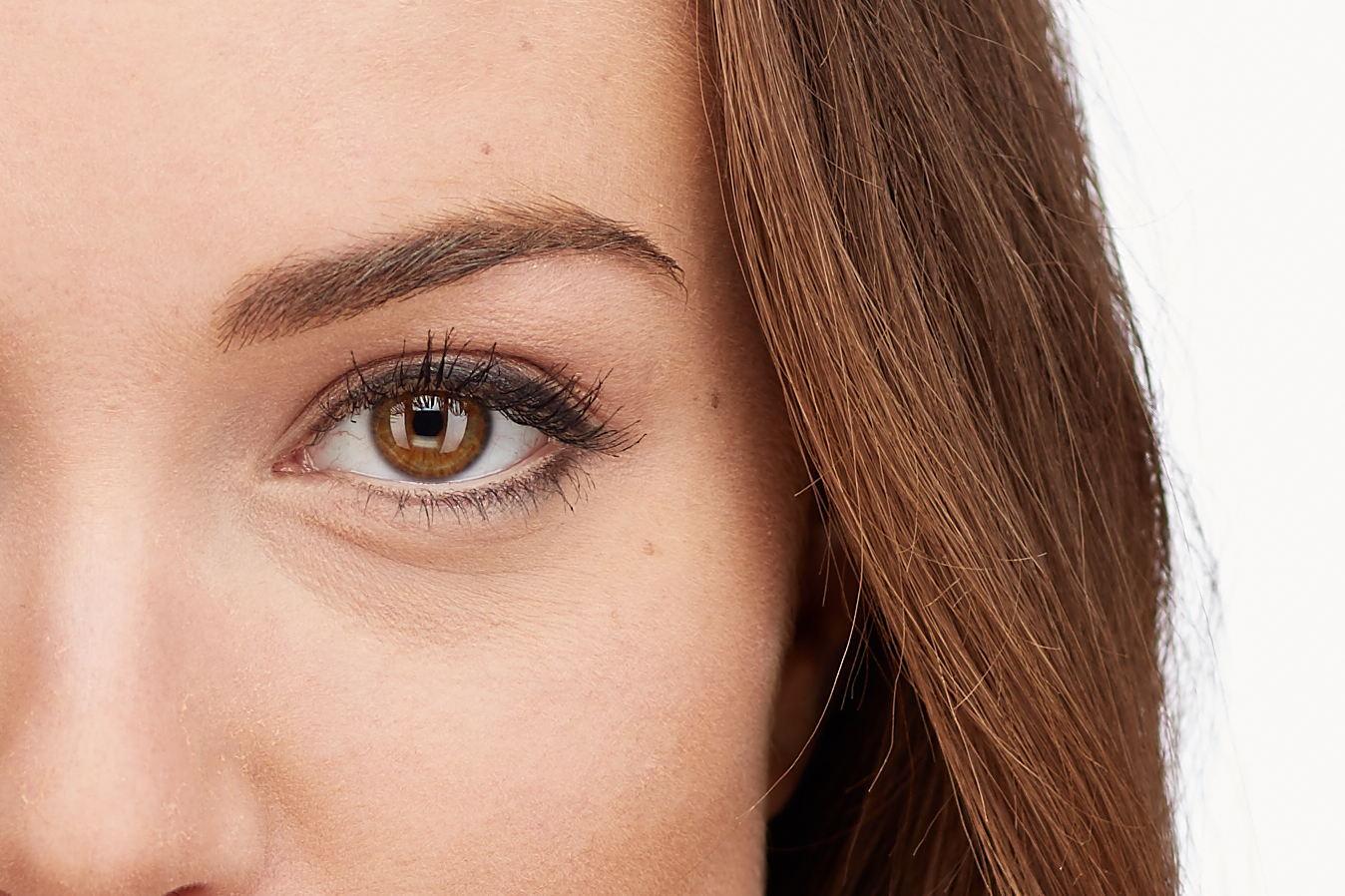
Here are two crops of the same image, the only difference is one has Luminance set to 0 and the other to 100. (download these and toggle between them to see the difference).
http://u.cubeupload.com/russkny/C1NRLum0.jpg
http://u.cubeupload.com/russkny/C1NRLum0.jpg
http://u.cubeupload.com/russkny/C1NRLum100.jpg
http://u.cubeupload.com/russkny/C1NRLum100.jpg
Let me know what your thoughts are.
Best,
Russ
So for the longest time I've been noticing that skin on female subjects (at default C1 settings, no adjustments) tends to look somewhat "grungy" and rough when compared to what I see in Lightroom with the same images. Today, after a bit of experimentation, I discovered that the default Luminance setting of 50 in the NOISE REDUCTION panel seems to be the culprit - it actually has a SHARPENING effect in the image!
Once I set Luminance to 0, skin looks much better, doesn't have that "crunchy" look to it and has an overall smoother tone.
I'm a bit puzzled. In all other image editing software I've used, increasing Noise Reduction Luminance setting will generally BLUR detail, not enhance it.
Is this the intended behavior in Capture One? Most of my images are taken at ISO 50 or 100 and there isn't much noise, so all Luminance does is add unwanted artifacts and deteriorates image quality.
Here are two crops of the same image, the only difference is one has Luminance set to 0 and the other to 100. (download these and toggle between them to see the difference).
http://u.cubeupload.com/russkny/C1NRLum0.jpg
http://u.cubeupload.com/russkny/C1NRLum0.jpg
http://u.cubeupload.com/russkny/C1NRLum100.jpg
http://u.cubeupload.com/russkny/C1NRLum100.jpg
Let me know what your thoughts are.
Best,
Russ
0
-

That is quite the difference. Looks like sharpening or clarity has been applied, not noise reduction reduced.
Using using Capture One version 10.0.2.33 I tried this with a D800 NEF and I did not experience the same thing that you are. Moving the Luminance from 50 to 0 increased the sharpness ever so slightly, as to be expected.
However, I tried this same thing with a 5Dmk III CR2 and moving the Luminance from 50 to 0 reduced the sharpness, like you are experiencing, though it is ever so slight and not anywhere near as drastic as your example.
What camera and version of capture are you using? Is your example on an otherwise unaltered photo, I notice the more contrast that is applied to the image the more noticeable the Luminance difference makes so I wonder if another specific setting is somehow at play.0 -
Hi cdc,
Thanks for posting.
Yes, the difference is very noticeable and not acceptable, especially for skin. The reason it's more noticeable in my examples is because they show the difference between luminance setting of 0 and 100, not 0 and 50. Still, setting of 50 is bad enough that I would rather not use it at all. This is certainly not the way I expect noise reduction adjustment to behave.
My RAW files are also from 5D Mark III, and I'm using the latest version of C1 (10.1.2.26).
It sounds like your Nikon RAW files are behaving correctly though? This is very odd. I found some old Nikon D40x NEFs on my computer, and they seem to exhibit the same issue. It does look as though a clarity type effect is being applied.
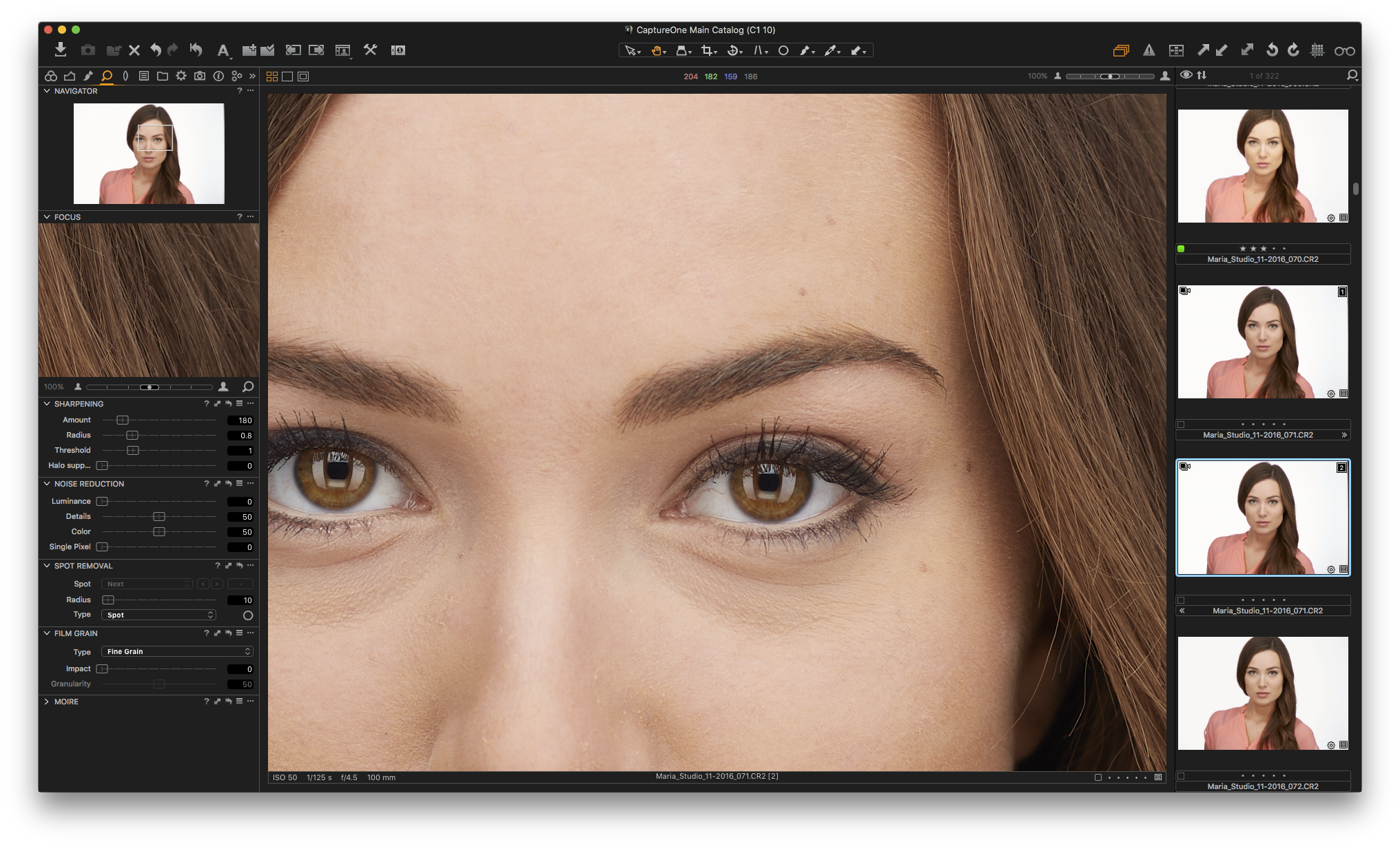
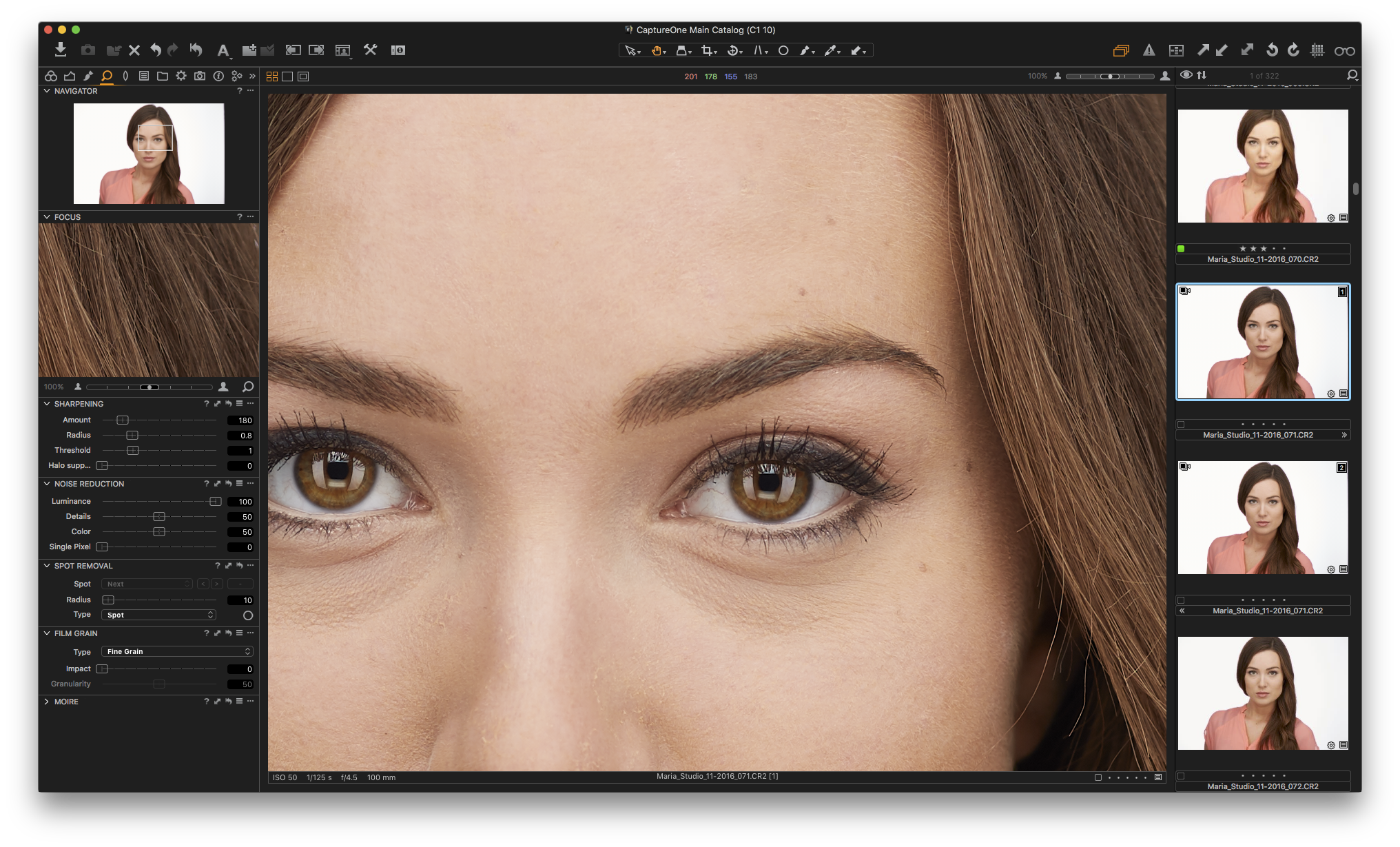
Here are two screenshots of the same image with no adjustments, the only difference being luminance is set to 0 on one and 100 on the other.
http://u.cubeupload.com/russkny/C1NR0.png
http://u.cubeupload.com/russkny/C1NR0.png
http://u.cubeupload.com/russkny/C1NR100.png
http://u.cubeupload.com/russkny/C1NR100.png
Regards,
Russ0 -

This is by design, and part of the default look. What you see is not technically sharpening, but a bit of clarity.
Remember you can do a per camera default, so for each image you import from your camera, you can set the noise parameters to what you like instead.0 -
[quote="Christian Gruner" wrote:
This is by design, and part of the default look. What you see is not technically sharpening, but a bit of clarity.
Remember you can do a per camera default, so for each image you import from your camera, you can set the noise parameters to what you like instead.
So, Christian, to clarify... are you saying that when you increase noise reduction, Capture One automatically increases clarity to compensate for the reduction in detail that noise reduction would cause?
ian0 -
[quote="Christian Gruner" wrote:
This is by design, and part of the default look. What you see is not technically sharpening, but a bit of clarity.
Remember you can do a per camera default, so for each image you import from your camera, you can set the noise parameters to what you like instead.
Can't say that I'm a fan of this default NR approach. I really dislike what this clarity effect does to skin. I would much rather have NR luminance only do that, reduce grain noise, and have separate controls for local contrast/clarity.
Is there a way to negate this clarity effect? Maybe dial in negative clarity? And if so, how much negative clarity to dial in?0 -

What if you turn down the "Details" setting in the Noise Reduction tool? 0 -
I did try that, but could not see any perceivable difference with the Details slider all the way down. Luminance slider still adds that clarity effect just as much. 0 -
You say that most of your shots are at base iso in that case you can just put luminance to 0 as default, and thus get rid of the effect all together. 0 -

As far as I am concerned, I always import pictures with preset values of NR and sharpening to zero. I adjust (increase) these settings when necessary, depending on my tastes, the targeted result, and the image. 0 -

[quote="russkny" wrote:
I did try that, but could not see any perceivable difference with the Details slider all the way down. Luminance slider still adds that clarity effect just as much.
Russ,
Looking at your screen grabs I can't see very much of a difference (or indeed any difference) at all but I assume it may be different on viewing files, in different screen, different browser, etc.
However, as Christian has observed, at base ISO I would not expect there to be much of a need for NR and I don't see any in the most likely places in your shots - which is, of course, very good news!
Grant0 -
Hi Grant,
You would need to download files locally and swap between them, then you'd see that the difference is quite drastic and obvious.[quote="Christian Gruner" wrote:
You say that most of your shots are at base iso in that case you can just put luminance to 0 as default, and thus get rid of the effect all together.
That's correct, Christian, pretty much all my shots are at base ISO, so there isn't any noise that I can see. Perhaps this added clarity effect works better on images taken with high ISOs.
That's what I ended up doing, saved NR defaults for my camera with luminance at 0. Still, it would be nice if this clarity effect had a separate control.
Regards,
Russ0

Post ist für Kommentare geschlossen.
Kommentare
11 Kommentare