Bug reports

Hi guys!
Reporting a bug. Capture One 12 Win.
I'm left-handed mouse user, so bug with left-handed mouse in Color Balance tool. When double clicking on Saturation or Brightness controls with right mouse button resetting them "to zero" doesn't works. It works with left button instead. I think you just "forgot" that user can be left-handed 😄 In Capture One 11 this was ok.
P.S. Capture One is a great tool, especially in case of color corrections, but whole product really not ready 😕
I'm still using Adobe LR because of two meaning (for me) pros: good lens support, and masking control in Sharpness tool.
Reporting a bug. Capture One 12 Win.
I'm left-handed mouse user, so bug with left-handed mouse in Color Balance tool. When double clicking on Saturation or Brightness controls with right mouse button resetting them "to zero" doesn't works. It works with left button instead. I think you just "forgot" that user can be left-handed 😄 In Capture One 11 this was ok.
P.S. Capture One is a great tool, especially in case of color corrections, but whole product really not ready 😕
I'm still using Adobe LR because of two meaning (for me) pros: good lens support, and masking control in Sharpness tool.
0
-

[quote="NNN636388437770639919" wrote:
Hi guys!
Reporting a bug. Capture One 12 Win.
I'm left-handed mouse user, so bug with left-handed mouse in Color Balance tool. When double clicking on Saturation or Brightness controls with right mouse button resetting them "to zero" doesn't works. It works with left button instead. I think you just "forgot" that user can be left-handed 😄 In Capture One 11 this was ok.
P.S. Capture One is a great tool, especially in case of color corrections, but whole product really not ready 😕
I'm still using Adobe LR because of two meaning (for me) pros: good lens support, and masking control in Sharpness tool.
This being a User to User forum with no official technical support I would suggest you create a Support Case and register you problem report and suggestions directly in order to obtain personalised responses.
HTH.
Grant0 -

Have a problem. it wont start for me. have tried unistall the program and installed it again, it does'nt work for me. it wont start up anymore, it work fine one time then when I was to start the program later it just wont start.
tested and download capture one 11.3.1 and that one worked but not version 12 for me0 -

[quote="NNN636791211828885711" wrote:
Have a problem. it wont start for me. have tried unistall the program and installed it again, it does'nt work for me. it wont start up anymore, it work fine one time then when I was to start the program later it just wont start.
tested and download capture one 11.3.1 and that one worked but not version 12 for me
Contact support at0 -

bug report:
CaptureOne 20 PRO, build 13.1.0.162
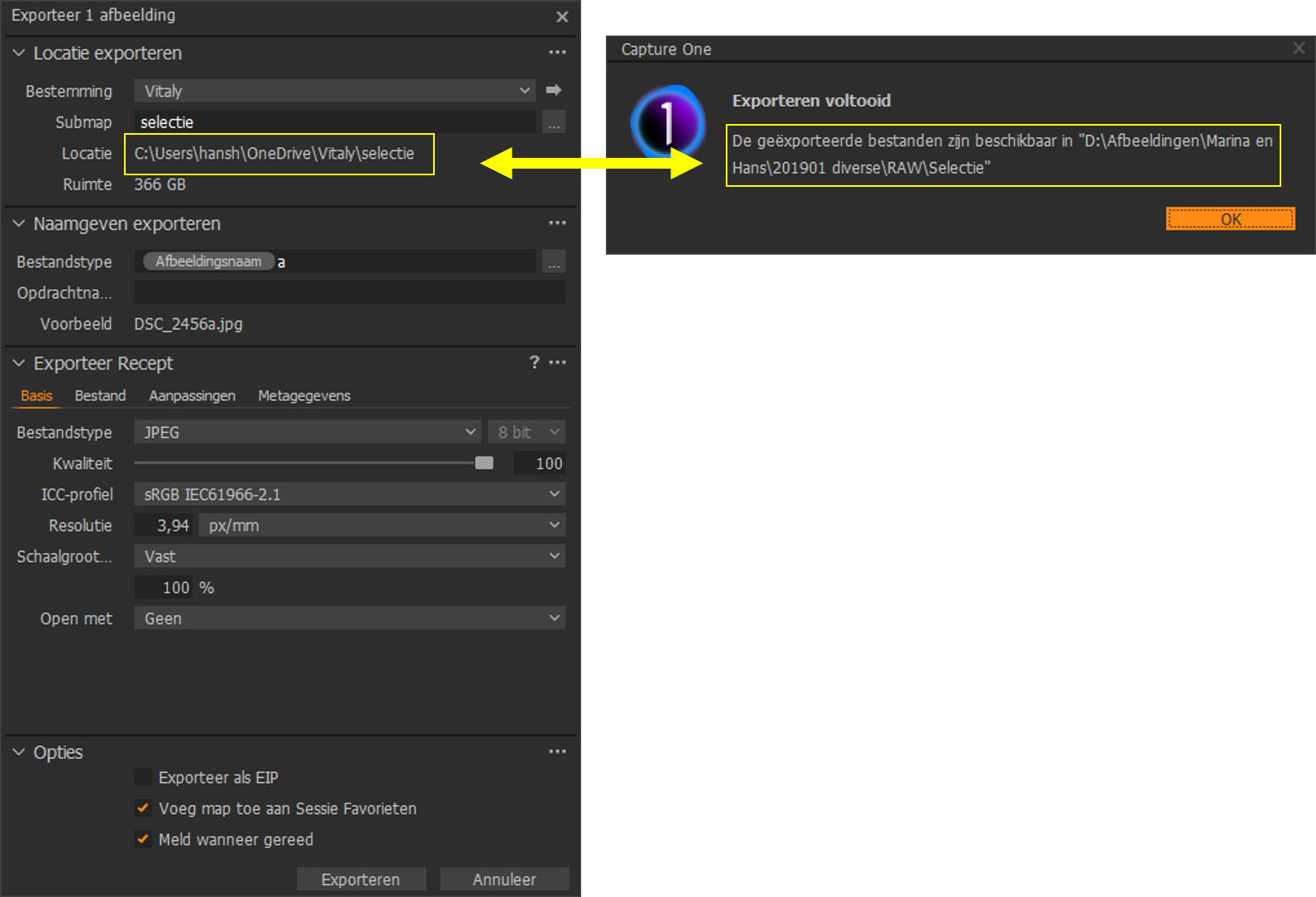
when I want to export a picture and I set the export location, captureone ignores that and puts it in the original directory. see picture.
 1
1 -
Hans Ham,
What you describe is a very common user error. I have three tips for you.
First, under Export Recipe (Exporteer Recept), File (Bestand) tab, check the Root Folder (Hoofd map). You probably see the export path. Change this to Export Location (Export locatie).
Second, keep your software up to date, in particular, if you suspect an error. There have been four maintenance updates, being build 13.1.4.3 (Windows) the latest.
Last, post in the Capture One 20 subforum.
Let us know if you still have questions.
0
Post ist für Kommentare geschlossen.
Kommentare
5 Kommentare