Importing images from Photomechanic

I am using a Mac with Nikon capture 1 express and I cannot import images from P/M into Capture 1.
Can someone please tell me how to do it?
Thanks
-

> Can someone please tell me how to do it?
Probably, at least if you first describe your import steps and where it fails. Does "Mac" mean "Mac only" or is storage outside the Mac cabinet involved?
As far as I know, there is no such thing as "import from Photo Mechanic", in your case C1 needs to import directly from image storage (disk, memory card reader, camera...)
0 -
I download my images from my Z6 into Photomechanic. When I hit E on an image it can be opened in NX-D or Affinity but it won't open in Capture 1.
I am using a Mac with high Sierra.
Thanks for replying.
0 -
As you are using an Express version of Capture One, you must be using a catalog not a session. Catalogs can't just open images - they have to be imported into the catalog first. Neither NX-D nor Affinity Photo use a catalog system, and they can just open individual images, as can Photoshop. You would find the same issue with other catalog-based apps, such as Lightroom Classic, I think.
I haven't ever used Photo Mechanic, but I understand you can tag images. I suspect your best approach is to tag the images you want to deal with in Capture One then import the tagged images into your Capture One catalog.
Several users who participate here use Photo Mechanic, I think, so you may receive suggestions about how best to use the two apps together, or you could try searching the forum for posts mentioning Photo Mechanic.
Ian
0 -
"Edit with" in Photo Mechanic is not quite the same as doing a C1 import
If I got this right, you ("limey") also posted the question in the PM support forum. Do you mind fixing your name here in the C1 forum so your posts may stand out from those in the "FirstName, LastName" crowd? Further, I believe your question has been answered several times in the PM support forum (where "limey" registered in 2008), you should be able to find useful information there.
I occasionally do "Edit with Capture One" in PM, but it does not quite fit my workflow so I tend not to. Moreover, I use C1 in session mode which I think simplifies things for me, including "Edit with Capture One" from PM and other software. The Express version of C1 are Catalog mode only, no? Or does C1 Express for Nikon support Sessions?
.
0 -
> Ian Wilson...I haven't ever used Photo Mechanic, but I understand you can tag images.The understatement of the year, Ian.0
-

The E shortcut or the right-click on thumbnail > Edit photo command in Photo Mechanic, lets you open an image in another editor.
When Capture One has a Session opened, the Session opens the entire folder for that image. With a Catalog opened in Capture One, I get the Import Images dialog in Capture One. In Capture One Express, you only have this last option because it has a Catalog.
May I suggest a different workflow? After ingestion of images with Photo Mechanic, you probably have them in the right folder, with the right folder name, and maybe renamed the images and add metadata (PM is very powerful in this field). Next, you maybe delete some images.
Next, switch to Capture One and import the remaining images into Capture One.0 -
Thanks everyone for replying...yes I am "limey" and my name is Derek.
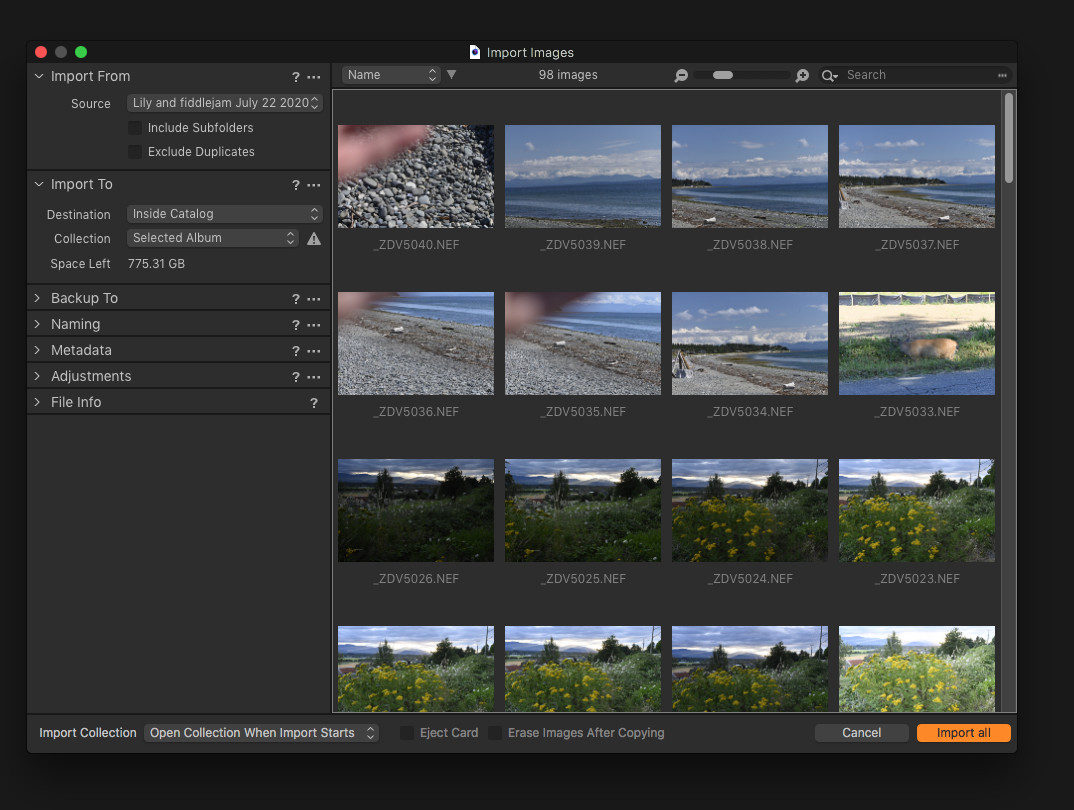
I have attached screen shots of the problem I am having...I hope someone can suggest what I need to do next. I ingest to P/M and create a sub folder, in this case Lily and Fiddlejam.

 0
0 -

Derek,
There must be about a Hundred "FirstName LastNames" registered for this forum now. No Idea why this is permitted but it would be great if you could head to your User Account into and change the name etc. so that we know who we are rplying to.
Your problem seems to be that you are asking the import to be added to a "Selected Album" but you do not currently have a suitable album selected. The screen shot does not show what you do have selected to that is about as far as one can advise currently.
Are you sure you want to copy the files into your catalogue?
0 -

Derek,
I think you should select "Recent imports" instead of "selected album", and you will find the images you have imported in your catalogue and in the "recent imports collection" just below "all images".
0 -
Kirk from Photomechanic suggested I click and drag images from P/M into Capture 1 and it works great. So no more messing around with catalogues.
0

Post ist für Kommentare geschlossen.
Kommentare
10 Kommentare