Having 2 versions of the C1 20

Is there any way to have 2 versions of the software installed on a Mac at the same time?
Due to troubleshooting/issues (and still waiting to hear a response from Capture One) I would like to be able to open 13.0.4 and 13.1.1 on the same machine.
I have for example version 11 and 12 installed on this machine.
When I try to install different versions of 20 in the "applications" folder, I have to change the name of the application.
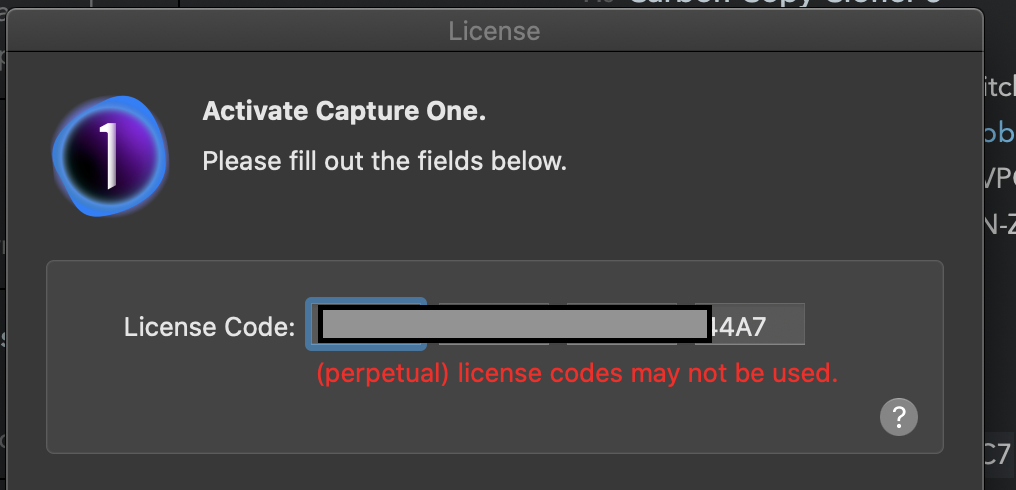
When I change the name of one of the versions and try to open the application, I get the message "(perpetual) license codes may not be used"
Perhaps there's a workaround to have 2 versions installed at once though?
-

I experienced no problem at this point given that only one
of them is opened at the time, either can be used even al-
ternatively.
I also renamed the app adding their respective version to it.
Ex: Capture One 13.1.app and Capture One 13.1.1.app
I rename the apps right after the installation and the first run.0 -

Jacob,
I think you probably need to name them at the point of installation rather than attempt to hack a name after the event.
If I were you I would not do anything more until you have a full understanding of the correct options available to you.
0 -
@Nikon Shooter, so glad to hear it's possible! Perhaps you can run me through the steps? As soon as I rename Capture One within the application folder and try to launch, I get that "(perpetual) license codes may not be used" error.
@SFA thanks for your insight. However, It's not clear to me how to "name them at the point of installation". My first instinct was to rename the .app file within the volume, but that does not seem possible. Perhaps you could elaborate?
I agree, best bet would be to have a full undestanding of my options! Very open to any additional insight, and have my fingers crossed that Capture One support will get back to me within a reasonable time frame so I can get back to work on this client project.
0 -
Hey Jacob,
I just made an audio and screen capture with some
explanations / demonstrations, you can find it here:
http://www.kodiakmedia.at/2020/07/CO%20versions.mov0 -
Thank you @Nikon Shooter for taking the time! I downloaded and watched the video. The way you have it setup is exactly how I attempted to set it up. However, for me, if I change the name of the app in the application folder (just as you have), I get this message when I open it up and type in my license (see below... I blocked out the full license for posting online).
Regardless, just wanted to say thanks for your input, and I have my fingers crossed Capture One support will get back to me.
 0
0
Post ist für Kommentare geschlossen.
Kommentare
5 Kommentare