What is going on with Heal layer ??

Why it does not work normally as before ? Before I added Heal layer, marked the mask, straight line adjustable for the source appeared, I adjusted and it was done.
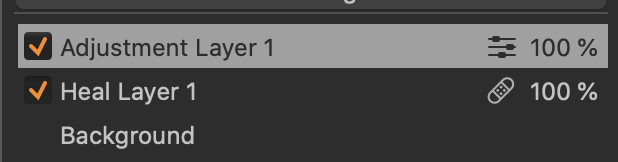
Now Heal layer added, mask drawn, some new "adjustable layer" is created, no source line and nothing works ...
-

This is the new and unusual behaviour after introduction of the new Heal/Clone Layer. You first have to choose the right brush (for healing or cloning) and then add the corresponding layer. If you only select the "normal brush", an adjustment layer will be added.
0 -
Really strange and I wonder what kind of "benefit upgrade" this is ??
0 -

The benefit is that when you click on the healing tool, a healing layer is automatically created (the same for the clone tool). You don't need to first create it.
0 -
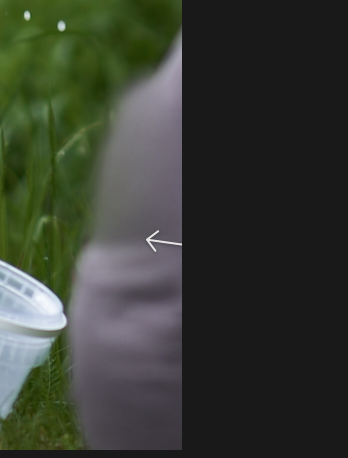
OK, this can be understandable but there seems to be another problem: you draw the mask, your photo is already cropped and the line leading to the healing source is going out of the picture and you cannot grab it to move with it ... what to do then ?
 0
0 -

— I wonder what kind of "benefit upgrade" this is ??
There is a limit to the number of layers in CO, 16 that is.
Before, every clone or heal layer took one of them and
sometimes it got too many, leaving little wiggle room for
adjustment layers. Now, all clone and heal will be done
on their respective layers and, if I got that right, this has
no limit in either cases… compared that to spot / scratch
removal with a limit of 100.0 -

For the crop problem - thins has been noted and proposed to the C1 team for some sort of change to be introduced.
As of now the option would be to delay making the crop or change.remove the crop and re-apply it when you are sure no further healing is required.
One other alternative would be to create a NEW variant with no adjustments. Apply the Healing and cropping players required and then copy your existing edits from the previous variant to the new one. They will then be added to the heal and clone layers. (In the past they would have replaced any existing layers.)
It would also be possible to use the crop tool to copy the crop to the clipboard. Remove the crop from the image. Create the Healing and Cloning layers with access to the full image and then paste the crop back to the image.
My own usage, when this problem arises, is to simply remove the crop or change it to allow access to the part of the image out side the crop, make the Healing adjustment and then remake the crop. However I would say that in MOST cases my crop position requirements are not especially critical. A few pixels here and there do not matter. I appreciate that for other people's needs things may be different and that having to mess with a crop may be more annoying.
0 -
Regarding the crop problem. This has existed since forever, I think. My solution for years has been to manually set the heal/crop source by Option-clicking on the source area I want and then drawing the brush.
I've tried waiting to crop until after healing, but that gives the same problem: if I then want to tune the heal/clone, I need to change the crop to expose the source point. My workaround works 100% of the time and also gives me control over the correction.
For me, I wish these tools had a preference setting that allowed me to set whether the default behavior is for C1 to automagically choose the source point, or for me to.
0 -
And what happened now with the gradient filter ? All the time G was the shortcut for it (till recently) and now it does not work. After pressing G the photo disappears and you see thumbnails. Why are they doing such things ?
0 -
jj kk, you can customise your keyboard shortcuts!
I don't always understand their decisions or choices like
making (paying) McNally to be ambassador!?!?!?!?
Sure, the guy has a long career that is still going on but
the recent seminar was a waste of time, he just didn't
know the app and was showing old pictures.0 -
Sure I can customize, but if certain shortcuts were inbuilt from the beginning why to suddenly change them? Does not make any sense.
0 -
Right… like I said, I don't always understand their decisions or choices.0 -
Maybe the same chaotic like this forum? ;)
0 -
I haven't contributing since long but I saw that
some guys are good and really trying to help.0 -
jj kk,
Keyboard shortcut customisation exists because many (but not all) users want it to exists and insist that they can do better for their purposes than any "standard" options.
In addition there are more possible control options than there are usable keys on a keyboard. But probably very very few people use all of them and most people use just a few.
Once the Shortcut definition options exist then they have to be used and extended as things change. When new functionality is introduces (or old functionality becomes obsolete in new versions) the control keys need to be revised and hopefully improved in many cases.
For Heal and Clone layers there have been significant changes made - basically entirely separate layers and functions. So changing the shortcuts and the position of controls on menus is required. Like it or not.
I would imagine that all of this was driven by various sources of user feedback both before and during the development process.
As the saying goes; "You can keep all of the people happy some (small part) of the time, some of the people happy all of the time but you cannot keep all of the people happy all of the time."
0 -
@SFABut jj kk has a point there.
Suddenly, the app went to 16 layers… cool.
Then masks could be copied and repositioned… very cool.
Now, heals and clones are unlimited and on their own res-
pective layer… super cool.
Why remove productivity features? It's a mystery to me!0 -
Changing a keyboard shortcut is not the same as removing a productivity feature.
- L will select the linear gradient mask tool
- T will select the radial gradient mask tool
Why the change? My guess is that Capture One is trying to appeal to new users and most new users come from Lightroom. In LR "G" is for "grid" which gives you a grid of thumbnails. They want Capture One to feel familiar to LR users during the 30 day trial period.
0 -
@ Marco Hyman
– "Changing a keyboard shortcut is not the same as removing a productivity feature."
— "…trying to appeal to new users and most new users come from Lightroom."Losing the ability to reposition layers is.
Crashing app when batch renaming is as well
… just to name these two.0
Post ist für Kommentare geschlossen.
Kommentare
17 Kommentare