Cannot open C1 due to crash handler

This popup message come up when trying to start.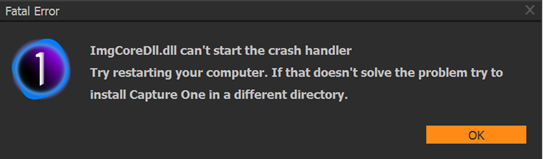 C1 crashed several times earlier and has been sluggish last few sessions. Do I delete current version and start over? Will I lose library from past year?
0
-
Followup: Did a reload of last update and the program successfully rebooted and it now functions as it should.
0 -

When you have Capture One crash and it refuses to open up again there are a few things you can do.
- Log off. Doing this should kill all of the running tasks opened during that session. After logging back on - Capture One should restart.
- Open a cmd.exe (DOS prompt, Command Prompt - whatever) as a local administrator and type in tasklist | find /i "Capture". You will find a process named CaptureOne.exe and a number (represented as xxxxx) - ignore the other elements on the line. Now, type in taskkill /PID xxxxxx the Capture One process will go away and you should be able to start it back up.
- Hover your mouse over the task bar and right click. Select Task Manager. If it comes up without showing detail click the obvious button to show details. Select the Process tab, click the name tab (far left), scroll down and find the process labeled Capture One. Right click the Capture One process and select end task the capture one process will end and you should be able to open it back up.
Now, let me digress for a minute. You should not be running everyday activities using a logon account that is in the Administrators group. All that does is open the door to malware and other bad things.
0
Post ist für Kommentare geschlossen.
Kommentare
2 Kommentare