Multiple heal layers - how to erase some of them ?

It is nice to be able to create many heal layers with one heal layer but I somehow did not figure out how to be able then to erase some of them ?
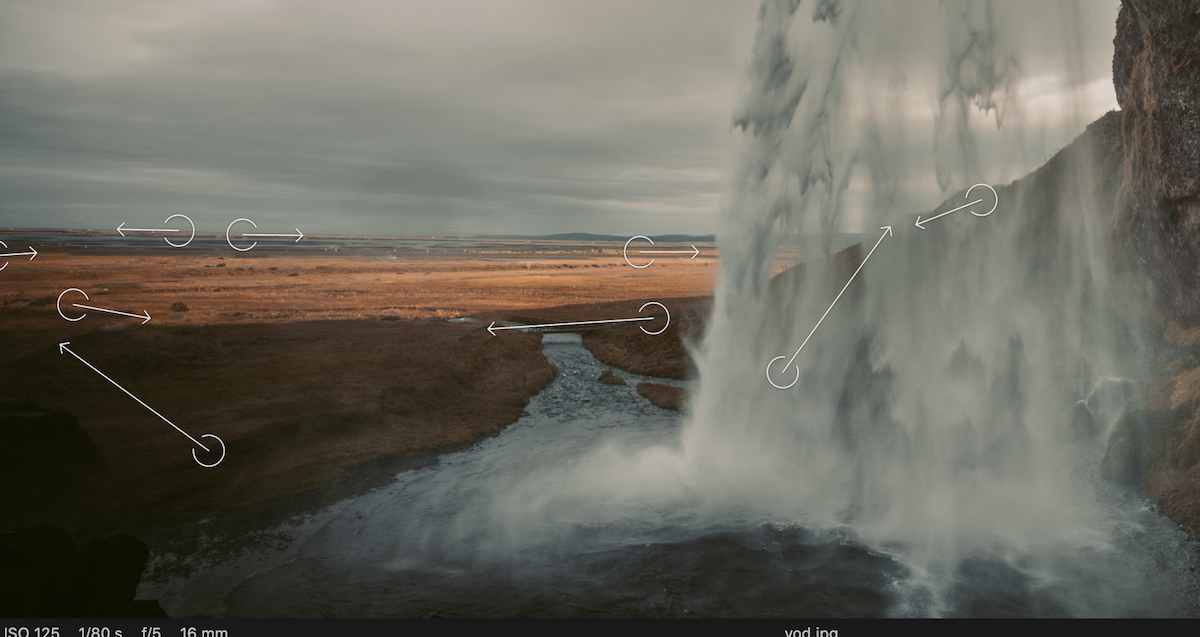
-

You can either delete the layer or click the source point
and move it, make it editable, delete that point.0 -
At least, they got that one right…
all heals or clones, respectively, are on only one layer… Cooool!0 -

Do you mean multiple LAYERS or multiple heal selections?
Assuming selections - clock in the circle for the source point. When successfully selected it should turn to orange.
Then delete.
For more information check the on-line User Guide.
Here's the link to save you having to search for it.
https://support.captureone.com/hc/en-us/articles/360002625697-Repairing-layer-with-the-Heal-tool
0 -
Yes, on one layer, but I still don't understand how I can erase just one of these made points within one heal layer ... I don'r want to erase everything - all of them.
0 -
SFA: "Assuming selections - clock in the circle for the source point. When successfully selected it should turn to orange."
Oh yes :) now it works. I tried all the time to look at the right click options :) Thank you
0
Post ist für Kommentare geschlossen.
Kommentare
5 Kommentare