How to copy/paste adjustments to images in different folders?

Hi all,
I'm working out of a catalog with different folders, not sessions.
I know how to copy and paste adjustments between images (variants ) between images in the same folder...I adjust one image....then alt and click the other image(s) to select them and hit the copy and apply button.
But what happens if I want to copy and paste the adjustments of one image and apply to an image in another directory?
There's no way to select other images in folder other than the 'primary' one I have selected.
I'm sure I'm missing something...but whenever I switch folders...and select the image(s) I want to paste too...well it doesn't seem to work.
Any suggestions?
Thank you in advance,
cayenne
-

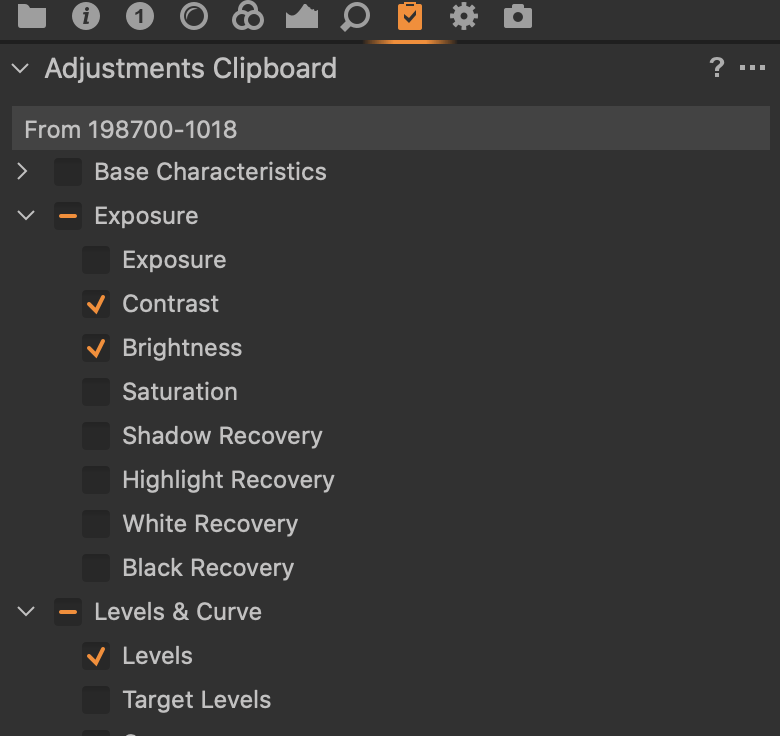
Select source. Use the Copy button to copy adjustments. Verify everything you wanted was copied by looking at the Adjustments Clipboard in the Adjustments tab. Switch to the Library tab and navigate to the other folder. Select the images you wish to apply the adjustments to. Switch to the Adjustments Clipboard again to double check that you are applying all the adjustments you want. Hit the apply button at the bottom of the Adjustments Clipboard.
There are probably another half dozen ways of doing that. I use the above because I tend to be paranoid as to exactly which adjustments are being applied.
0 -
Thank you for the reply.
Ok, I see the Copy adjustments button.
But I don't see an "Adjustments Tab" anywhere.....?
Thank you,
cayenne
0 -
The icon is a clipboard with a check mark.
 0
0
Post ist für Kommentare geschlossen.
Kommentare
3 Kommentare