Import Catalog fails from MacBook Air laptop to iMac desktop

Trying to import a catalog from MacBook Air laptop into iMac desktop. Both connected through local net. It fails, see the attached image.
Catalina 10.15.5
Capture One 13.1.2.37
Thanks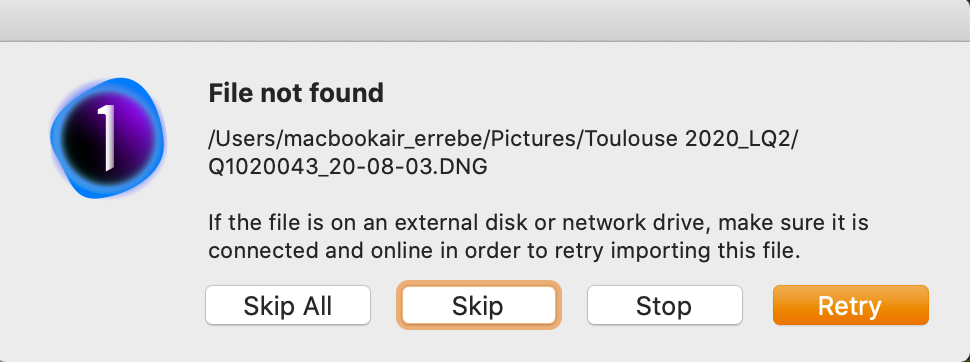
-
Once you have imported (or copied) your catalogue from one computer (1) to the other (2), you should tell (2) where are the pictures (the path to follow), unless the catalogue is managed. Otherwise, the catalogue won't be able to localise the images.
1 -
Thanks, but I don't get anything imported or copied. The message you can see in my previous message pops up for every picture, and nothing is imported. Says the source (laptop) it's not connected, but obviously it is, otherwise, how could I locate the catalog to import?
0 -

Okay, the error message may be confusing, as it was not designed with this scenario in mind. The point is that the path to the image is no longer valid as seen from the iMac. It is a local path, valid for the MacBook Air. Hence the error.
If you like to import the catalog successfully, copy the catalog and the images to the iMac. Open that catalog and relocate them so Capture One can find them. Next, close the catalog, open the catalog you like to import the other catalog to, and import.
1 -
Thanks Paul... sure I got the copy part, but sorry when you say "Open that catalog and relocate them [the images?] so (...)"
What do you mean exactly...? tried different things too long to list here, but 🤯🤯🤯
Thanks for your patience...
0 -
Hi Ramon,
I was a bit cryptic in my text, indeed. That was confusing.
When you copy the catalog and the images to your iMac, I suggest you open that catalog and check whether the images are in an online state. This is probably not the case, as the path on your iMac probably differs from your MacBook Air.
If the images are indeed in an offline state, you can locate them. It is best to do this from the Library, Folders section, and select the parent folder of all your images folders (assuming you have multiple image folders in a parent folder). Right-click on that parent folder, and browse to the new parent folder. That is basically it.
More detailed instructions here:
0 -
Thanks again Paul...
I read carefully those instructions, will leave you a comment there...
Best...
0
Post ist für Kommentare geschlossen.
Kommentare
6 Kommentare