C1 Express for Nikon

I am being offered updates for my edition.
The updates seem to include everything Capture One...including a trial of the full programme etc.
I am happy to stay with Express but would occasionally like it to be updated....but not the rest of C1.
Is it possible as there doesn't seem to be an option in the updates list?
Thank you.
-

AFAIK, that there is only one update package for all versions. Your activated license determines what features are offered to you.
I.e. download the (full) update, install it and based on your license, you won't see the test version but your CO Nikon Express will be updated
0 -
Thanks may well try that tomorrow.
A little nervous as last time I tried I had to remove all traces of C1 from my PC and start all over again!
0 -

Ted,
There should not be any need to remove all traces of C1 when updating unless something very bad has happened to the PC during the short period of the update.
I usually Run a complete Install process into a new folder rather than update over the previous installation. That gives ma a chance to go back and compare if I feel a need to do so. I very rarely do within the same version.
Ralf is quite correct. The activation (Licence) key controls the functionality to which you will have access. There may be situations where it is necessary to go into the Licence Management feature (either from the Application or through you Account log in) to de-activate C1 on the system so that you can re-activate with your activation Key once again.
I need to do this for my parallel installations for example since the application is installed in different folders. It can also be a requirement if there has been a major change to the system configuration. Something like a replacement disk, for example, even if the new disk is a clone of the old one. The activation checking process may see think the new system configuration is not the same device as the one for which C1 is currently registered.
There are few other situations where a complete clean and re-installation should be expected unless you have been very unlucky.
0 -
A seamless update on top of the previous installation with no request for license key.
I was a bit concerned because my key, under the 'Help' tab, doesn't show the last 4 digits.
My previous problems were possibly created around a complete Windows reinstall.
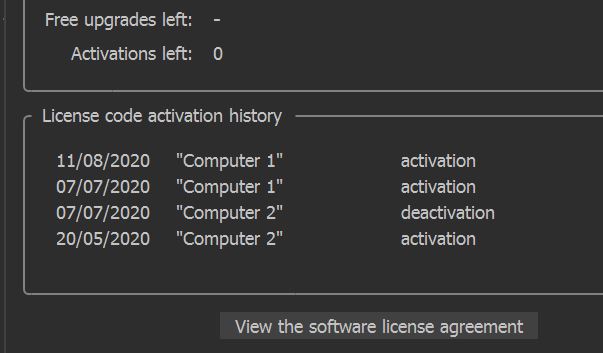
Image of my installation history is attached....it hasn't changed after my update....I have checked that I have the updated version!
Thank you both for your assistance.
 0
0 -
Ted,
good to hear that it worked fine.
I think the reason, why the last digits of the key are not shown, is to make it more difficult to steal/copy a valid license key. You need to keep in mind that this is the same for all versions.
0 -
Thank you, I need to dig through some paperwork and find my full key (just in case).....thank goodness they still produce paper and pencils!!!
0
Post ist für Kommentare geschlossen.
Kommentare
6 Kommentare