CaptureOne edit preview stops working

CaptureOne (v.13.1.2.35) on Windows 10 Pro.
Preview stops working in browser and main preview. I upgraded not long ago and this happens every time randomly. It can happen on first image I open to edit or after 5 minutes. Look at video link below.
It renders the program complete unusable and I have to revert to using Lightroom.. I also can't open my catalog with older version of CaptureOne since it's upgraded now. This is ridiculous.
Not to mention I have lost edits on my CaptureOne catalogs three(!!!) times this year, so I ended up using CaptureOne as a file browser / editor in session mode.
I'm not impressed at all with all these CaptureOne Windows issues last 1-2 years. CaptureOne needs to become stable again like it was pre v11, or else people are going to flee. I know more than one who have reverted to Adobe or bought Hasselblad and use their Phocus software because of all these bugs, and it is getting quite difficult to defend the next upgrade cost with all these bugs too, because this year especially has been a very very bad year..!
Aleksander
-
Let me add, it happens to my laptop too running last version of CaptureOne. Can reproduce, but can happen after 1 minute or 10 minute, 1 image or 10 image completely randomly.
0 -

I have not seen this behaviour. I would submit a request as it is unlikely that people in the Community will be able to help you with this.
0 -
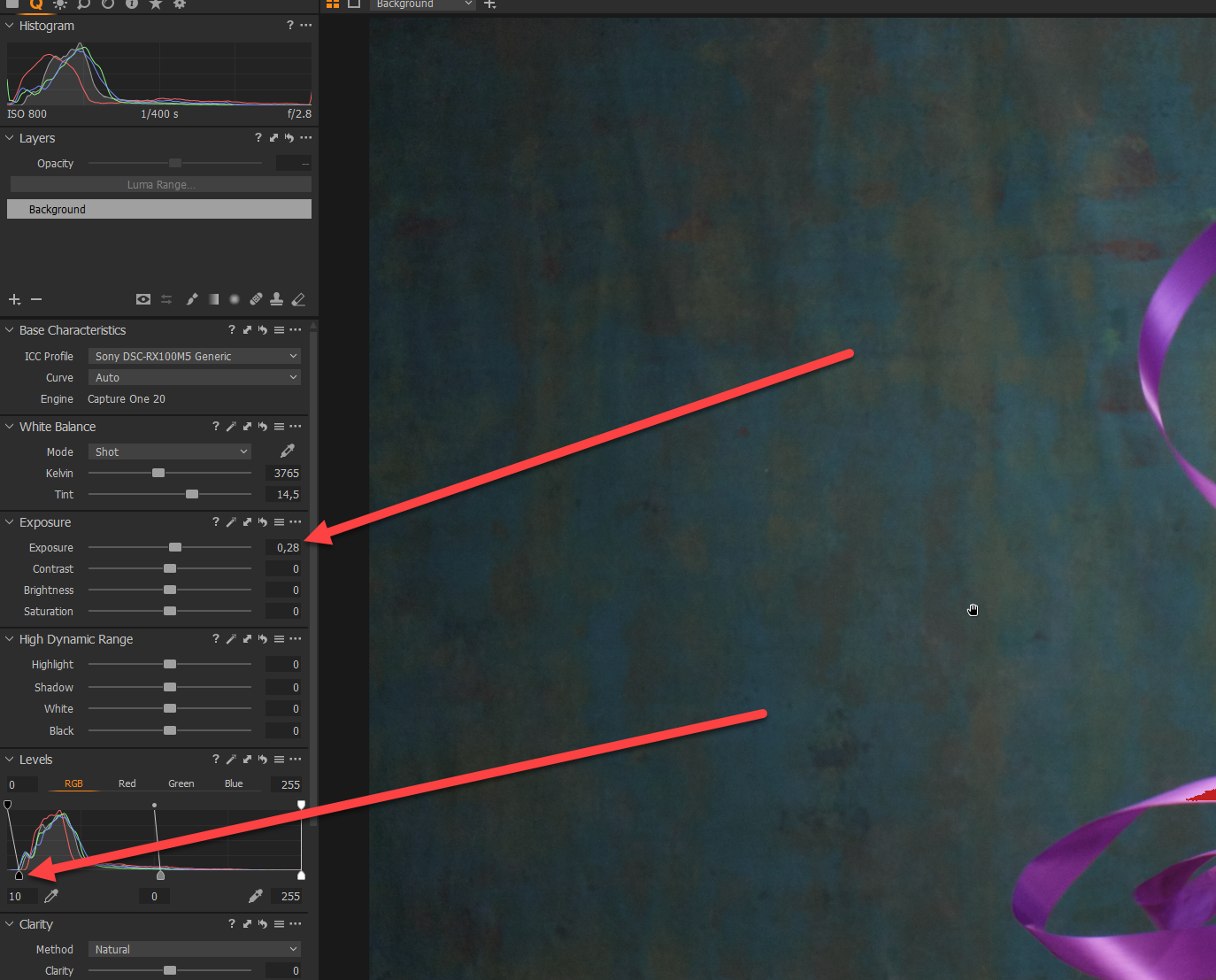
Steps to reproduce, twice today:
1. Adjust exposure2. Adjust blackpoint.I dragged blackpoint up and it just stopped adjusting the image. Restarted application, did the same, and it happened again.I tried with a RX100M5 RAW sample file to eliminate my own camera brands which is Fujifilm X-T3, X-T1 and Sony A7iii. But it happens on all of them.
I have posted to CaptureOne team
 0
0 -

@Aleksander Torset Eriksen
What you see and describe came into Capture One with V20 on Windows machines. It's "normal" since. And I'm not amused at all with all these CaptureOne Windows issues the last years too. Some of them are "databased" (and not fixed for the last years!), this special seems not.
I tried with a RX100M5 RAW sample file to eliminate my own camera brands
No, this issue is not limited an special RAW formats. It happens with NEF, ORF, RAW, DNG, JPG, TIF, PSD and other formats too.
What I could see so far is that this behaviour comes up faster when using or copying keystone corrections (what you seem not to do). More I cannot tell you, sorry. But if you get answer from support let us know.
Kind Regards
Ernst0 -
@Ernst Weinzettl
Hello and thanks for replying.
I did not notice this before, but some hardware differences could maybe make up for the difference on my and your end. I guess from what you're saying that you have experienced this, yes?
If "yes", how often does it happen with you?
Interesting, I'll try that to see if it will provoke and produce the error again. Maybe I'll try on my older files too just to get more data on it.
I am a bit disappointing. I do welcome many of the features Capture One have gained, but I'm not sure if all of them are worth getting with a less stable application as a result. Not being able to edit files for clients isn't fun when it's money involved.
Best regards,
Aleksander T. E.
0 -
Hi Aleksander,
in my case there was no change in any hardware part of my machine.
Yes I have experienced what I wrote. C1 (V20) has replaced most of my other graphic tools, I don't need even Photoshop or Affinity Photo often at the moment. It happens to me usually two to six times a day while working two to eight hours every day with Capture One.I'm using old files, very old files, new files, different formats - but I could find no way to reproduce. The only thing I found: keystone correction seems to encourage Capture One to blur all previews and stop all editing, even the change to another image.
But what I could see it that often there are signs of upcoming problems:
- One click on an image in the browser brings up an enlarged preview automatically and every time, even if you have choosen full image. After a while C1 will hang (no editing etc.).
- Browser does not show thumbnails (but empty squares). After a while C1 will hang (no editing etc.).
- There are more such signs to know Capture One will fail short time later.
Not being able to edit files for clients isn't fun when it's money involved.
I agree. But this issue does not stop down C1 or crashe´s the database. After a restart of C1 you can go on with editing. Only in rare cases this problem will occure immediately after restart. Yes, this behaviour is annoying especially if you have the high price in mind. Yes, this behaviour cost valuable time. But it does not stop my work for my customers really.
The most annoying thing is the lacking of support in issues like this.
Kind regards
Ernst0 -
Hi Aleksander,
I had a look where I described this issue before. You can find the thread here:
Kind regards
Ernst0 -

Same issue here with CaptuOne 21, as soon as I click on a raw file, in my case a RAF from Fuji XT-3, the programs no longer works, didn't crash, but no action works. Pictures turn to bad quality version, only thing you can do is zoom in/out. Also, can't close the program, it keeps running in the back, so can't relaunch showing message that 1 session is already running.
Not sure if that's related to the use of lightroom to create some panos, but soon after that CaptureOne stopped working despite reinstalling, creating new catalog, session etc. As soon as I click on a raw file the program stop working.
0
Post ist für Kommentare geschlossen.
Kommentare
8 Kommentare