Wireless Tethering with Nikon D850 and Capture One 20 (build 13.1.2.37) c21877

I was wondering if it is possible to wirelessly tether via wifi or bluetooth from the Nikon D850 directly into Capture One 20 (build 13.1.2.37) c21877? If there is a software workaround, please let me know. I have been on youtube all day and the only thing I see working is shooting with a controller type 2nd party software to a folder and then having Capture One import (watch folder) the photo. I was wondering if there was a way to connect directly to Capture One?
-

Come on, Bethany, this is the kind of advice you ask someone that hates you!
… but since I have no reason to hate you, I'll summit these considerations.
No connection will be safer — nor faster — than a hard wired direct cable from
the camera to CO via the integrated (free to you!) capture tool tab.
Keep you chain safe and simple… you'll be happy you did. Trust me.
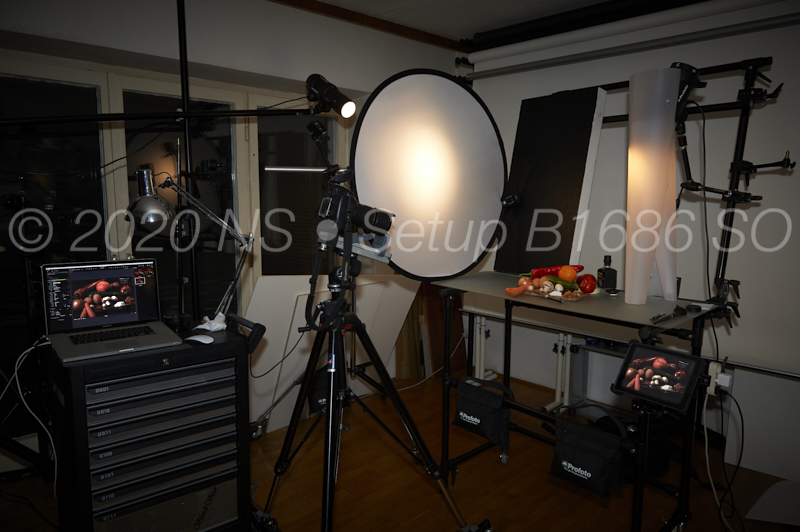
The only extravagance I allowed me in my studio is to control both the flashes
and the camera from the iPad where the controls are radio but the tether is not.-2 -

hm, tested wifi tethering with my system last week and while it is not perfect it is very usable and better than I thought. some have different needs , I for sure would use wifi tethering when c1 would offer it and i have more than one good reason to stop using a cable. but as with many other great developments happening right now on the hardware side I doubt this will be implemented in the foreseeable future in c1, ignorance is their greatest strength. after the success and progress of ipad pros one might have thought they are already working on an app which allows tethering and field processing..... 5 years later they are still sleeping.
1 -

1) To the initial question, as far as I understand the D850's manual, the builtin BT & WLAN functions are quite limited and work only with the "Snapbridge"-Apps for Android and IOS. The best you can achieve via that is a transfer of a 2 MP image to those devices(?)
For transferring the images immediately to a computer without a cable, you'll need either a WLAN-adapter (such as Nikon's WT-7) or an Eye-Fi card.
2) Concerning Nikon Shooter's comments:
If you're controlling you camera from your iPad, you are tethering wirelessly...
I agree with that a wireless connection might have security issues (which can be kept to a minimum). But I would look at the whole situation, to weigh the risks against the benefits for any solution.
There are situations where a wireless connection is preferable or the only solution, e.g.:
- A cable connection would be unsafe for the equipment, if somebody tripped over the cable. In a studio that may be easy to control but in the field?
- Events where the camera needs to be placed in such a way that a cable connection is impossible.
- When using a USB-connection, it is needed to use repeaters (or accept that the connection might be slow or unstable [transmission errors]) with a cable length of more than 3 - 5 m. [some setups might allow also longer cables, but that is not sure]
1 -
@CSP:
After all, we can see only what is already published but not what is in development nor how many customers are really demanding for a certain feature. (Surely, the more customers ask for the feature, the more likely it will implemented)
I guess that Apple's switch to own silicon for Macs, a version for iPad Pro might get more likely.
0 -
@ Ralf Crumbach the iPad Pro is now 5 years old and a phantastic tool for location work but here still nothing on the horizon. you have to be an idiot or ignorant to not see in which direction photography is moving. speaking for sony, when they released their imaging edge software it was really bad but they make progress with every version. now remote already offers tethering via wifi and many other pro features like image overlay. a few more versions and it is more than good enough but when this point is reached I don't need a C1 version 1 app full of bugs when the sony works and is free.
0 -
@Ralf Crumbach
— "If you're controlling you camera from your iPad, you are tethering wirelessly..."
I suggested a difference between- tether connect — for files transfer
- remote control — for camera (Capture Pilot) and flash control (Profoto Studio)
Yes, Capture Pilot will receive a quick preview of the shot but the shot itself goes to the
computer capture folder and is displayed and tweaked in CO.
 0
0 -
...we know that. but when the camera supports it you can do both wireless and this is how the future will look like, with or without C1. the capture pilot was a nice idea years ago focused on studio photography but not really useful in my experience and it seems phase one knows this too because they never improved it.
0 -
Nikon Shooter,
The concerns about "remote control" or "tether connect" should be basically the same in my understanding:
Transmission delays or faults: if you are not shooting still life in a studio, this may be an issue when trying to take a photo (triggering the release)
When I look at your setup, it is obvious that you manage with a cable solution. But there are other setups where is might not be possible.
E.g. Nikon's WT-7 is able to transfer data close to 1 GBit/s. For most LANs 1 GBit/s is state of the art and sufficient for users not experiencing delays. If the USB-cable setup falls back to USB2 speed it is clearly slower. Nikon's WT-7 works over distances up to 200 m [Nikon claim], I can't imagine that you would be able to cover such distance over USB-cables.
Anyhow, my point is that for achieving the best solution, it is important to consider the demands/requirements. I'm sure that one size does not fit all.
0
Post ist für Kommentare geschlossen.
Kommentare
8 Kommentare