Leaving Creative Cloud

I have been wanting to try C1 for a very long time. As I am getting into C1 I am realizing its a very different tool than Lightroom. Are there any good resources that would help a seasoned lightroom user? I think I am expecting C1 to operate like Lightroom and it does not. I would love to hear what your thoughts are about migrating from Creative Cloud. Is C1 a good replacement? I have read in my forums how C1's raw processor is second to none.
-

Hello,
Congratulations :) I left Lightroom around a year ago and would say that C1 is a good replacement, the images it produces look great. I found that the Lightroom sliders were a little heavy handed meaning that I tended to finish with an over processed look. I find the C1 sliders more subtle and therefore I don't tend to over apply.
Broadly speaking I find the tools provided by Capture One to be similar to Lightroom, but the tools are organised differently. What I would say is that because Capture One is very configurable from a user interface perspective, take the time to organise the tools that you use in the order that you use them in the user interface. It is quite possible to organise the tools in a similar way to Lightroom, but I would say that it is best to figure out the tools that you use most and work our what your workflow needs to be. I tend to look at lens correction first, then light, then colour, but others may have a different flow. I tend to sort out white balance early in my flow, so I have added the white balance tool into the Light tab so to make sure that I do it early.
From memory there is a workspace profile that mimics Lightroom if you need it to act similarly, but I stayed away from this as the thing I like about C1 is I can set it up how I like rather than Adobe telling me how my work flow should look. Over time I have moved the tools around to suit my needs as I have refined workflow.
I found Colour, layers and masking to be the biggest changes from Lightroom, but there are a lot of videos on Youtube that will tell you how to use those.
I would take a look at Paul Reiffer's videos on YouTube, also the Capture One youtube channel is pretty good, I picked up most of my tips by watching these videos.
1 -
Hi Mark,
Thank you! Did you see any significant improvements in your images over what you were getting in LR? Were you able to do without Photoshop? I will totally check out Paul's Youtube channel Thank you for the tips on workflow, im still trying to muddle through this a bit and feel a bit lost. Im sure ill get it as I work with it more.
0 -
I'd suggest that whether you can do without Photoshop depends on what kinds of things you are accustomed to use it for. There are certainly some things that PS will do that C1 won't (just as there are some things that there are things that PS will do that LR won't - though not completely the same things). If you wanted to ditch PS you could try Affinity Photo - very similar and most of what I might want to do in that regard I could do in either PS or Affinity. Again, though, PS has a few features that Affinity doesn't match, but equally Affinity does some things better than PS.
As an example, yesterday I had a photo taken on a phone with a date stamp on it that someone sent me. I needed to remove the date stamp. I did it with PS, but I could equally have done it in Affinity. Depending on the bit of the image that it was on, I could have possibly done it with C1, but for this particular photo the background to the date made that too tricky.
Ian
0 -
Thank you Ian, Honestly Affinity probably would do 90% of what I do in Photoshop. Just curious what you're experience has been with Raw processing in C1 vs CC. CC is for sure a different beast than Lr. I think my biggest struggle is trying to get the results I am looking for in photos that I am used to largely because I just don't know the software yet.
0 -
I've been using Capture One for years (since version 4.1). I have only recently dabbled with LR and PS. I use PS more than LR. With LR it's been mainly out of curiosity. I've been frustrated by not knowing how to do things that I know perfectly well how to do in C1. (Of course, users coming to C1 from LR say the reverse!)
Your best bet, I think, is to watch lots of tutorials on the Learning Hub or the Capture One YouTube channel, to get the feel of it. And join a Capture One Facebook group or two for easy access to people who could provide answers to questions.
Ian
0 -
I have found the raw processing at least equivalent if not better than Adobe CameraRAW. This is a controversial topic of course, as each RAW processor has its supporters and detractors. I have seen some videos and examples on the topic and my feeling on the topic is that the same amount of detail is rendered, but I think C1 tends to add a little more sharpening, but we are talking small differences here. Both C1 and Adobe CameraRAW are for all intents and purposes very similar as far as I can tell.
I think generally the sliders do very similar things to lightroom, Exposure, highlights, shadows, blacks, whites, clarity, sharpening and noise reduction are all very similar in operation. Lens correction and colour in my opinion are more advanced in C1 and I certainly needed to watch some videos on the topic before I fully wrapped my head around them (particularly colour).
One of the big differences for me is in relation to layers and masking. I remember that Lightroom does not do layers and the masking capabilities were shockingly bad in my opinion. So in my Lightroom days if I wanted to use layers and masks then I would automatically go to PS. These days I very rarely use a pixel editor and only then for specialised work. Since C1 does a great job with layers and masking I do most of my edits in C1. I now use Affinity Photo for any pixel editing I need to do, and since I don't get particularly technical with pixel editors then Affinity photo does most of the stuff I need it to do.
Items like exporting to external applications (round trip editing) and exporting finished edits are in my opinion similar in operation to Lightroom once they have been correctly set up.
0 -
I think generally the sliders do very similar things to lightroom, Exposure, highlights, shadows, blacks, whites, clarity, sharpening and noise reduction are all very similar in operation.
Not quite the same when it comes to blacks and whites. Blacks and Whites in Capture One are for adjusting the very darkest shadows and the very brightest highlights, whereas the Shadows and Highlights controls cover a broader part of the tonal range. In Capture One you set black and white points with the Levels tool (which LR doesn't have). Confusing names!
Ian
0 -
Good point. I could not remember all the sliders available in LR, I thought it had Blacks and whites but maybe I was mis-remembering. I find blacks and whites incredibly useful when editing so another bonus to using C1 then :). Regardless, there are many sliders in the C1 Exposure tab hat have similar operation to LR sliders and they work in a similar way, that's the point I was trying to get across.
0 -
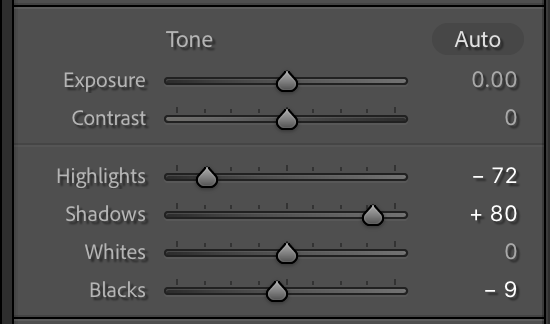
Yes, LR does have Blacks and Whites (see screenshot) but the important thing to know is that are a totally different thing to Blacks and Whites in Capture One. The LR Blacks and Whites sliders perform the same function as the handles on the Levels tool in Capture One. The Blacks and Whites sliders in Capture One are for adjusting the very darkest shadows and the very brightest highlights, like the regular shadows and highlights adjustments but confined to the very ends of the tonal range.
Ian
Screenshot from LR:
 0
0 -
Ah ok...I remember now. I have moved on from Lightroom and maybe I am repressing :D.
0 -
I was confused about this my self and learned a little about the levels control. Its a little different than what I was used to.. Just by experimenting with some of the different editors out there it seems like some are going the way of "AI" ... Even though the "AI" can do some pretty neat things I think it could be limiting over time. It seems like C1 is the RAW image equivalent of shooting in manual mode where you have complete creative control over the process, however you also need to have some technical knowledge to get the results you may be looking for. I think the implementation of layers is really useful to have in the RAW editing process.
0 -

"Did you see any significant improvements in your images over what you were getting in LR?"
I absolutely did, and it's 100% of the reason I switched from LR to C1. The crucial difference for me was in the JPG rendering. C1 managed to preserve more detail in hair that LR seemed capable of. The actual functionality was very similar, but the final result was better, and that was the crucial detail.0 -
That's what Im really going for. Subscription really doesn't bother me, it just seems Lr has not kept up in some areas. C1 really seems to be for the person that wants complete control over the raw processing / editing process. Some of the .jpgs that I exported last night were really good. It just had that (this seems a bit better than what I had before feel" although it could be in my head....
0 -
@David Bachman
Here's the image that made up my mind for me. It was taken in 2012, and at the time I was still splitting my workload between Aftershot Pro (which was stupid fast) and Lightroom. The difference between LR and ASP was minimal, but the difference between LR and C1 was stark.
I realize there's a big difference in contrast and so on, but what made up my mind was the detail in the hair. Lightroom couldn't preserve the detail without making it noisy with sharpening. Capture One brought that detail out and didn't make any compromises by doing so.https://nfgworld.com/grafx/LR-C1-comp2020.png
And for anyone pointing to this and going "yeah but" please let me assure you that I tried a lot of things, many more things, and a bunch of stuff for good measure. This is a bad example, perhaps, but it's all I have left to show, since I no longer have Lightroom and anyway I don't care, it was eight years ago. =P
Aftershot Pro had speed and power, but lacked nuance*. Lightroom understood the limits and tried to keep me within bounds, but Capture One gave me room to play and delivered the best output when I was done. Easy choice.
*Also, f**k Corel. I don't like Adobe much but I have a whole lot of steaming dislike for these wretched walnuts.0


Post ist für Kommentare geschlossen.
Kommentare
14 Kommentare