simplify workflow
Implemented
Hi guys,my name is angelo and I am from Italy. i like your software very much but i have some things that i can't it make work the way i'd like to be.
1st Issuei'm working right now on a project where i'm searching through about 150 folders one by one and select very few pics in each folder. I'm using photo mechanic as viewer and i noticed that if i want to edit only one photo c1 import the all folder and create a subfolder with a lot of data thumbnail, proxies, settings, cop and cof files. This is actually pretty annoying if you want to edit just 1 photo out of maybe 2000..
Is there a way to make a workaround for this thing?
2nd Issue. when i choose a file, let's say a jpeg, from a viewer or windows explorer a file and i drag and drop on c1 or ask the viewer to edit it with c1, c1 open and ask me to import it. so I have to say yes (1click) and then chose it from thumbnails (2nd click) to be edited.
Is there a way to make a workaround for this thing and just edit the file without these two additional clicks?
3rd thing, probably there is already and i simply can't find it.
I cannot find history or cronology to go back to a previous edinting situation. i only see the undo botton.
thank for your patience
angelo
-

Hi Angelo,
Thank you for the post.
It is possible to choose certain photos you want to edit from the selected folder in the Import From field with the Cmd/Ctrl key.
As for the 2, could you please tell me whether you are using Session or Catalogs in that case?
As for point 3, we have also received similar suggestions to have the history of edits in a separate panel/tool with the possibility to revert back to the previous state of the variant. For now, this option is not available in Capture One, but this request is sent to the Product Management team as something to consider for the implementation in future releases.
As a workaround, you may consider creating a clone variant (Image -> Clone Variant from the main menu) to preserve the copy of the selected image at the current state and then continue working on the initial variant. That way you will have several variants of the same image at different stages of editing so you can get back to any of those at any time.
0 -
Hi Lily, i've been using using c1 for few days only. And the work flow is perfect already if i'm editing let's say a wedding in raw. I choose a folder and i get the preview for all pics in the folder and no big deal if it create a new folder inside my working folder.
thank you for your patience
1 Most of the time (i work for a local newspaper), i'm using jpgs. So i download my jpgs into a dated folder where from i choose the ones to be sended to my newspaper with a photo viewer, in my case photo mechanic. Once i made my selection those pics i chose get exported, resized and with the metadata (iptc filled) into a subfolder named after the caption of the the photos i exported. In a day I have various little reportages to do, and for each one i do an export session in a differentently named subfolder. Since the picture resized into the subfolder are smaller (about 2000x1300 px) i prefer, if i have to edit them, to do it before reducing them. So i do it when they are still in the dated folder where I downloaded them at first. This mean that if i took 1000 photos that day, and i wanted to edit only 1 photo, I must create a folder with 1000 thumbnail, proxies, settings, cop and cof files.
I think most of the photograpers i know use a similar workflow
what i'd like the most if it was possible was to edit a photo without creating any new folder.
2 I' see it' written session on top othe bar, i assume i'm using session
Another question. When i open a photo i normally want to save it in the same position, maybe with a different name or maybe in a subfolder. In C1 i don't see in the process recipes an option like : ..Save in the same folder ..or save in a subfolder.
the path is always to be explored and found
Thanks for reading my questions and sorry if my english is not correct I hope you understand the meaning
ciao Angelo
0 -
Hi Angelo,
Thank you for the clarifications.
When you work in the Session, there is no need to import or drag photos into Capture One. While working in Sessions, the Library tool acts as the file manager (Explorer/Finder) of the operating system, so you can simply navigate to the needed location and the photos will be shown in the thumbnails of images located in that folder will appear in the Browser.
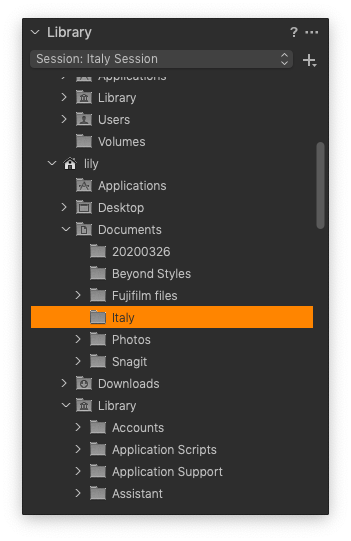
As for the output (export) location, indeed it is only possible to choose it manually for now, so that suggestion along with having the history of edits will be forwarded to the Product Management team as something to consider for the implementation in future versions.
0 -
Hi Lily, I tried to import with the control key pressed from rhe library or in any other situation ...Capture 1 if i want to edit a single Capture 1 imports the whole lot of images in that folder ...creating alot of garbage.
If i have to edit just 1 picture of 1 MB which is contained inside a folder of 300 pictures C1 creates a 300MB folder ...
I don't want C1 to create a folder with all the pictures in the folder i'm working in.
If i use Irfan view, affinity, Photoshop i can do it ..i start doubting i 'll be able to do it in C1...
0
Post ist für Kommentare geschlossen.
Kommentare
4 Kommentare