Using C1-20 catalog in C1-21

I asked this on another community forum so I thought I'd try a different one as no one responded. I am wondering if I open a C1 Pro 20 catalog into Pro 21 it goes through an "update" process but are all the files then converted from RAW through the 21 conversion engine or does it just copy what happened in 20. I ask because there is a claim that 21 has improved color rendition and sharpness applied, presumably due to more lens/camera data.
I'm wondering because in many folders I have done considerable tweaking for example I have been using my camera to digitize thousand of slides that I have previously taken and many of them require a lot of compositional and color edits and I don't want to lose that work but would like the newer processing.
Thanks for anyone who might be able to help
-
If you open a version 20 catalog using version 21, then
- Capture One asks you if you want to convert the catalog to version 21 - if you say yes, then
- it saves a backup of the version 20 catalog
- it creates and opens a version 21 version of the catalog.
But it DOES NOT do anything to images in the catalog unless you ask it to. The updated catalog format is needed to take account of things that the old catalog format was not created to record - any Dehaze adjustments would be an obvious example.
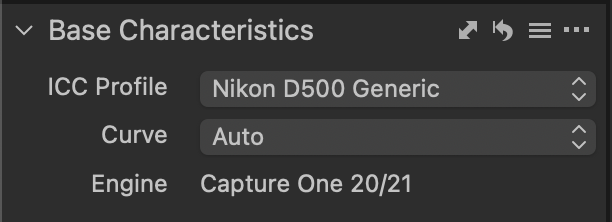
A catalog can contain images that have been adjusted using many different processing engines - I still have some images in my catalog that are on a version 6 engine. If I change the engine on those, the look of the edited image changes, and my practice is not to change it. If I want to do more work on such an image, I clone a variant, and then update the engine only on that. I am not sure, but I actually wonder whether the version 20 and the version 21 engines are the same. The processing engine in the Base Characteristics tool now reads Capture One 20/21.
A version 21 catalog cannot be opened by version 21, but that is why it creates the backup, so that you still have the old catalog, and you could open that with version 20 if you needed to.
Ian
0 -
Thanks Ian, if 20 and 21 raw processing engines are identical it wouldn't make any difference I guess. I looked at my version and it does show Engine is 20/21 so I am a little dismayed that they claim it has better color and sharpness in 21. So far I haven't seen much to be impressed by in 21 as a change from 20.
0 -

Thanks Ian - I have a sort of similar question but have had no response from submitting a technical issue ticket.
I had a catalogue in C1 20 (fuji pro) and when upgraded to C1 21 (full pro) I deleted the C1 20 programme as recommended. I upgraded the catalogue but when it opened non of the images could be seen - message stating unsupported or corrupted.
Have you seen anyone else with this issue?
0 -

@Kay Nakamaye
The differences for the New colour settings options (for those cameras that are so far supported) are in the values in the profiles and the existing engine as most recently changed for V20 can process the revised profiles. That is not the sort of change that will always require a revised or updated core processing engine.
There are some quite significant changes for V21 but they are not obvious "Headline" changes and may only be of large benefit to so parts of the user base. With such a wide range of user needs it is almost inevitable that some updates will be that way. Or may seem to be that way.
I recall a release a few years ago where nearly all of the obvious changes were Mac related - especially for some Applescript updates. Good for the Mac users and the subset of Mac users that use Applescript. Not so much obvious value for Windows users but it had to be done.
More recently those of us who are Canon users have less to be pleased with than users of some other systems. Or at least that would be the conclusion when reviewing the headline features and functions.
However not so long ago the introduction of Luminosity masking alone made up for any disappointments that Windows and Canon combination users may have felt in previous years.
Or at least it did in my personal opinion. No doubt others could not care less about that particular enhancement.
Much like I don't care much for the Before and After tool. Yes the concept is seductive and "cool" in principle but, in my very personal opinion, adds nothing of real use to the process and never has done in any editing application. It's quite useful for educational inserts in blog posts or on web sites but for proper editing analysis it has huge shortcomings.
Sadly no one seems to think much about that and people just clamour for the same concept with the same limitations that all of the other applications provide.
0 -
Thanks SFA, your comments make a lot of sense and I understand, but as a more casual user some of the "updates" are not particularly useful to the noncommercial user. I left Adobe because I really dislike the subscription model and being old school like owning software. Looks like that model is taking over the software world though and Phase One is trying to get everyone to move in that direction as well. It's understandable of course to generate a stream of income to keep the company in business.
You did bring up an interesting question though. If in fact the processing of RAW conversions is constantly updated for cameras already in the system, are those changes applied to your existing catalog after you have edited the image? One would presume then as C1 does not change the original file that when a given camera/lens system is modified it would automatically be applied to that combination, do you know if that's true?
0 -
I just got a message from Phase One support regarding this issue and they led me to this link which explains the conversion engines pretty well and how they deal with things. It appears that Ian and SFA are correct that in fact the engine for 20 was probably updated as time went on and so the base characteristics show up as 20/21. Thanks for all your thoughtful input and if you find anything new I would be ecstatic to get more information.
0 -
Kay,
While the Catalogs and sessions database files will need to be updated when next used that is not the case for images (or, indeed, variant edits of images. At least not immediately.
Each variant had a setting for the processing engine used when last edited and the deprecation period for support is several years. For example V21 Release Notes indicate that support for V6 and V7 engines has now been deprecated and it is recommended to update to at least the V8 engine to retain an existing edit that is compatible with V21.
However the chances are that going that far back one might want to consider revisiting thee original edit anyway to take advantage of new features introduced in the intervening period.
From memory somewhere in that period of evolution came a fairly significant processing engine enhancement that would mean that older engine edits, when upgraded to a newer engine, looked a little different. For some reasons the V8 release stick in my mind as being the one where the effect was a little noticeable but it may have been later. Nothing too big but different if compared side by side without further attention.
Nothing to get concerned about but something to be aware of if your C1 edit work goes back that far.
The processing engine can be mass updated or individually updated by variant.
I hope this helps.
0

Post ist für Kommentare geschlossen.
Kommentare
8 Kommentare