Resizing an image for printing

How do I resize the whole, no cropping, image down to 6x4 for printing?
-

Select the image.
Use File -> Print. Use Page Setup to select 4x6 paper. Might have to make a 4" x 6" custom size.
If you want to print outside of capture one...
- Go to the Process Recipes tab
- Create a process recipe with the Basic tab "scale" parameter set to "Dimensions"
- Key in the dimensions you want, e.g. 4.00 x 6.00 in
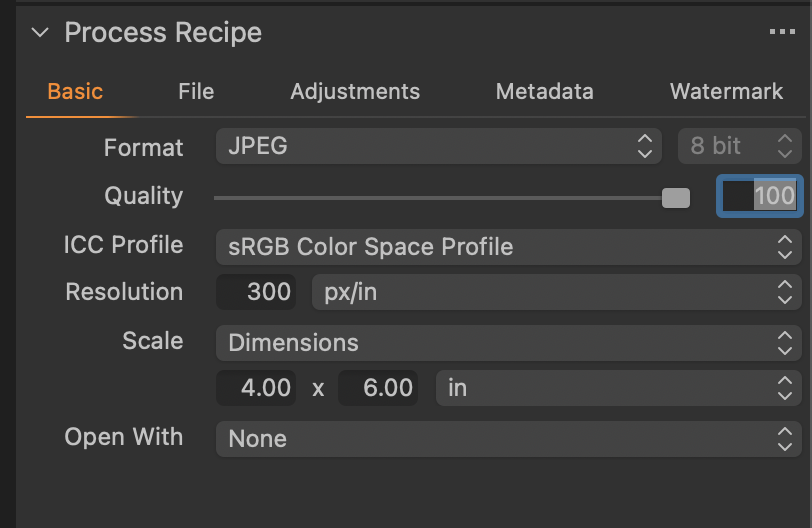
Export that, then print the exported image. You may need to tweak the Resolution number to match your printer.
0 -
While Marco's method works, I prefer to print directly from Capture One. Unfortunately the Print dialog is complex and presets you save don't remember all settings you may have made.
In the Print dialog, select your printer from the printer list (C1 always defaults to the first printer in the list every time the program is launched, but remembers the printer choice until you quit the program), and choose the paper size you'll use.
Then set the Cell Size and Border. I've created presets for the sizes I use. A problem I haven't figured out how to solve is the relationship among paper size, cell size, and border width. Sometimes settings work as expected and sometimes they don't, and sometimes they even don't work when I think I've set the dimensions the same as "before", but C1 seems to have its own mind at times. It seems to depend on whether I select a standard paper size or Borderless (Borderless is less predictable for me). I'd suggest that you choose a regular paper size and NOT any borderless options for that paper.
In your case, choose a Cell Size of 4x6" and whatever border you desire and make a test print. If it works, be happy, otherwise tweak the border size. After you get a set of cell dimensions that work, save them as a custom preset.
Then in the Print dialog that you get after finally pressing the Print button, go to Printer Settings, set the ICC profile and other attributes as needed and save them as a Printer preset. This preset can contain paper size and orientation, ICC profile, and other settings and I find it to be extremely useful. Between the cell size preset and this one, I've succeeded in getting consistent prints without having to go back and check all settings every time.
I keep hoping that C1 will eventually overhaul the entire Print settings dialogs so one could save a single setting and rely on it time after time. I've hoped that for quite a number of years now...
0 -
I have tried many times to print using the printing module of Capture One.
First, as Abbott says, it is far from being user friendly, and is very unpredictable, at least to me.
Second, if you let Capture One manage the printing, you can't be sure about the obtained result, as far as colours are concerned, even if you chose the printer ICC profile. I would say that it's better not to let Capture One manage the printing, but instead let the printer do it. At this stage, when the printer driver opens, enter your ICC print profile.
Because of all of these drawbacks, I prefer to use the Lightroom or Photoshop printing modules, which are far better.
I have already submitted a feature request to the Capture One staff about the printing module, without any satisfactory solution up to now.
0 -
Thank you Robert and Abbott for replying....I will continue to use P/S for my printing.
0 -

I print directly from C1, just make sure to load the ICC profile for the paper that is used. I let C1 do the rest, since my monitor is calibrated the prints come out just as I see them on my monitor. I don't let the printer control the ICC profile.
0 -
I used to print from PS (CS6) but found that C1 (v8 or 9 at the time) gave much more consistent results with what I saw on my calibrated NEC monitors. Occasionally I still try to print non-critical things from PS using my Epson Stylus 3880, but invariably I have to use printer color management to get decent results. On the other hand, when setup with the correct paper profile as Lars mentions, C1's color management has been consistently excellent. My issue with C1 is with its obtuse print dialog and printing methodology, not with the results I can ultimately obtain from it.
0
Post ist für Kommentare geschlossen.
Kommentare
6 Kommentare