C21 - what happened with the import ?

I tried to import photos from the camera as always: they were shown, I made "import", nothing much happened, I saw them all in the catalogue , ten disconnected the camera and all disappeared with ??. I connected the camera again, made import again and impossible to import, got just some error report or what.
What is going on ? Why it does not work as before ?
Not speaking of the fact that so many options now and still you cannot select to which catalogue you want to import it (apart from the open one).
How to make the import working as always , i.e. photos added immediately to the catalogue ?
-

at "import from" dialog have you setting "Import to" to "copy to catalog" instead "add to catalog"?
if importing from external device (removable) this setting needs to be "copy to catalog".
0 -
Capture One always imports into the currently open catalog or session.
If you are importing to a catalog, the options are the same as they always were, except that the names have changed, because they thought that the new wording was clearer.
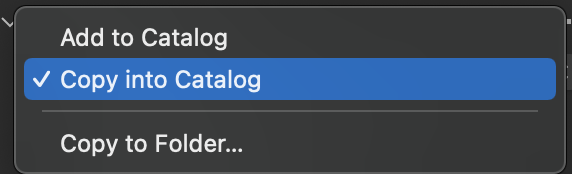
The choices are as shown.
- Add to catalog means that the images stay where they are but the catalog indexes them.
- Copy into catalog means that the images will be stored inside the catalog rather than in some folder somewhere.
- Copy to Folder... means that the images will be stored outside the catalog, but in some folder you choose.
You can't use the first choice if you are importing from a memory card or a camera. You can use either of the other two.
Ian
0 -
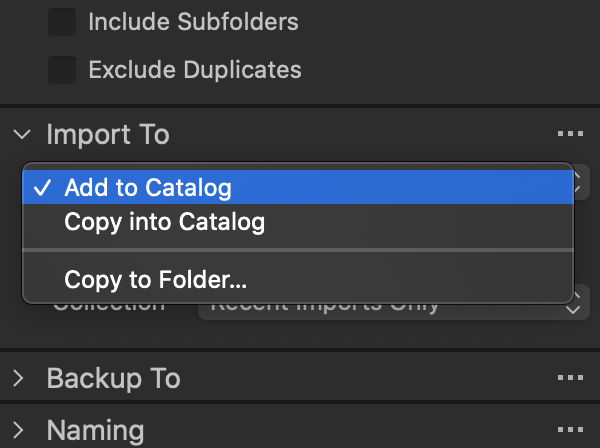
Well, the first option was obviously applied when I was importing from camera .... I tried again and you can use that option. I thought that the basic preferences will be saved from the previous version
 0
0 -
I wouldn't expect the first option to be possible when you are importing from a camera or a memory card. But I suppose that if your camera is capable of being seen as a drive by your OS, then perhaps it could be. But obviously you shouldn't use option 1 in those circumstances, because as soon as you disconnect the camera, you disconnect the images. You have to use options 2 or 3. (Option 1 is only any good if the images are already on your computer, and you want them to be added to the catalog.)
Ian
0 -
But can it be made default ? (as before)
0

Post ist für Kommentare geschlossen.
Kommentare
5 Kommentare