Heal Problem.

Version 20 (can't justify upgrade price!!)
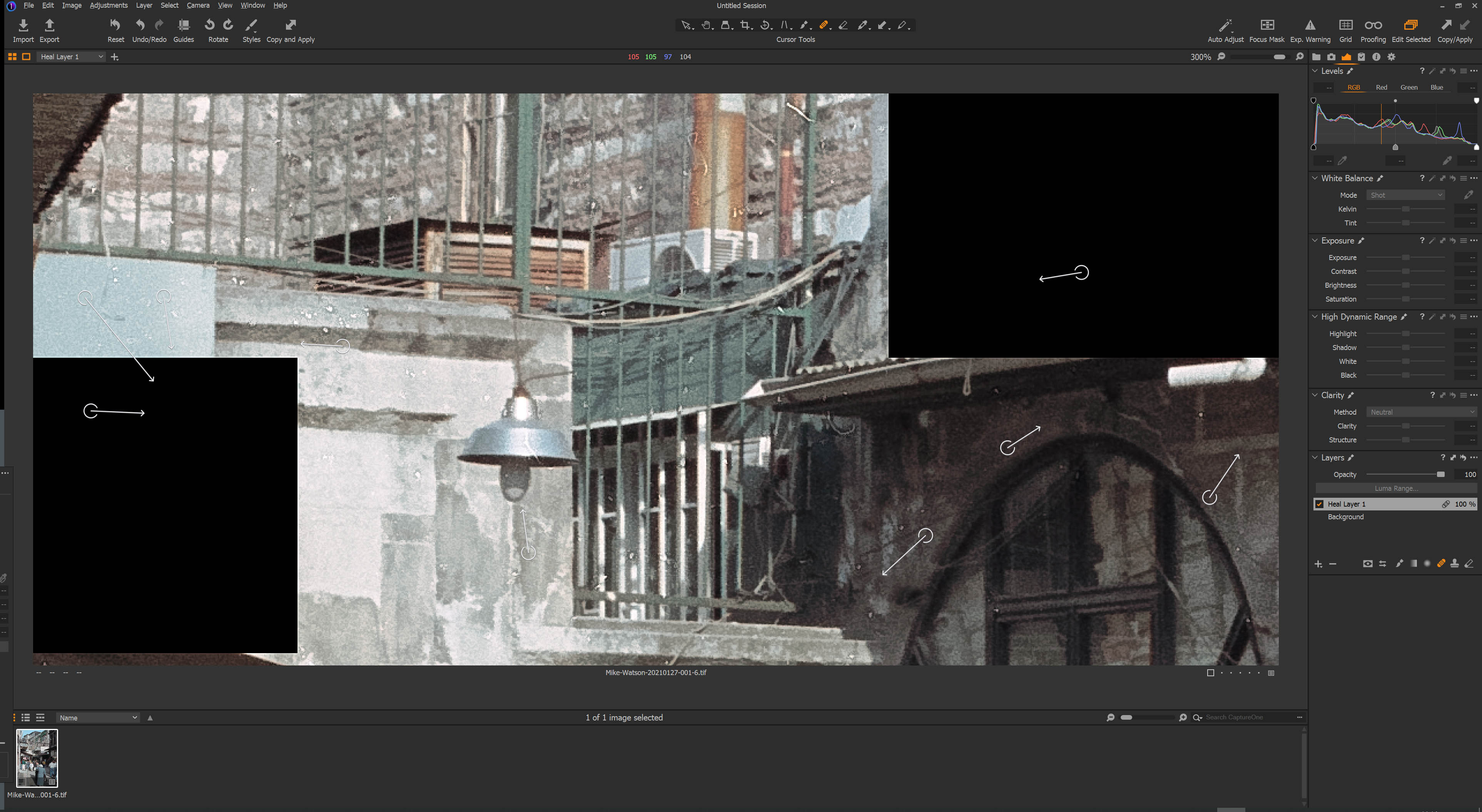
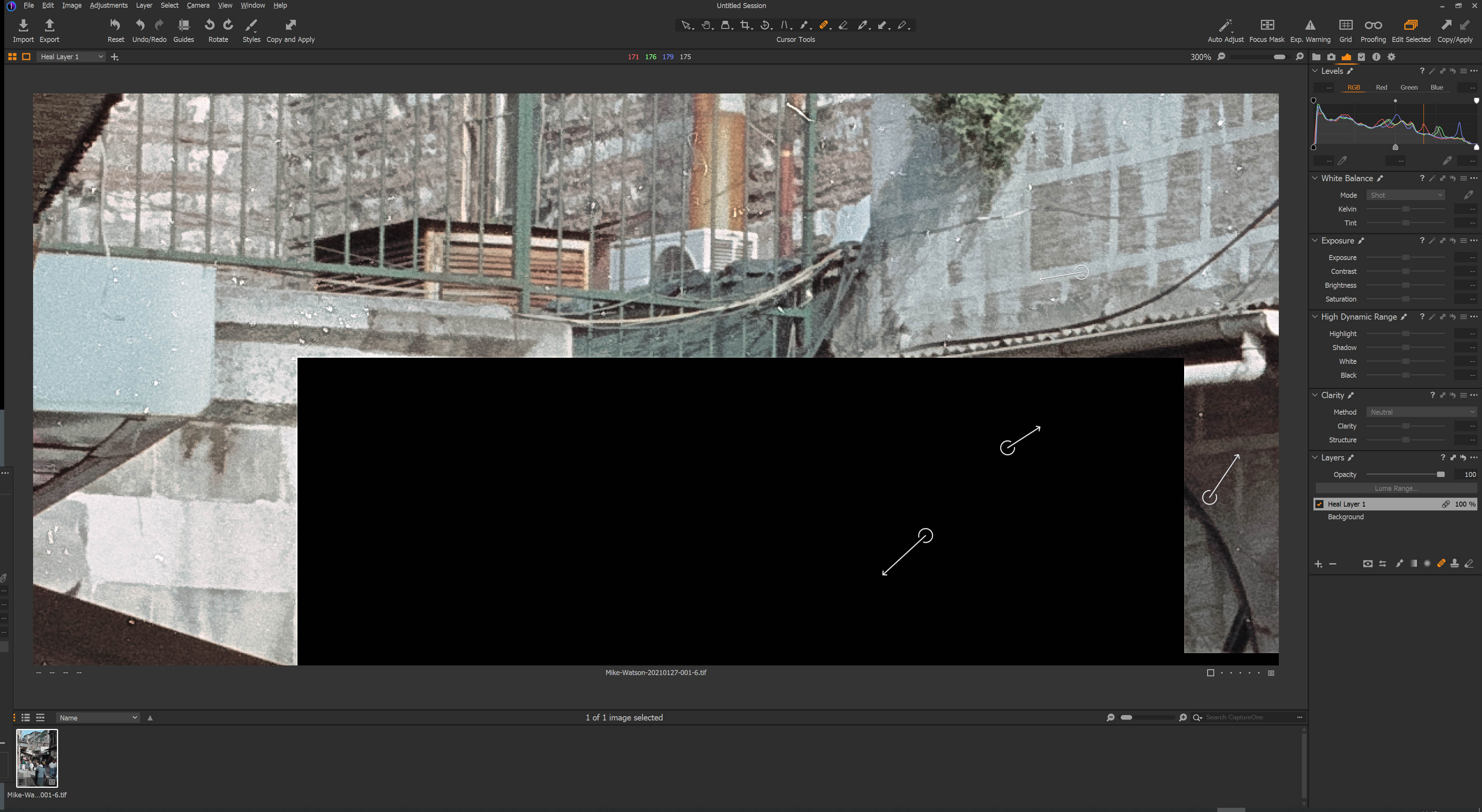
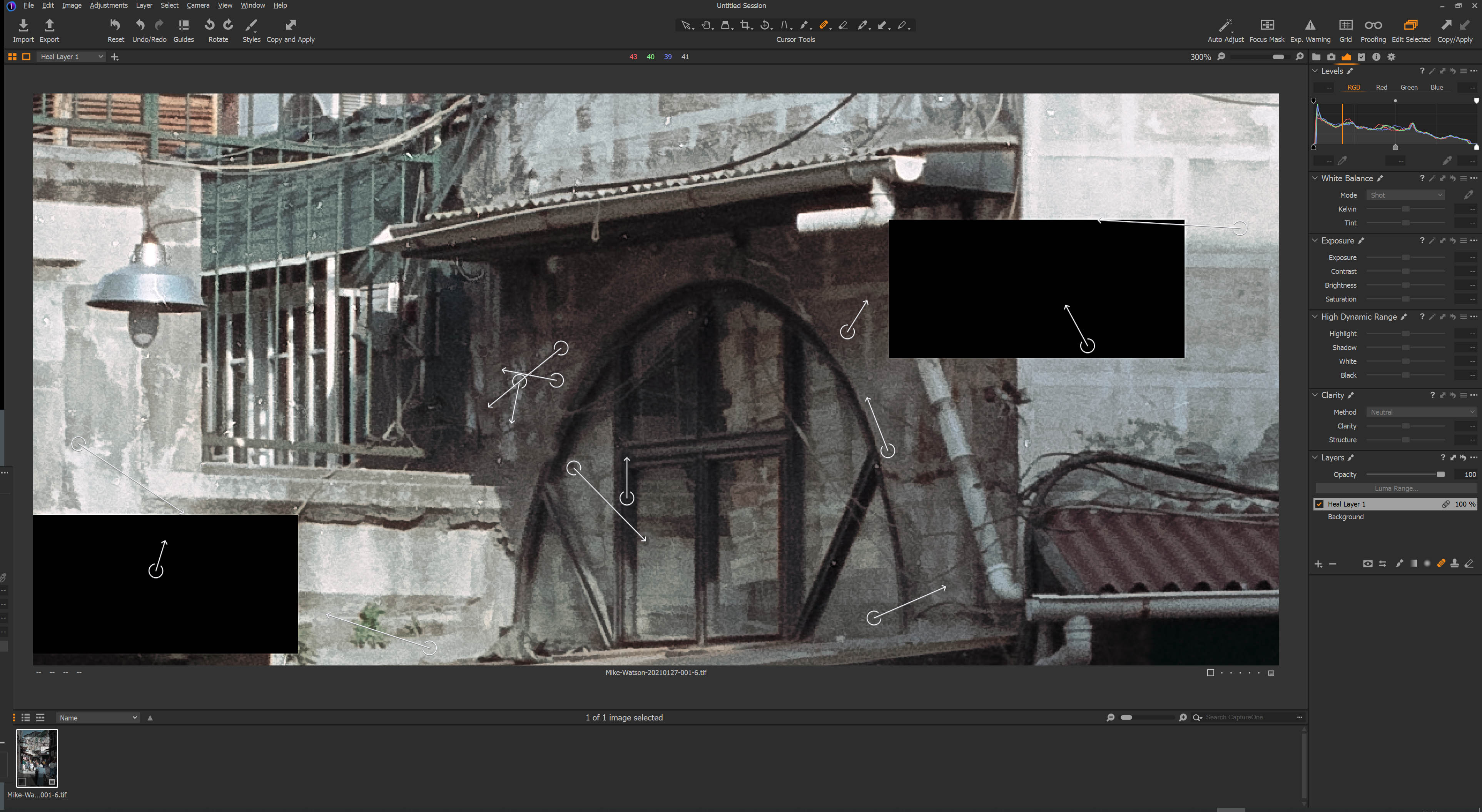
If I have cropped an image and try to heal anything the image breaks up and black blocks appear all over the screen sometimes in places I want to heal. Each time I click a heal spot the blocks flash and move!!
I've tried with and without Graphics card Acceleration and the only way to recover is to disable the heal layer.
-

Mike,
Windows 10?
This is not something I have seen using Win7 nor, so far, of a new Win 10 device. However that alone means nothing since this looks like some sort of problem writing output to screen possibly because the system cannot keep up with the amount of processing involved for some reason and fails to stitch the blocks of the image (as processed) back together again.
Does it make and difference where the Heal tool appears in the stack of layers?
Do you see this in all images or are only the largest files affected (for example - there mat be some other common factor.
Does it always happen when there is a heal layer present even if only one heal action is defined in the layer or is it necessary to have quite a large number of "heals" applied in the layer before the problem appears?
Given some possible criteria for an appearance of the problem I would be interested to have a go at trying to recreate it.
0 -

Mike,
you are not alone, one of another bugs I have. using Win10, latest build, latest graphic card drivers (Nvidia RTX).
I was trying to find out more and just found, this is known bug from the times of implementing new heal/clone features last spring. Nothing else. Nowadays, only disabling heal layers work.
For me, it appears accidantally and I haven´t found why so far.
Edit: think, there has to do with the core, the previewing and for the future they will not take care about it.
0 -
It may be worth checking for updated drivers for the GPU. Or even rolling back if the latest driver is installed.
There are also at least 2 lines in the NVidia driver development that are offering drivers on the same hardware but for different intended purposes. There is potential for confusion and unexpected results.
I have noticed on my recently acquired Win10 Notebook with T2000 that even the built in Intel OpenCL processing offers enough performance to be included in the configuration alongside the Quadro, though it took a bit of setting up and reconfiguring to actually get the applications to use the T2000 rather then just the Intel.
I suspect that the basic assessment for most activities was that the Intel (always used anyway for drawing screen changes made by the applications) and CPU combination was, for the needs I was presenting, the fastest combination anyway.
Working with video (or, presumably, games that are basically artificial video) one can monitor both GPU devices and observe an apparently far higher work rate. Hardly surprising if it is processing something like 30 frames a minute.
0 -
A few more observations.
I used a large sample file and added a few (about 20) entirely random heal actions - quite large areas healed.
The recipe as set produces a tiff file for print - the output file is 85Mb.
I repeated the output a few times with and adjustment layer, the heal layer and the layers in different orders. No issues.
With both layers active there seemed to be relatively little GPU activity and most processing seem to be activated via the CPU. Ditto with only the Heal layer active.
With the heal layer inactive then both GPUs show an active spike in operation and the CPU also shows a spike but lower than when the GPU's are showing nothing happening.
I ran the output about 20 times. No problems observed. Output processing took about 2 seconds click to finish. Any possible difference on speed with different layers included or excluded and using or not using the GPUs was impossible to gauge. Speed differences might show up over an extended output run with multiple images.
So, all in all very inconclusive and of no help to the problems people are experiencing.
:(
0 -
Thanks for the responses and suggestions.
Windows 10 build 9600 64bit 3.7Gig Intel Core I5
NVIDIA GeForce GT 1030 have had several driver updates since it started.Latest NVIDIA driver installed 461.40 26th Jan 2021
Windows System software and Graphic drivers updated on regular basis.
Because I don't run "games" I used to uninstall the 3D graphics driver
parts of the NVidia drivers but these are no longer listed separately.If I open an Image and start to heal straight away it happens as well as
if I process the image and then heal.I see it in most images although I rarely heal from camera images, it is
usually a scanned image that requires spotting.One heal operation will cause the problem and it happens whether image is
cropped or not.Mike
0 -
I am using latest game driver for RTX 2070, Ryzen 3600, 16 GB RAM @ 3200 MHz and think, there will be no difference between game or studio driver.
Just therefore, this bug I am experiencing from last autumn.
As I heard, it persist also in v21.
What might be worth of try, is to try to create new catalog and if this helps, then IMHO that it is what it caused - large database of previews and bad caching.
0 -
Mike,
Back in the first post you mentioned seeing the problem even with the GPU disabled for hardware acceleration.
So if that is the case AND the disabling has worked as intended - it seems to on my system but that is not necessarily a guarantee - then that might seem to suggest that maybe the GPU is not part of the equation.
My machine is running Win10 build 19401.
Processor Intel(R) Core(TM) i7-10875H CPU @ 2.30GHz, 2304 Mhz, 8 Core(s), 16 Logical Processor(s)
Currently 16Gb RAM most of which is being used by the applications in use.
Intel software base embedded GPU and the Quadro T2000 are both used when deemed useful.
However note my comment about almost all processing (anywhere in the system, any application) being almost all CPU when output processing a Heal layer. That fits in with ancient information that GPU process is not useful in all situations and, indeed, for all file types.
The other aspect of issues like these seems to me to relate to the configuration of the computers we use - maybe not so much the theoretical performance of the headline components but the capabilities of the bits that connect them all together and run them. Or even failing but not yet failed, components.
Even my 8 years old notebook with hardware of its era has not exhibited the problems you have illustrated above. So it is not purely an available performance issue.
That can make thing rather tricky to investigate and come up with a resolution - or even identifying what a resolution to the problem might be.
0 -
Hi Stanley,
Thanks for that but I run a completely new session for Capture One daily anyway. I use Lightroom 6.5 as my D.A.M and import the images there first. I have a batch file to clean out Capture one sessions, image core and directories so a new one is built each time I do some work. Images exported from LR, processed in C0 and are re mported to LR after processing.
0 -
SFA
I agree the GPU doesn't seem to be the problem. Guess I'll put up with it. It's just that I am about to scan 20 reels of 645 images and dust WILL be an issue.
Thanks again Mike (long retired software engineer)
0 -
Mike,
if even sessions are affected...
I can try within next week if have time another home PC, but guess nothing will aim to solve this.
More the team of C1 engineers nor anyone else can help how to handle this.
PS: to your workflow, did you follow this https://www.youtube.com/watch?v=vPnwjPPqGgg or you have you own? Thinking last month to go for the same, e.g. Lightroom as a DAM and C1 just for conversion or next idea go back to LR completely and use Iridient or Enhanced detail (have Fuji).
0 -
Stanley ,
Yep, that's exactly the video I watched to do it..... :-)
Bit of a pain now as I have added a panasonic LX100m2 to my kit for last Chrsitmas and this needs DNG converter to get it into LR but after a while I may import to C0 and then export to LR for keywords etc....
0 -
Mike,
I feel for you with the scanning.
Found the available software good but not perfect when had a similar task to do a decade or so back. Sorting most of the dust marks during the scan was a great idea when it worked.
If you feel like sharing a file and your edit file(s) via a file sharing service I would be happy to take a look at the combination on my system to see if that throws up any anomalies or interesting looking process performance information.
0 -
You might want to try to use the NVIDIA Studio Drivers, they are much more reliable than the regular Gaming Drivers.
0 -
C-M-B
Thanks, I tried that a while ago.
For some reason the web site doesn't seem to show the Studio drivers for the NVIDIA GT 1030 and NVIDIA Experience doesn't show it as an option when I follow the prompts. Currently trying the latest driver but only installing the driver, not the other packages it ships with . (HD Audio and PhysX System Software but still no joy)
Mike
1 -
SFA
Here's the exported TIF file from LR which is sent to Capture One.
https://www.dropbox.com/s/tnvzmhssdeqpkay/Mike-Watson-20210127-6.tif?dl=0
0 -
SFA
Well that provoked a bit of thought....
While creating that file I saw the size so tried 8 bit with - no change.
Then tried Adobe RGB - no change
Then I went back and tried exporting an original Nikon RAW file and that DIDN'T have the issue.
Exported to Capture One as a TIF from the nikon raw file and it had the problem.
Export to Capture One as JPEG and it didn't have the problem
So it appears to be something to do with it being a TIF file.
Will do further experiments tomorrow (removing all metadata for a start...)
0 -
My bad, the Studio Drivers are only available for the GTX 1050 and above!
Generally speaking CaptureOne isn't known for being 'good' with TIF files and produces tons of issues:
https://support.captureone.com/hc/en-us/community/posts/360009395197-problem-with-TIF-images-
Especially with layers TIFs one will eventually run into some problems...It's just sad that these bugs and problems still persist and have not been fixed for version 20 (and I bet they're still in version 21 too and will continue being there forever) - because now that 21 is released they won't fix any problems with 2020.
0 -
SFA and C-F-B.
Thanks for your patience and suggestions. Eventually found my workaround.. After trying various other tweaks I decided to try exporting a PSD from Lightroom to Capture One and that does not suffer from the problem. A short test seems to show having a PSD rather than a TIFF is not a problem (They are after all nearly the same thing from memory) so that's what I'll do .
Thanks again Mike
0 -
Hi Mike,
That's a great shot to play with. Probably one of the best I have looked at for spot fixing and a high success rate for the auto selection fixes, especially when zoomed in at 300%.
I just added a Heal layer and a crop.
It may or may not be comforting to know that, despite my system being maxed out on memory use with C1 running 2 sessions and a catalog, Edge with about 50 tabs open, Da Vinci Resolve loaded and some sample phone videos active a load of folder enquiries open and many of the Windows system analysis tools active, (and breathe ...) no problems found in processing or output to new 16bit tiff files via the Output Process tool.
When editing I can see some small levels of GPU activity registering for both the Intel built in GPU and the NVidia. Output processing seems to be handled entirely by the CPU.
What has surprised me about this recently acquired Win 10 system is that output of the 16bit, 103Mb (after the crop) file takes almost no time at all. Blink and it is likely one would miss the process bar on the Output Process tool. I was so surprised I re-ran it several times. Always the same speed and result. No obvious anomalies observed on the output files.
So I guess the good news is that what you are seeing is not a fundamental burned-in problem.
The less good news is that discovering that does not really help your immediate needs.
I have no idea where one might look next.
Why TIFF files should be a challenge is a mystery. I don't recall having any problems with TIFF files for any reason (other the published pixel dimension limits that have never been a problem for me and the need for RGB colour space which again is not a problem as I have not scanned or create tiffs using grey scale.
To gain some insight on that it may be necessary to have the C1 team provide some guidance as to what could possibly cause TIFF files with Heal Layers (and only TIFF files) to be problematic on a particular system. (Or several systems but not ALL systems.)
0 -
SFA,
Well thanks for taking a look.
I will stick with the PSD transfer for now as it doesn't impact my workflow any and works OK.
Will skip version 21 for now and may do a two year upgrade cycle.
Thanks again Mike
0 -
spoke to soon! :-(
Problem occurring with PSD as well.....
0 -
Found a new workaround. :-)
The problem occurs if I export a TIFF file from my Catalog in Lightroom which I rarely do as I usually work in RAW files. However it has come to light now during lockdown as I have been scanning lots of old negatives which results in a dng file from the scanner.
The images are then converted using the NLP plugin (Negative Labs Pro) to convert a negative to a positive in Lightroom. This usually leaves a dng which I can export to Capture One as a TIF, to process. This exhibits the problem.
The workaround is that the NLP process allows you to make a copy of the image which is a TIF. If I export this and convert it to DNG in the export process then healing the DNG does not exhibit the problem. (an extra step in the workflow which I will put up with for now!)
*** Incidentantly if I convert this dng to a tif in Capture one by say editting it in an external editor but then cancelling the edit the problem occurs with the generated TIF which hasn't been editted but created by Capture One.
Mike
0 -
Mike and others,
maybe bullshit, but as I was working with some pictures and external editors, I have noticed, that at my side, TIFFs coming back from Topaz Sharpener are affected whereas those from Affinity not.
I don´t know how to check it through editors settings, but this makes me think that there is something with tiffs compression to come to play here.
Generally I think, that Affinity saves uncompressed files and Topaz LZW or ZIP compressed.
0 -
Stanley,
Thanks for the suggestion. I tried no compression and zip compression (as labelled in the Lightroom Export dialog) but both exhibited the problem for me. As SFA said above it could depend on your hardware config that something works on your system but doesn't on mine. Having been in the computer and software industry since the late 70's nothing suprises me!!
Oh, just to add I have logged it as an issue
https://support.captureone.com/hc/en-us/requests/79345
Mike
0 -
Mike,
Considering the rather "open" nature of computer development in recent decades - especially in Microsoft World - I am regularly amazed that anything works as well as it does!
0 -
Mike,
Actually I meant, that saving in external editors could have had some influence. For both, Topaz nad Affinity, I use uncomressed tiffs when exporting to them, but when the tiffs are back in C1, Topaz is affected. That suprised me.
But I have remembered, when I was processing some ICC profiling for my Fuji camera through Lumariver, there is some workflow that need tiffs of course and curve setting. With everything else that standard curve apllied, the Lumariver couldn´t open the tiffs as they missed something, specifically "TIFFTAG_TRANSFERFUNCTION".
I was trying to solve this with C1 support, the didn´t know. My conclusion at that time was, that native fuji curves and appropriate tiff are somehow locked for further editing.
Maybe this is not the case, but there is something deep inside C1 when working with tiffs.
0 -

Having the same problem with AMD RX480 card, Windows 10 and latest drivers Capture One 20.x. I have been experiencing this for months.
This is opening a raw file in Capture One and processing it a jpeg. I get the issue on the screen and when processing it to a jpg, making this feature useless.
Capture One engineers must be aware of this. I don't understand why fix it. On this thread someone mentions it is also happening on 21 ????!
0
Post ist für Kommentare geschlossen.
Kommentare
27 Kommentare