color range restriction to masks
Implemented
I suppose the same as requested by Prasad 2 months ago here: https://support.captureone.com/hc/en-us/community/posts/360013694897-New-Color-Range-feature-along-with-Luma-Range-for-color-based-non-destructive-layer-mask?input_string=color%20range%20restriction%20to%20masks
Adding a color range restriction tool to the luma range restriction tool to refine any mask would be a huge leap forward when it comes to local edits.
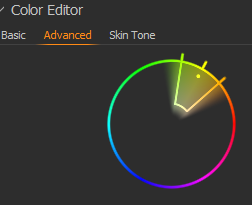
It could either use the circle known from the color editor tool or even some kind of linear presentation of the color range with lines and handles as restrictions on both sides, similar to how it works with luma range.
Imagine a mostly brown bird in front of a background that's mostly green but also has some brown parts in it.
If you create a mask from a brown color selection within the color editor, the resulting mask will also contain all those brown parts of the background that you don't want while probably not the whole bird is part of it because the beak, eyes, legs or even some feathers might have a different color. Now you would have to rasterize the mask, grab an eraser and erase all the background parts, then grab the brush and brush in those missing spots of the bird that weren't part of the color selection in the first place. That's a bit cumbersome.
It would be so nice to just brush over the whole bird and then add a color range restriction to that mask in order to exclude the green surroundings of the background.
Just one example that I would think of as a bird photographer. I'm sure there are countless other situations in other genres in which this would come in handy as well.
Thanks in advance!
Cheers! Jochen
-

Hi Jochen,
Thank you for feedback on Capture One - we appreciate the time you've taken to contribute towards the development of the software.
I have forwarded your comments and suggestions on to our Product Management team as something to consider in a future release. Hopefully your feedback contributes towards a future version of Capture One.
Though we cannot comment on future releases and the features to be added, we recommend keeping an eye on this article - click Follow next to the title of the article to stay up to date with new features and improvements.0 -
+1
Yes, a Color Range option to adjust a layers mask (without rasterization) this would be great.
To pick the color range a user interface like the Advanced Color Editor would be good (just the part to pick a range)
 0
0 -

BeO - I have added that option in my Design Mockup... It would be awesome if Capture One implements it in 2022...
0

Post ist für Kommentare geschlossen.
Kommentare
3 Kommentare