Luma Mask - blocks and lines

When applying a luma range, I'm getting blocks and lines of different sizes and shapes all over my image. They're still there after a restart, and they show up in a recipe created TIFF or JPG. It's actually in the mask itself, and can be seen clearly with the "show mask" setting.
I'm editing a Fuji RAF file from an X-T2.
Is anyone else seeing this sort of thing?
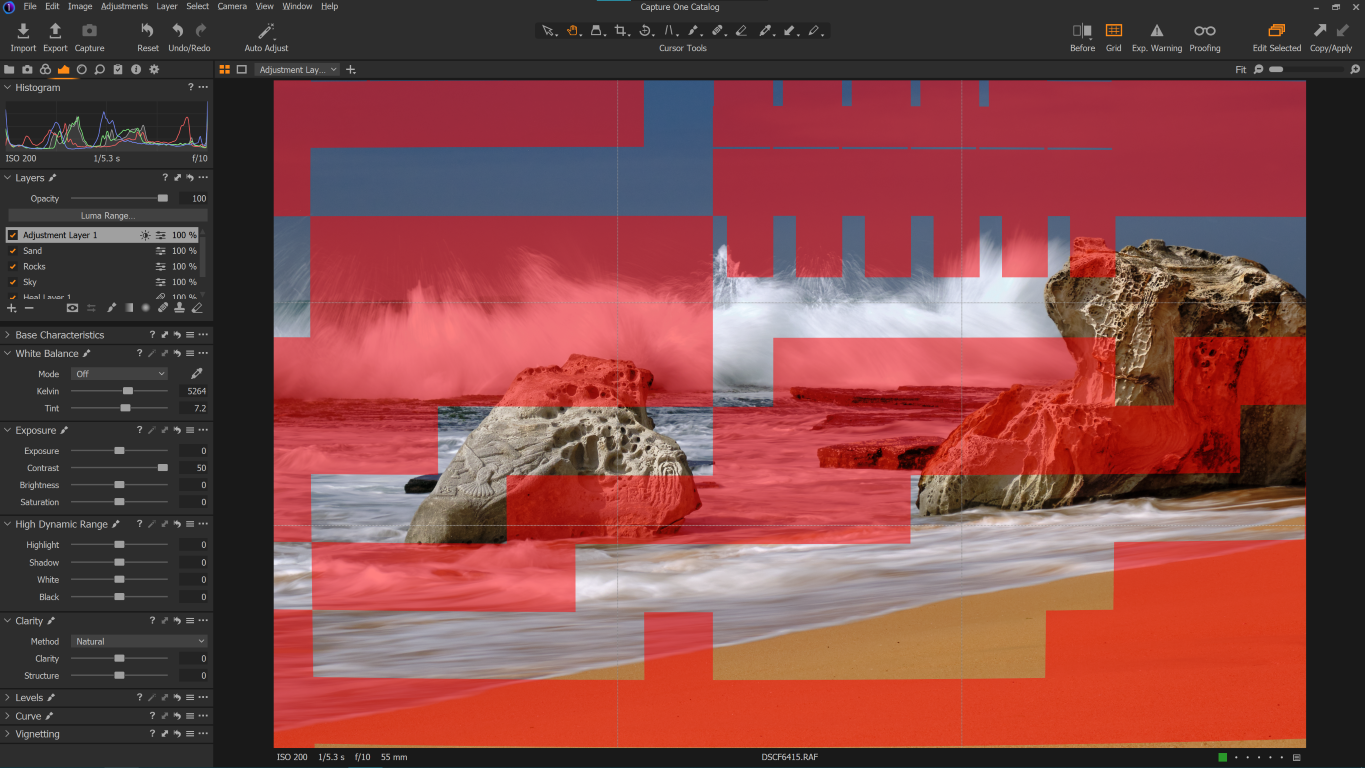
-

Same exact issue here with my X-T20. Was about to post something until I came across your post. I was able to fix the issue by turning off hardware acceleration and re-opening Capture One. Will Capture One provide a fix for this? Doesn't happen often but quite annoying.
I've had something similar happen during jpeg exports (blockiness).
1 -
My advice: report a bug if the following doesn't help:
0 -

It may be worth checking for new GPU drivers or, if you have the latest available for your equipment, trying going back to the one before.
Also, if it seems to be embedded in the mask have you already tried deleting the mask and re-creating it?
Does it always appear on every mask or is it something that is somewhat random yet regular enough to be annoying?
Finally, are you using the last released version of V20? (Or some other version . I assumed V20 on the basis of the post being in the V20 section.)
0 -
In regards to my case, after experiencing the issue, I upgraded my nvidia drivers to the latest Studio drivers and the issue still happened for the particular image. It does not happen on all images.
Also, I did try deleting the layer where I was trying to use a luma mask and recreated it. Same issue occurred for that particular image. I'm using the last and most up to date version of Capture one 20 they have released before they moved on to Capture one 21.
Does Capture one ever release updates for previous versions after they move onto higher versions (bug fixes)?
0 -
Eugene,
No, there will be no further updates for V20 and I doubt there will be any for V21.
There was one situation about 3 releases back where some cameras were supported on an about to be replaced version because the release timing and a couple of other factors I have forgotten made it wise to do so but that is unusual.
If you were using a Session I would be tempted to suggest you delete (or rename in the Windows browser) the .comask file related to the image and try again.
I'm not sure what the equivalent of that would be for a catalog and how one might safely "play" with it without potentially causing other issues.
If it is just a single image (or a very small number of images) one likely possibility is a corruption of the data for the Mask settings for that image.
You could try creating a new catalogue, importing the problem file afresh to that catalog end making the same edits (not copying the existing ones) to see if the problem repeats for the "new" image.
0

Post ist für Kommentare geschlossen.
Kommentare
5 Kommentare