How can I see what camera each file was shot with?

I use more than one camera. How can I see what camera was used for each file? There is some info about shutter speed and ISO but I cant see the camera name anywhere.
-
I have another problem now. I clicked on the eye dropper for white balance and now I dont know how to stop using it. I have tried clicking on the button again. I have tried pressing ESC. I have no idea how to stop holding the eyedropper.
Why is this so unintuitive
1 -

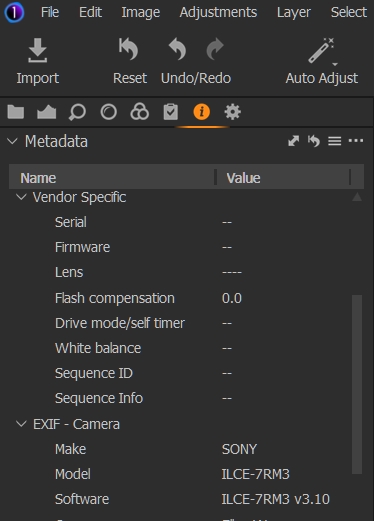
The metadata tool is one option.
Or name the files for the camera used on import.
In my case, my main cameras have different naming conventions for the files which makes life easier for those times when needing to know the camera may have some importance.
To change from one tool to another simply select the next tool to be used.
A quickly accessible "neutral" tool is the "Hand" tool. The default keyboard shortcut for that is "H".
0 -

The Metadata Tool is the 'i' icon on the main tool menu.
 0
0
Post ist für Kommentare geschlossen.
Kommentare
3 Kommentare