Update fails

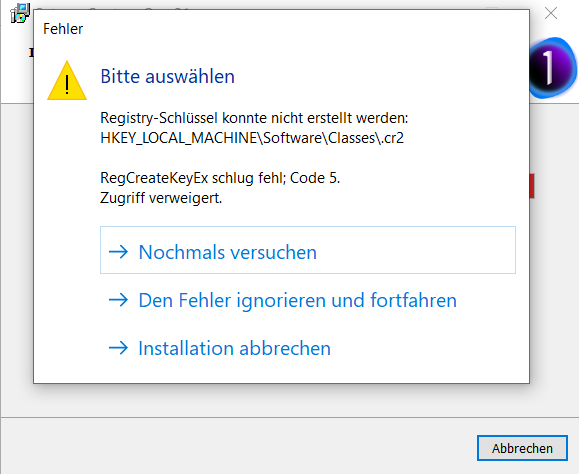
-

Have you tried to run the installation "as administrator"?
0 -

hello i'm the administrator of my desk and laptop. i have the same issue
best regards
0 -

Hi there,
same issue here.
If you ignore the error message and continue the installation it will finish the update but I'm not sure what the impact might be.
I have started a support call on this.
First guess from COP support was antivirus software causing the problem. For me that didn't do it. i.e. same issue even after disabling all antivirus/antimalware software.
In case I receive a new suggestion from the COP support, I can leave a message here.
0 -

I had the same problem and I did ignore it. But not before I tried every thing in the book dealing with security and permissions on the .cr2 registry entry. None worked. I do not have a canon camera, but I did have a pocket one many years ago. So I suspect the registry entry came from that one.
I will watch for any COP answers here.
0 -
Well, the ticket I've opened has been closed now.
As COP is running (art least for me) with no direct impact from ignoring the error upon installation my ticket has been closed with the following feedback:
"Glad to hear it works. We've reported the issue and added more customer tickets to it. It's currently "in audit", it's being checked. I'll mark our conversation as solved for now, ..."
0 -

(NOTE: Yes, I replicated my reply in the threads I found covering this bug to keep things in context)
I ran into the exact same issue installing the Capture One 14.1 update ("RegCreateKeyEx failed; code 5. Access is denied") when the installer tries to create the .CR2 and .CRW-related registry keys. As mentioned in this and other threads, one can ignore and continue without any obvious issues running the application.
A workaround that did work for me was to boot Windows 10 in safe mode (search for and run System Configuration, click on the Boot tab, check Safe boot, and press the OK button), and run the installer. The installer finished without problems; once done, reboot Windows using a "Normal startup."
This was also documented in an old thread describing the exact same problem with a previous Capture One update file, titled "C1 20 installation issue on Win10 Pro" (https://support.captureone.com/hc/en-us/community/posts/360009401898-C1-20-installation-issue-on-Win10-Pro?input_string=WORKAROUND%3A%20Capture%20One%2014.1%20Update%20%22Access%20is%20denied%22%20(RegCreateKeyEx)%20Install%20Error)
I understand Capture One support may not look at these threads, but as a software engineer by trade, I would look at an issue with the installer, RegCreateKeyEx calls, and UAC. Also, FWIW, both keys where I got the failure already existed and had values related to other programs (e.g., OpenWithProgids had entries for Affinity.Designer, Affinity.Photo, and Affinity.Publisher - 3 pieces of software I also use and have been installed in my box for some time). And, the Capture One update did not change the keys in any obvious ways even after it succeeded. But, I digressed, yet I do suspect this is an issue with the update/installer file itself. :-D
Hope this helps folks a little more!
0
Post ist für Kommentare geschlossen.
Kommentare
6 Kommentare