Record to apply later vignette correction?

Hello, is there a possibility to record a preset; as a user preset; to correct vignette, in a given lens to apply whenever these lenses are used? And for more than one lens? Example: Zeiss 1.4 / 50mm ZE (35mm lens) used in the GFX50R (medium format). This lens always produces some vignette and I would like to correct it more automatically whenever I upload a set of .RAF files from Fujifilm, made with this lens. Thanks.
-

There is a limited selection of corrections that may be applied. From the
drop down >Curve, select and save. However, vignette is not among them.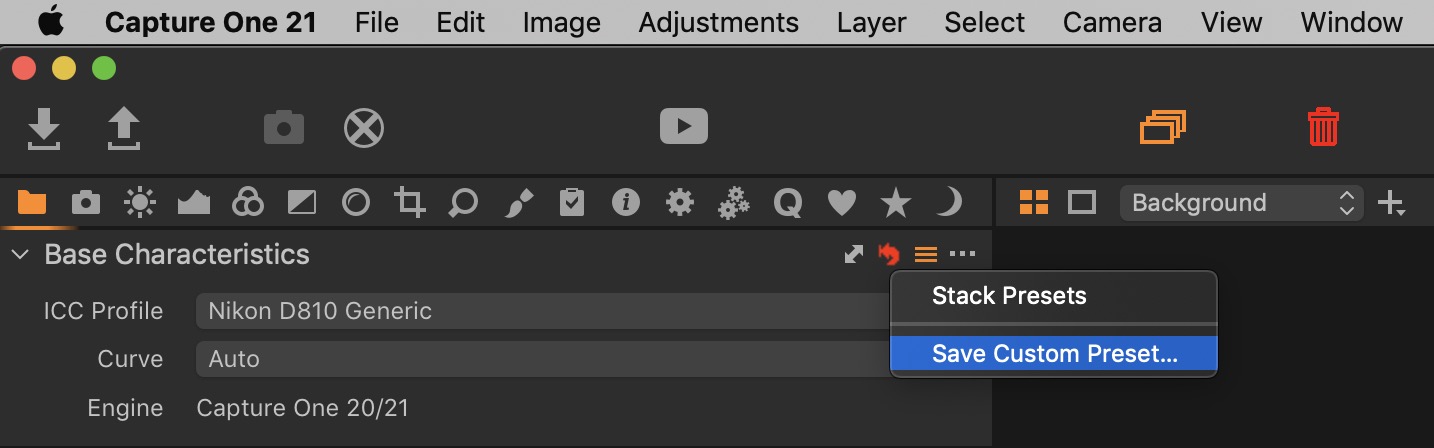 0
0 -
Thanks Nikon Shooter .-( Any alternative ideas? Cheers.
0 -

In the Lens Correction tool, set the 6 variables (3 checkboxes and 3 sliders) as you want and then click on the icon next to the ... one in the tool's upper right corner. From the resulting menu choose "Save Custom Preset" and name it appropriately.
What I don't know is whether that preset will automagically be applied to each image with that lens, or if you'll need to apply it to each batch shot with the lens.
0 -
Possibly…
To apply the same correction to a number of files, first select all the files,
press SHIFT key and click the double arrow of the tool you want to copy/
apply from. HTH0 -
Thank you both.
From those 6 variables, none is Vignetting Correction (only under the Exposure Tab). But maybe I can use the Light Fallof!?
0 -
Yes; Light Falloff is what you want. Also look at the other sliders.
Frankly, I rarely use the Vignette tool (which you could also incorporate into a custom Style). Reason: As my tastes have evolved, I find regular vignettes are usually not what I want. Instead, I often create a circular gradient and apply the adjustments I want, such as Exposure, Saturation, and Clarity. OTOH, to fix lens issues I want to just address the lens stuff, so I'd create a preset as described above.
0 -
Thank you very much for your help .-)
0
Post ist für Kommentare geschlossen.
Kommentare
7 Kommentare