BUG: 14.3.0 Export Location tool - Cannot change folder options

In the Export->Location tool, the Choose... button only allows me to select a folder. There is no way to access the other options (Catalog Default and Same as Original).
EDIT: I'm on Windows 10.
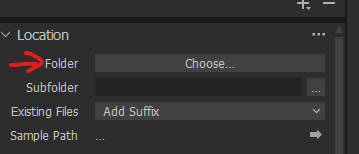
:'-(
EDIT: I received response from Support regarding this bug report. It turns out that the ability to choose between these options appears only after you have chosen a default export path for the catalog (which you only need to do once). That is counterintuitive IMO. Anyway, I'm relieved to confirm that once I did it, the options appeared.
I still consider it a UI and documentation bug. I'd expect some sort of UI prompt to define the default path. There is also no mention of this in the documentation, which ought to be.
Noam
-

Hi Noam!
It looks like they just trashed the export tool :(.
See the Mac forum: https://support.captureone.com/hc/en-us/community/posts/4404439561873-New-Export-Button
I would suggest to keep on 14.2.x until they either put the old one back or fix the new one..
I quickly downgraded after I noticed the new one is not working correctly and I have may jobs to deliver. I actually delivered them (fortunately Jpeg was select by this customers, using JPEGMiniPro..) because I can not use that session anymore on 14.2..
Unfortunately, the old version is not available either in there "old version" page. Hope CaptureOne is not doing an Adobe..
Cheers.
1 -

Perhaps this is a MAC issue. All the options are there in my Windows version.
0 -
No, I'm on a Windows 10 PC. Sorry, I should have mentioned it.
0 -
Having checked again to be certain all options are available I can confirm they are there. Perhaps reinstalling the update will solve your problem, unless you've done that already.
0 -
Interestingly, I'm having this issue with my main Catalog, but when I opened some Session, the tool was fine with all options available as expected. When I re-opened the Catalog, the problem remained, though.
0 -
I'm curious as to why the behavior of the tool was as expected in a Session and not in a Catalog. You may have done this already...why not try creating a new Export Recipe in the Catalog and see what Location choices show up?
Another thing to try...in the Exporter click on the 3 dots to the right of "Location" and choose reset the tool.
Maybe one of these things will at least get to the source of the problem.
0 -

May not help in the first place but here under Windows it's ok, I can make my of choice of all offers. So seems no general issue. As Barry says, try to to reset ....
0 -
@Barry: Of course I already tried that. Resetting the tool did nothing, and I created fresh new recipes. BTW, some of my old recipes had a different Location option selected, but again without the ability to change it.
0 -

Have you tried recreating the recipes?
I think that you may find that the legacy settings for "current values" as "last used" in a catalogue may no longer be entirely compatible with the revised aggregation and simplification of the new approach and may be "frozen" in processing so that they still work as they were but cannot be modified within that recipe.
Note that if you have previously used tokens to define the output some of the tokens and previously available fields are no longer present. Historic use of those tokens would, presumably, break the new offering.
A new recipe should overcome that, obviously with the absence of the old tokens had you used them.
0 -

I have compared related XML files and in 14.3 this block is new:
E K="fileName"Not only this also the destination folder and subfolder will be saved individually.
Such behaviour results in that I have to check before a multiple export each recipe if the destination folder and its subfolder and file name are set correct.
Edit 1: Win10 pro
0 -
@SFA: Like I said, it happens with fresh new recipes as well.
0 -
UPDATE: I editing the OP. It's a UI quirk.
0 -

"It turns out that the ability to choose between these options appears only after you have chosen a default export path for the catalog (which you only need to do once). "
Can someone tell me how do that?
Thanks
Dan
0 -
@Dan, Just click on the Choose... button.
1 -
Aha! Thanks, Noam.
0
Post ist für Kommentare geschlossen.
Kommentare
15 Kommentare