Importing LR Catalog and Creating A Reference Catalog

Hello, Id be grateful for a little assistance in sorting a few questions.
I'm running C1 14.3 on a Windows platform. I'm trying to do the following to import my LR Classic 10.3 catalog into C1 and it fails with an enormous list of errors (System.NulReference.Exception); importing one folder a 17 photos out of a 40K.
So then I tried to create a new C1 reference catalog, leaving my photo where they were. C1 created a catalog and imported the photos, but did not import the file structure. For example
My Photo > Wildlife > Birds > Bald Eagles. It only imported the Bald Eagles, leaving behind a mishmash of hundreds of unorganized folders.
I followed the tutorials for doing both and to say I'm disappointed would be a understatement.
If any member of the support team (which has not responded to ticket) can offer suggestions Id be grateful.
Thank you
-
I'm not a member of the support team, but...
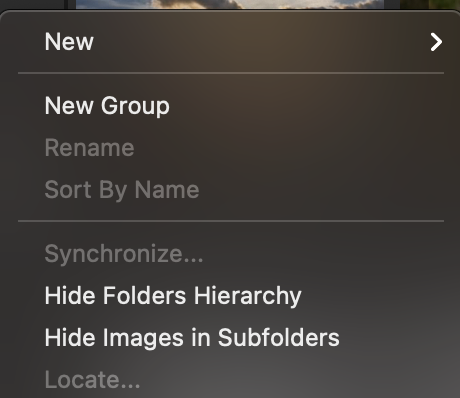
I'm not sure what you mean by a mishmash of hundreds of unorganised folders, but it made me wonder whether you knew about an option that shows or hides the folder structure.
If you click the ... at the top right of the Library tool, do you see this...
... or this
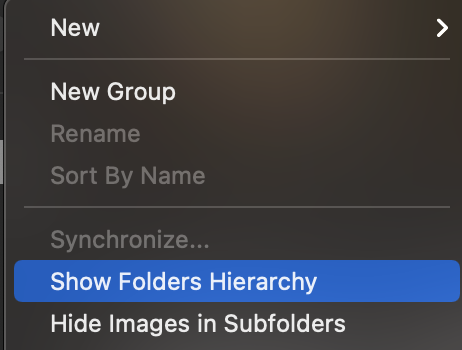
If you select to show the hierarchy you get the folders within the "tree" structure. If you hide it, you get a flat list of the folders.
Ian
0 -
Hi Ian, I found a obscure radio button that reveled the file structure hierarchy. I also took you suggestion and sync parent fold too. However, I haven't heard a whisper from the Tech Support ? I don't have this issue with other products in use in my studio.
Thank you again for your kind reply and assistance
Charles
0 -
I don't know about a radio button - only the two options I showed you. And I don't think I mentioned syncing the parent folder. But I pleased to know it helped.
Other products of course have their own ways of doing things. If you are still not happy with how you are seeing the folders, perhaps you could post a screen shot?
Ian
0 -

Charlie,
Did you take the opportunity to do some housekeeping and cleansing of your LR catalogue before running the import?
At the very least it would make sense to exclude any file types that LR may support in ways that C1 does not.
In addition, the internal data of a long-used database can contain some "unexpected" references that a conversion program may not be able to fully resolve.
FOr a large and long-established catalogue database that may not have been internally refreshed for some time, to do so before conversion is very likely to confer some benefits on the process.
0 -

FYI - Update to thread
Hi Charles,
I consider this a bug and I've filed a report with all the details for our R&D team to audit the issue. I will place your ticket on-hold and will get back to you when we have a response from our engineers or if we need any more information for this report.
We also cannot guarantee that this bug will be fixed in the next service release, but rest assured that it has been reported and will be looked into and our developers will do their best to roll out a fix as soon as possible.
Best regards,
Victor
Capture One Support0

Post ist für Kommentare geschlossen.
Kommentare
5 Kommentare