Automatic creation of smart folders for each day and grouping of days into months

The topic is probably not new, but I can't find it. I organize my personal photos in the catalog. When importing, I copy the photos to the catalog.
After importing photos, I would like separate folders to be created automatically for each day. I would also like days to be subfolders of months.
I think I came across a tutorial like this once, but can't find it. I will be grateful for any help, because so far, I have done all this manually.
-

I make a smart album for each year in a group named "By Year" I only have to do this once a year so manually creating this album is not an issue.
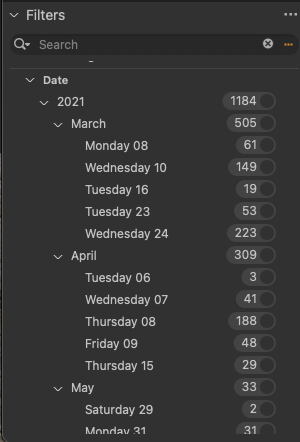
The easy solution to your question is to use the Filters Pane.
1) select the smart album for a specific year... (or any other project or album)
2) open the filters pane and select "Date"
you will see a list by month and day of the images in the selected collection with the number of images.
Select Months or individual Days to filter the images as needed.
 0
0
Post ist für Kommentare geschlossen.
Kommentare
1 Kommentar