rename the external drive with catalog & photos

It turns out for a variety of reasons, I need to rename several external storage media, each containing their own catalog & folders of images.
I'd like to rename the drive, but the first time I tried it through Finder super bad things seemed to happen. Next I tried to rename it through the browser in C1-21. No joy: see screenshot showing "Rename" greyed out.
Do I need to:
a] rename drive in Finder
b] in C1-21 open catalog on renamed drive?
Please advise.
Super, thanks
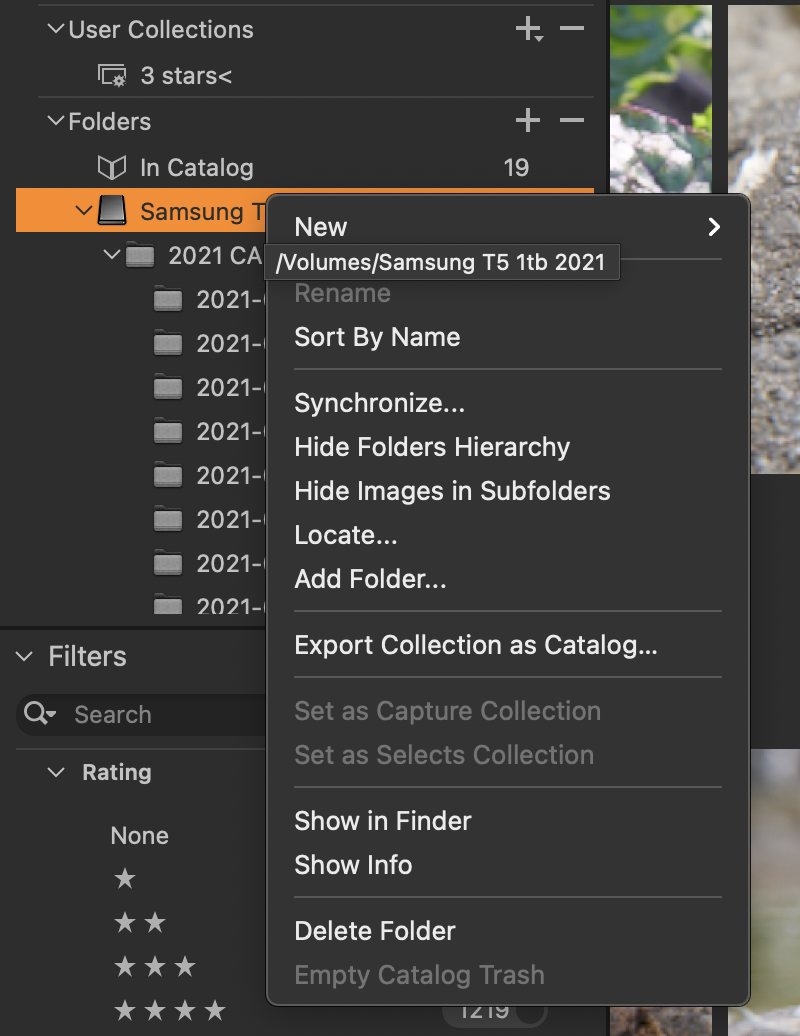
edit: spelling
-

You can rename folders, but not drives.
Quit C1. Rename drive with finder. Start C1. Now your Samsung T5 SSD will be shown as unavailable.
Then click on + to add the top-folder of the renamed drive. Click on your top folder in the unavailable old Samsung T5. Right-click on "Locate", navigate to the top folder.
I did that only once, so to be sure, wait for other posters if they confirm my recipe or offer a different one.
1 -
Joachim Jundt: Many thanks for your concise directions. I will wait for a corroborating reply before trying your tip.
0 -
I don't fully trust the catalog functions of C1, e.g. I lost catalog entries for referenced sub folders with a long parh name on an unknown occasion (I believe it has something to do with the length but who knows. I don't know exactly what the root cause nor when it happened because it were old folders and I noticed it much later by coincidence, maybe it was caused by an update of the software), but I could bring them back with "Add" folder, including the image edits.
This is just an example. What I want to say is that nobody can guarantee that it will work flawlessly even if it worked for someone. And if you get an answer of a user which had problems this does not mean that you would have this problem too. In the end, if you need to rename the ssd then you could just try it, but take precautions. Here's what I would do:
- I would make a backup copy of the catalog first (in addition to your regular backup so that you have at least two backups).
- Then I would use the Verify catalog function (to ensure I am starting with a catalog in good state).
- Then I would try as Joachim advised.
- Then I would check that all folders and all images are there (the count) and by sample check one or the other image can be worked with and didn't lose its edits and masks(!).
- I would do this for every folder or only pick some samples until I trust the procedure works, I would work with the new catalog for a while before I rename the other ssds.
0 -
I have to agree, BeO, catalog functions of C1 are nothing to rely on completely. And apparently C1 developers have no interest to improve them. Right now, there's only Lightroom as a (at least) working and useful combination of RAW-converter and DAM.
The verify catalog function was usually happy with a catalog with many missing photos, it never found any mistake on faulty catalogs – I actually have very close to zero expectations to the DAM-part of C1 as it appears to me it's the unloved late stepchild of that company. Otherwise one could at least do a search for album/project names.
Anyway, good luck with the renaming, Michael.
0 -

> Michael Mazzola: I will wait for a corroborating reply
This is not that reply as I know next to nothing about Mac systems. If drive name refers to what people like myself call a (disk) partiton label, or perhaps disk label if there is only has one partition, my guess is that it is not used by the Mac system for anything, it is for "human consumption only". The OS and filesystem likely refer to a partition using a machine generated ID. They come in a few flavors, but I can not remember seeing the partition label used as one.
While you wait for the knowledgeable Mac user to chime in, you could experiment with a memory stick, and a few image files. Put a catalog/session with few images (file copies) on the memory stick, work on it in C1, observe the "drive name" in C1. Close C1, change the "drive name" in Finder, restart C1 and see if everything is the same, except for the drive name of course.
0 -
It should be straightforward.
(1) rename the drive outside of Capture One using Finder.
(2) In Capture One you will find that your catalog doesn't know where your images are. But all you should have to do is select the top level folder on your drive (the one that seems to have a name starting 2021 CA...) and use the Locate function to tell Capture One where it has got to.
But of course your catalog should be safely backed up before you do anything like this.
Ian
0


Post ist für Kommentare geschlossen.
Kommentare
6 Kommentare