Filters are disappeared

Hello,
filters are disappeared. In the filters tool I clicked on ... , then Show/Hide filters. I then selected "Date" (in Basic) and "Places" (in IPTC - Image), but the filter tool remains empty.
This is happening in a catalogue with 2000+ pics, all with metadata about Place, Location, City.
-
I add that only filters under the Filters tool in Library group do not work.
The tool filter under the metadata section works as usual.
Aren't they the same? I'm confused...
0 -
What is the tool filter under the metadata section?
0 -
In the library tool, you need to select a folder or collection. Then you see all the respective images in the browser (unless you have set the Advanced search in the browser to filter some images out). Then the filter tool in the library tool tab adjusts its numbers and should work in the same manner the Advanced Search works.
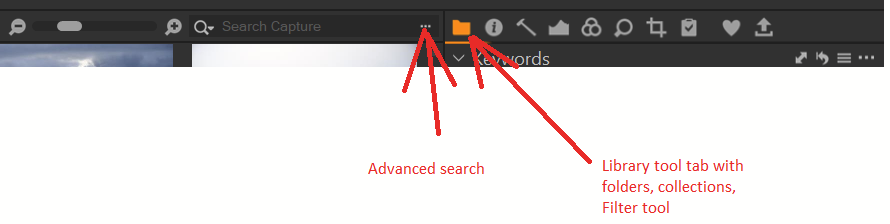 0
0 -
If you are in a catalog, select the collection "All images", remove the Advanced search settings if any, then the FIlter tool has all images available for you to filter.
0 -
Hi,
sorry for this late reply.
Yes, I did all what you suggest, but it did not work. At the end, I deleted the filter tool and then added again, so it worked.
Thank you.
Marco
0

Post ist für Kommentare geschlossen.
Kommentare
5 Kommentare