Actual Brush Size Smaller Than Preview

The size of the brush is smaller than the circle used to depict the brush. In other words, the effected area on a mask is smaller than the depicting circle. This has been true for many versions of Capture One. It is relatively easy to work around when the visibility of the mask is enabled. Is this behavior intentional or a bug? Given how long brushes have worked this way, I am guessing it is intentional. Is there an advantage to this type of display? I have always found it to be a nuisance.
-

The actual brush effect is about the size of the brush circle. If you set the brush to be very hard, it’s effect is what the circle shows. For a very soft brush, the most dense effect will be smaller than the circle, and it sounds like this is what you’re talking about.
0 -
Abbott,
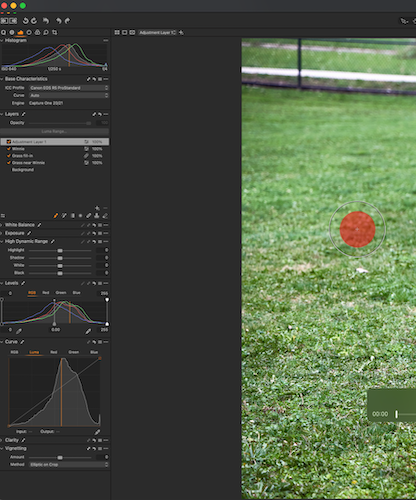
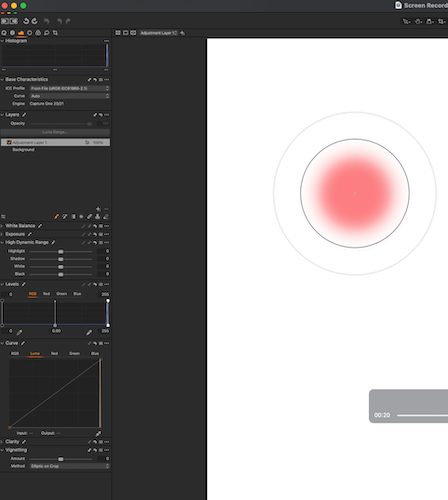
What you describe is what I expect to see. I am surprised if you do. I am running Capture One 22, Build 15.2, on macOS 12.2, although as I mentioned I have seen this for many prior versions. Are you using Windows? I have attached two screenshots. Each shows the brush mark following a single click of the mouse. The first (green background) shows a brush with 100% Hardness; the brush mark (effect) is smaller than the circle. The second screenshot shows a brush with 50% Hardness. The brush mark extends only to the inner circle.
Hopefully, someone from Capture One will enlighten us.
 0
0 -
David,
I'm running on a Mac with Mojave, which isn't officially supported but so far works perfectly. Now that you mention it, I see the same thing you do. It's never bothered me, so I haven't paid attention to it. I use a Wacom tablet and simply watch how the mask is drawing.
I even just looked at the brush using the black mask and see the same thing. You could file a support request if it really bothers you. For me, it's just one of the things that doesn't work as they say it should, and is easy to work with.
0 -
Abbott,
Thank you for checking and getting back to me. It is easy enough to work around the bug, as you said. Never the less, it has been "bugging" me for quite a while; I finally decided to inquire.
David
0 -
The answer to the question I posed is when the size of the cursor has been increased in System Preferences (in the Accessibility section), the brush size shown in Capture One will be larger than the brush effect. I learned this from Capture One's response to my support request. I am posting for anyone seeking an answer who comes across this post.
1 -

David, thank you for the idea, indeed, it works.
However, this is still a bug, strange that after 1y it is not fixed.
I need a big cursor on my mac and brush working properly in C1 at the same time.
0 -
ilia r. I agree; it is disappointing this bug has not been fixed. I just now renewed my support request. It might be helpful if you file one yourself. Hopefully the more people report the same bug will raise the priority of getting it fixed.
0
Post ist für Kommentare geschlossen.
Kommentare
7 Kommentare