Can't add ratings to some images

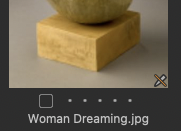 For images with the marker with the diagonal line through it in the lower right corner of the image I can't add a star rating. No problem with other images.
How to overcome?
-

What are the dimensions of the original image?
There are some constraints for files that cannot be edited in any way in C1.
See the Release notes for further information.
I think that symbol is specifically used for files that do not meet editing requirements. I'm not sure if it would also apply for files that are "found" but are protected at the OS level and cannot be edited for that reason.
There is, as I recall, a different symbol for files that are known to the catalog but cannot be "found" at the time of asking for them.
0 -
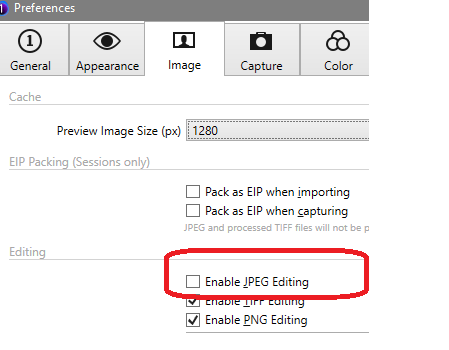
Did you check this preference setting?
 0
0 -
- Yes
- It appears as if Metadata is locked. The Icons to the right of the word "Metadata" are greyed out.
0 -
With "Yes" you mean it is ticked, right? And only the metadata tool is disabled? Then it might have a different root cause.
I wasn't sure anyway because if unticked, then I do not have a pencil icon stroken through like yours, my icon is the below "eye". But I have a Windows system which I thought might explain the different icon.
 0
0 -
Yes I mean it was ticked. Only a few of the images exhibit the stricken pencil icon and the grayed out Metadata options all are around 1920 x 1080.
0 -
Only the metadata tool?
Where do these files come from?
What icc profile is show in base characterics tool?
0 -
This may not be relevant but given it looks like an odd problem right now I guess everything needs to be considered.
If the files are all jpgs, what sort of jpgs are they? How were they produced? (Just in case there is some sort of unsupported aspect to them that is not obvious on the surface.)
Also, is there any potential that they are locked in some way at the File System level?
In theory, since, historically, C1 would never make changes to an existing file and all edits are in sidecar files, a read-only file should not be a problem. But whether that observation is still valid if one is using V14.3 with its option to overwrite an existing output file is something that may need to be investigated. Maybe there is some documentation in the Community pages that mentions such things.
0 -
I think there is also a size limitation, images with less then 500 px or so cannot be edited.
0 -

Metadata options all are around 1920 x 1080.
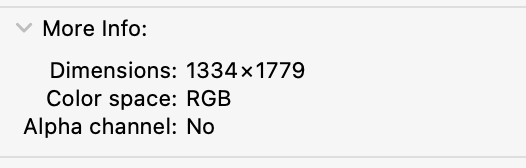
I'm not sure that answers the question that was asked. When you select the image in Finder and hit cmd-I or use the tool bar to "Get Info" what is the listed dimensions of the image in the More Info section of the Info Window? That is the actual number of pixels in the image.
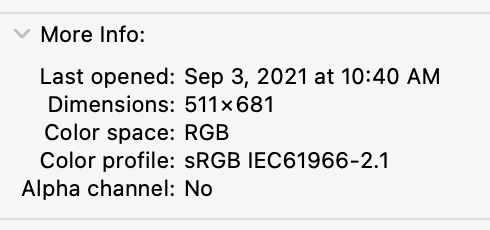
If either length or width is < 512 you can not edit the image. That includes making metadata changes. You also can not edit an image if it isn't using RGB colorspace.
This image can be edited in Capture One:
This image (same image, but reduced in size using the Preview App) can not because one of the dimensions is < 512:
 0
0

Post ist für Kommentare geschlossen.
Kommentare
10 Kommentare